Codex CLI + Claude Code: MCP Is 4x Faster Than the Command Line
TL;DR: OpenAI’s Codex CLI works best with Claude Code when you invoke it through MCP, not the command line. MCP calls return in about 3 seconds versus 13+ seconds for CLI on my dev environment, it avoids sandbox issues entirely, and keep everything inside your conversation. Here’s briefly how I set it up, tested various invocation methods, and landed on an optimized dual-AI workflow that works for my coding and research tasks.
Why Codex When Claude Code Already Works?
Claude Code (powered by Claude Opus) can be a great coding assistant. It helps with architecture decisions, file edits, debugging, and project management. So why add another AI?
Because a second opinion from a different model family catches things a single model misses. Also, sometimes a model gets nerfed or limited, or just had bling spots. Codex currently runs on GPT-5 (at time writing 5.4, and of course they will keep incrementing), which means different training data, different failure modes, and different instincts about code. When I ask Codex to review a plan that Claude wrote, it almost ALWAYS catches stale assumptions, overly specific wording, or scope gaps that Claude didn’t flag. Some people accuse Claude of being lazy, but when Claude and Codex work together it is anything but lazy!
To me: Codex isn’t a total replacement. It’s a reviewer and deep dive assistant. Claude guides, Codex reviews and helps improve every step of the way. (note, if you prefer Codex/ChatGPT you could easily reverse this scenario and use that as your daily driver and Claude as your tester/reviewer)
Right now, tons of people are hitting Claude Code token and usage limits while ChatGPT/Codex is being particularly generous with context and usage. I can get a LOT of work done without hitting any tool-use limits by using Codex as my assistant to Claude. Use tokens where they are cheap and plentiful instead of resource-limited spots.
Four Ways to Call Codex from Claude Code
I tested invocation methods during an actual work session (upgrading Codex from 0.98.0 to 0.117.0 and optimizing the workflow). Here are the real results:
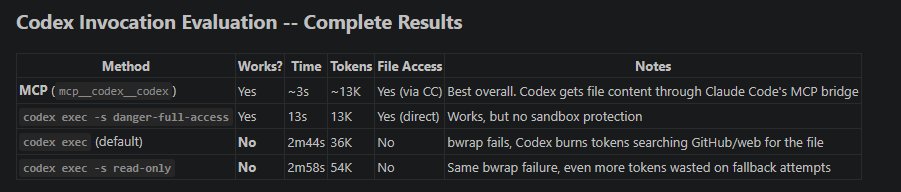
| Method | Works? | Time | Tokens | Notes |
|---|---|---|---|---|
| MCP | Yes | ~3s | ~13K | Best overall. File access through Claude Code’s bridge |
codex exec -s danger-full-access |
Yes | 13s | 13K | Works, but no sandbox protection |
codex exec (default) |
No* | 2m44s | 36K | Sandbox fails, burns tokens on fallback searches |
codex exec -s read-only |
No* | 2m58s | 54K | Same failure, even more wasted tokens |
*The default and read-only sandbox modes failed on my Ubuntu VM because AppArmor restricts the network namespace creation that bubblewrap (bwrap) needs. This is common on Ubuntu 24.04 with default security settings. Your mileage may vary on other systems.
The failed runs are expensive. When codex exec can’t access files through its sandbox, it spends 2-3 minutes and 36-54K tokens searching GitHub, the web, and MCP resource bridges trying to find your files another way. It never gives up quickly.
MCP Is the Clear Winner For Me
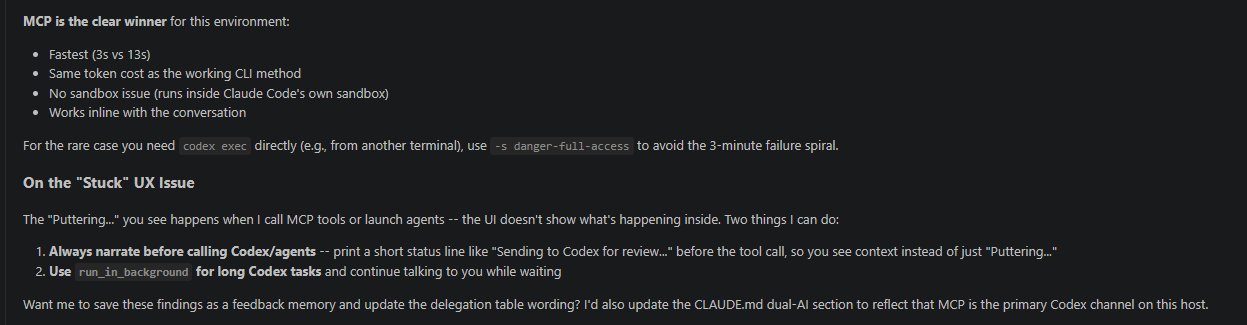
MCP (Model Context Protocol) lets Claude Code call Codex as a tool directly within the conversation. The advantages:
- Speed: ~3 seconds versus 13+ seconds for CLI
- No sandbox issues: Runs inside Claude Code’s own sandbox
- Same token cost as the working CLI method
- Inline results: Codex’s response appears right in your conversation
For the rare case where you need codex exec directly (running from a separate terminal, for example), use codex exec -a never -s danger-full-access to skip the sandbox and avoid the 3-minute failure spiral. [and of course beware of the potential issues with that sort of command!!!]
Setup: 5 Minutes to a Working Dual-AI Workflow
Step 1: Install or upgrade Codex CLI
npm i -g @openai/codex@latest
codex --version  # should show 0.117.0+
Step 2: Add Codex as an MCP server in Claude Code
claude mcp add codex codex mcp-serverStep 3: Configure Codex
Edit ~/.codex/config.toml:
model = "gpt-5.4"
model_reasoning_effort = "xhigh"
personality = "pragmatic"

[projects."/home/youruser/your-project"]
trust_level = "trusted"
Step 4: Verify
claude mcp list # codex should show "Connected"Use the /context command to verify your token usage after connecting. That’s it. Claude Code can now call Codex as a tool during any conversation. Obviously you can also just point CC or Codex to this post and have them review it for any concerns and draft your own implementation plan.
When to Use the Dual-AI Pattern
Not every prompt needs a second opinion. Here’s when the handoff is worth it:
- Plan review: Claude drafts an implementation plan, Codex reviews for stale assumptions and scope gaps
- Code review: After writing code, get a GPT-5 review for patterns Claude might be biased toward
- Architecture tradeoffs: When choosing between approaches, a different model family brings genuinely different instincts
- Debugging dead ends: If Claude is stuck, Codex often spots the issue from a different angle
- Web research and review: have them BOTH lookup latest info and best practices or news, whatever you need but have them keep each other honest.
Skip it for: simple file edits, straightforward bug fixes, or tasks where speed matters more than validation.
The “Narrate Before Handoff” Pattern
One UX issue I ran into: when Claude Code calls Codex or launches background agents, the VS Code interface just shows “Puttering…” with no context (or various other fun little message). It looks stuck.
The fix is simple. I configured Claude Code to always print a brief status line before making the handoff:
“Sending to Codex for plan review…”
“Asking Codex to review the delegation table wording…”
This small change makes the dual-AI workflow feel intentional instead of broken. You always know what’s happening and why.
My Model Delegation Table
After optimizing the workflow, here’s how I divide work:
| Task | Delegate To |
|---|---|
| Architecture, requirements, user Q&A | Claude Opus (primary agent) |
| Multi-file refactors, code review, plan review | Codex via MCP |
| Focused reviews, small features | Claude Sonnet (subagent) |
| File search, grep, renames | Claude Haiku (subagent) |
Claude stays the driver (and if you have the tokens you can skip Sonnet and Haiku and just use Opus). Codex is the second reviewer you bring in when a different model family is worth the extra look. (For the full hardware and software setup behind this workflow, see The Ultimate Claude Code Workstation.)
Hopefully this helps you in your workflow optimization, and if you have a different approach you like, or you see issues with mine… feel free to comment! Thanks for reading and have a great day 👍👍