Author Archives: J.D. H.

Lowepro Transit Sling 250 mini-review link

I am always in the market for a good camera bag, especially if it is compact and easy to travel with. šŸ™‚ That is why this particular article by Derrick Story about the LowePro Transit Sling 250 AW caught my attention: I want to travel light, have fast access to my equipment, and carry a bag that doesn’t scream “camera gear.” Lately I’ve been packing my OM-D kit in the Lowepro Transit Sling 250 AW ($99) and feeling great, even
Speeding tickets, license points and insurance rates

I recently received a speeding ticket from the local friendly highway patrol šŸ™ Here are some links that may be useful if you are in a similar situation: Can a lawyer beat your traffic ticket?http://www.bankrate.com/finance/auto/can-a-lawyer-beat-your-traffic-ticket–1.aspxFor less than the cost of a business lunch, a traffic attorney will take your speeding ticket to court on your behalf. We’re not talking about having your family attorney go to traffic court for you… What You Should Know about Plea Bargains in Criminal and

Google Pixel getting Haswell upgrade?

Now that Google I/O has come and gone with nary a hardware upgrade announced, what does Google have in store for future Chromebook hardware?Ā Hopefully an update of the Pixel to support Intel’s latest chips! Here are some reports that lend credence to the idea that the Pixel, or another Chromebook, will be seeing Intel’s Haswell chips soon šŸ™‚ Can Haswell Give the Chromebook a New Lease of Life?http://siliconangle.com/blog/2013/05/01/can-haswell-give-the-chromebook-a-new-lease-of-life/I’ve discussed Haswell before, and by all accounts it’s going to be a

iOS apps can now be transferred between developers!

When I developed iOS apps I was never very impressed with the backend (developer portion) of the app store šŸ™ Thankfully though, it looks like Apple has been plugging away at improving their app store features for developers šŸ™‚ Here is a great example of the improvement, Apple now allows apps to be transferred between developers! Here is the email I received: Apps can now be transferred from one developer to another within iTunes Connect, for example after an acquisition

Connect Lenovo X240/X230/X220 to LCD TV via HDMI? [SOLVED]

If you have a Lenovo X240, X230, or X220 laptop and would like to connect it to a display using HDMI, you will need an adapter. Thankfully the adapters are very easy to use and are quite inexpensive (<$15). Here are the appropriate adapters for each laptop: Lenovo ThinkPad X240 and X230 Mini-DisplayPort to HDMI adapter: Gold Plated Premium Mini DisplayPort (or Thunderbolt) to HDMI Male to Male Cable, Black 6 fthttp://www.amazon.com/gp/product/B00APLJ58M?ie=UTF8&tag=pixensity-20&linkCode=as2&camp=1789&creative=390957&creativeASIN=B00APLJ58MCable Matters Mini DisplayPort | ThunderboltTM to HDMIĀ® cable

Dell laptop brightness adjustment stuck [SOLVED]

Q. My Dell Inspiron 1520 screenĀ brightness adjustment sometimes get stuck after I suspend/resume a few times. When I try to adjust the screen brightness by holding the Fn key and then press the up/down arrows nothing happens at all andĀ it is really annoying as I have to reboot to get it to work again. šŸ™ Can you suggest a way that I can fix it without having to reboot? –Hank Chambers A. Yes, I have had a similar issue with

Show/Hide the Chrome Bookmarks Bar – Keyboard Shortcut

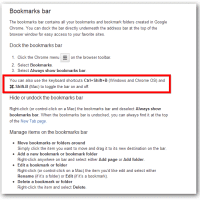
I am a big fan of Google Chrome and I generally browser with the bookmarks bar turned ON as I find it to be very useful. However, sometimes for screenshots or other purposes it is nice to hide that same bookmarks bar. Today I decided to find out how to quickly show/hide the bookmarks bar. Thankfully it is very easy, you can use these keyboard shortcut  toggle the bar on and off: Ctrl+Shift+B  on Windows and Chrome OS ⌘-Shift-B on Mac

Get rid of Google Voice popup notifications in Chrome

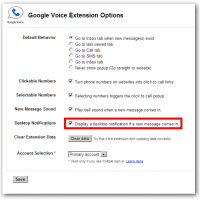
Q. I have an issue where my Google Voice Chrome extension now pops up notifications in the lower right hand corner in a balloon-box. It is quite annoying. I also much prefer the little notification bar by the regular Google Voice icon near the address bar. That one is much more useful to me and makes the popups redundant. Do you have any suggestions on how to hide/disable/remove the annoying Chrome popups? Tami Pain A. Thank you for your question

« Older Entries Recent Entries »