ASRock AM1H-ITX DC power and discrete video card?
The ASRock AM1H-ITX is a nice little motherboard with the bonus versatility of having a DC power jack for 19V external power supplies -or- the standard 24 pin ATX power connector. Having DC input (barrel connector) as a power option begs the question of just how much power input is supported (i.e. how many watts, or amps at 19V)?
As an aside, a NUC power supply is compatible and we know they do not put out much power. Most small 19V netbook/laptop power supply bricks these days seem to max out at around 40-80watts or ~2-4amps (@ 19V). On the other hand, Dell and other manufacturers with gaming or workstation laptops do have some 200 watt+ power bricks out there.
So, back to the original question, how much power can the AM1H-ITX accept through the DC power jack? The manual gives us some info: 41w, 56w, and 60w are the three wattages they list in the manual
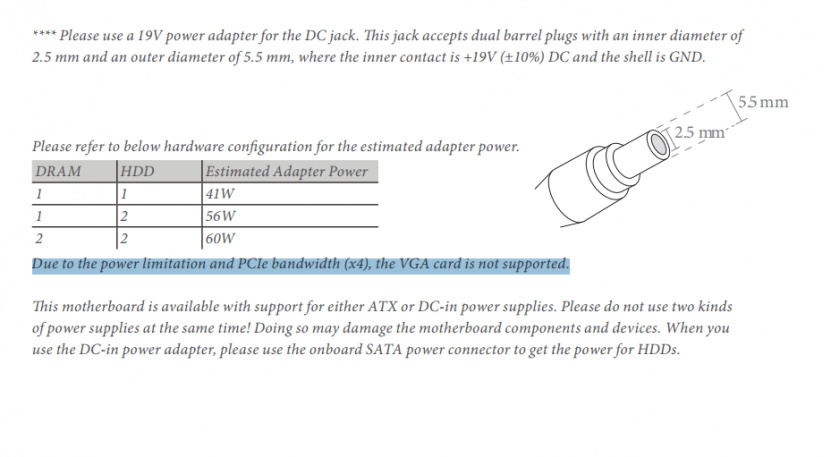
AM1H-ITX sample wattage listing from the manual
Sadly, the manual also states that discrete PCIe video cards (or ‘the VGA card’ as the manual quaintly describes them) are not supported when using DC power input. I have not tested this limitation but I would a low power discrete card can be used. It would be awesome to be able to run a NVIDIA 750 GTX (vanilla or Ti) and the AM1 with just DC power input and no internal power supply.
2014.07.07 UPDATE: checkout Mike’s awesome build with a full discrete Maxwell NVIDIA 750 GTX GPU running via DC power!
- am1h-itx dc (2)
- am1h-itx reviews (2)
- am1 dc power (2)
- asrock am1h-itx (2)
- itx dc (2)
- am1h-itx (2)
- asrock am1h-itx power supply (2)
- asrock am1h-itx dc adapter pcie gpu (2)
- am1h dc input (1)
- am1h asus (1)
I can confirm that the board can handle it. I crammed the AM1H-ITX along with a 5350, a Kingston HyperX 4gb DDR3-1600 stick, Slimline DVD-Rom, Microcenter house brand120gb SSD, a couple 40mm fans, and an EVGA GTX 750 2GB (non-ti) into a Travla C158 case. I’m powering it with a DC power brick (part number 316688-001 or spare 317188-001) from either a beefy HP laptop or possibly a docking station. The specs are 18.5v, 6.5a, 120 watts. I crossed my fingers, pushed the power button, and it powered up. Tested on Far Cry 3, nothing blew up. The brick gets warm, but not unbearably so.
Hi Mike,
Thank you for your awesome comment! That is great news that the AM1H-ITX can handle all that equipment with a DC power power brick 🙂 Now it makes me wonder whether it could handle my 750 Ti 😉
Do any of the chips on the motherboard get particularly hot? (voltage regulator/convertor etc.)
Thanks again for sharing the good news Mike and please keep me posted on your tech adventures!
-J.D.
I would imagine it could handle the 750 Ti with a sufficient power brick. My 120 watt brick could probably power it just fine, the TDP difference is 55W vs 60W. I went with the 750 vanilla due to there being one open-box, with 2GB instead of the usual 1GB, for $115; couldn’t pass it up.
After a half-hour or so of gaming I did notice that the mosfets seemed pretty hot to the touch (probably normal) so I cut some Zalman aluminum ram heatsinks in half and stuck them across the pairs of mosfets on the board, and mounted a fan over top. I hadn’t noticed any issues, it was just for my peace-of-mind.
The good thing about the AM1 platform and 750 series GPUs is that they are (relatively) inexpensive, so tinkering with them doesn’t fill you with quite as much dread as more expensive pieces of equipment would.
Awesome info Mike!
Also, I got your nice email with the photos. Is it okay if I post them for other readers?
I will make sure to keep you posted when I get to try out the 750 Ti on my AM1 board 🙂
Have a great 4th of July!
-J.D.
Sure, feel free.
Same to you.
Mike
Awesome Mike! The photos are posted now, hope you had a great 4th of July weekend 🙂
Hi man, nice review, i was gonna buy one of this mobo, how’s going with that dc supply? still all good? no problems?
Thank you for your nice comment James.
Yes, the DC supply is still working great 🙂 I highly recommend the entire setup!
Best regards,
-J.D.
Hi buddy, it’s till me, do you think a dc supply with 19v 7.1a 135w could be good?
135w may be too much but I need to use the pc for work and low gaming on breaks for up to 10h daily, I know nothing about notebook psu so i guessed if it has more power than needed, the dc supply will not overheat too much
Hey James, a 135W supply is actually a good choice since it gives you headroom above the board’s needs. The manual lists up to 60W for DC input without a discrete card, but in practice having more supply capacity just means the supply runs cooler. The bigger question is still whether the discrete card will work on DC input at all, which the manual says isn’t supported. Happy to hear if your testing shows otherwise.
Hello JDH
My google search has just brought me to this page.
I wish to use this mobo with a 750ti and dc input wondered whether your own testing has shown this to work?
In total I’d have the 5350. 750ti, two ssd’s and a dad drive to run. Many thanks Mark
Hey Mark, I haven’t personally tested the 750 Ti with DC input on this board. The manual explicitly says discrete PCIe cards aren’t supported with DC power, but in practice low-power cards like the 750 Ti (which can run without a supplemental connector) might work. I’d say it’s worth trying but have a standard ATX PSU as a fallback. I can’t guarantee it’ll work.