PCI Encryption/Decryption Controller [SOLVED]
Q. I have an unknown device PCI Encryption/Decryption Controller in Windows 8.1, what is the correct driver?
A. You need the Intel Trusted Execution Engine driver:
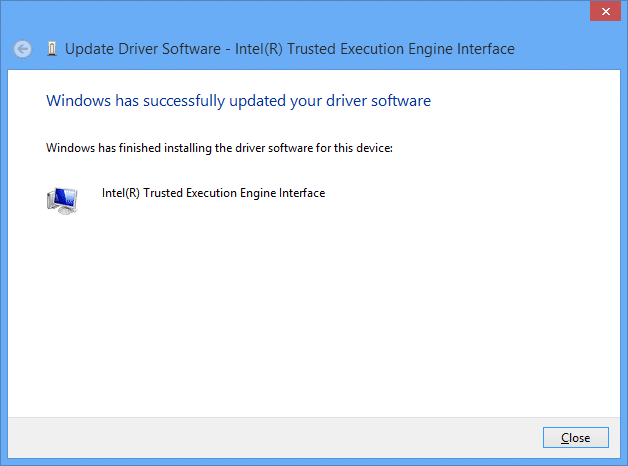
Update Driver Software – Intel(R) Trusted Execution Engine Interface
(Dell dl link)
File name: TXE_Win7_8_8.1_1.1.0.1089.zip
Version: 1.1.0.1089 (Latest) Date: 02/20/2014 Size: 34.39 MB Language: English
Operating Systems: Windows 7 (32-bit)*, Windows 7 (64-bit)*, Windows 8, 32-bit*, Windows 8, 64-bit*, Windows 8.1, 32-bit*, Windows 8.1, 64-bit*
DELL version, Intel® Trusted Execution Engine Driver
This package provides Intel® Trusted Execution Engine Driver and is supported on various laptops and desktops running the following Operating Systems: Windows 8.1(64bit).
Version: Version 1.1.0.1064, A00
Operating Systems: MS Windows 8.1 64-bit
Applies to: Intel Trusted Execution Engine
Release date: 5/27/2014
Last Updated: 5/27/2014
Also applies to Windows 10.
- pci encryption/decryption controller (897)
- pci encryption/decryption controller driver (126)
- pci encryption/ decryption controller (121)
- pci encryption/decryption driver (80)
- pci encryption decryption controller (74)
- what is pci encryption/decryption controller (70)
- pci encryption/decryption controller lenovo (51)
- nu vot (37)
- asus pci encryption/decryption controller (35)
- http://www.jdhodges.com/blog/pci-encryption-decryption-controller-driver/ (32)
In acer aspire es1-411-c32x,I can not install Intel Trusted Execution Engine driver on windowd 10 pro.please guide me.kmdf v ersion 1.11 also can not install on windows 10 pro.
Sorry for the late reply, Nay. If the Intel Trusted Execution Engine driver will not install on Windows 10, then I would not force it too hard. My best guess is either that Acer model uses a different package on Windows 10 or the unknown device is not the exact same one covered in the post.
Thanks a ton. The driver worked for Dell but I can’t seem to find the network adaptor drivers.
Sorry for the late reply, Anurag. Glad the main driver helped. The network adapter piece is separate from the PCI Encryption or Decryption Controller, so I would pull that from Dell by service tag rather than trying to solve it through the TXE driver.
Thanks, It worked perfectly well and it even fixed some of my damaged drivers
That is excellent news Yung. Have a great week and enjoy your computer!
Best regards,
-J.D.
I have an unknown device PCI Encryption/Decryption controller in windows 10. even after installation of TXE(latest version) and updating the driver, i still face the same problem. Any help?
Sorry for the late reply, Yussif. If TXE is installed and the unknown device is still there, I would double-check the actual hardware ID before assuming it is the same problem. At that point it may be a different device masquerading under a similar label.
Many thanks for the above information, Problem/challenge solved!
Dear Mark,
I am very glad you were able to solver your PCI Encryption/Decryption Controller problem!
Have a great week 🙂
-J.D.
It really worked. Thanks a lot!
Hi Phoenix,
Thank you for your comment. I am very glad to hear that my tip worked for you!
Enjoy your computer and have a GREAT week!
Best regards,
-J.D.
my acer aspire es 14 cannot work display the projetor and i need a pci encryption driver please help me
Sorry for the late reply, Rey. The projector and display issue sounds more like a graphics or display-driver problem than the PCI Encryption or Decryption Controller. I would treat those as two separate problems.
Thanks Bro,
it fixed my friend computer,
He owe me a match.
Hi Twizere,
Thank you for your comment. I am very glad this driver helped!
Best regards,
-J.D.
This is just another scam to get you to buy an automatic updater. I wanted the damn driver file and it had a link to the driver but that just wanted me to download the updater. Not what i want and not what is expected. Shame on this site for wasting energy!
Hi Joshua,
Thank you for your comment. I apologize for the inconvenience, I think you may have clicked the advertising link instead of the download link.
Here is the direct download link for your reference:
http://downloads.dell.com/FOLDER02108514M/1/3147_Chipset_Driver_GWY0H_WN_1.1.0.1064_A00.EXE
I hope that the driver helps you and that you have a great evening!
Best regards,
-J.D.
Problem solved, thank for this link.
Thanks so much, JDH! It worked. Please continue helping people around the globe thru your tech tips. Kudos and God bless you!
Thank you for your kind comment! I am very happy that the tip helped you 🙂
Have a very happy New Year!
Best regards,
-J.D.
Works fine. Thank you!
No problem! Glad I could help.
Have a great day!! 👍
-J.D.
it worked !!
thank you so much for the info and download link provided…
Dear Tan,
You are very welcome. Have a GREAT week! 😀
Best regards,
-J.D.