I Tested 13 Local LLMs on Tool Calling: March 2026
I built a deterministic eval harness and tested 13 local LLMs on tool calling (function calling) to find out which models work decently well for agentic tasks. The result that surprised me most: a 3.4 GB model scored higher than everything else I tested, including models five times its size.
If you’re running a local AI stack with Open WebUI, LM Studio, or any OpenAI-compatible frontend, tool calling is one of the key features that enables agentic behavior. It lets models call functions like checking weather, sending emails, or setting reminders instead of just generating text. But not every model handles it well, and the popular benchmarks don’t always reflect what you’ll get when serving models through a local inference server like LM Studio.
So I ran 13 models through 40 test cases across five categories. No LLM-as-judge, no random vibes, just schema-aware pass/fail scoring with deterministic and reproducible results.
The Setup
Hardware: AMD AI Max+ 395 with 128 GB unified RAM (about 96 GB allocatable to GPU). All models served through LM Studio v0.4.6 using Q4_K_M quantization over the OpenAI-compatible API. One exception: Gemma 3 4B QAT used Google’s pre-quantized Q4_0, since the whole point of QAT is that the model was trained specifically for that quantization level.
The eval harness sends natural-language requests to each model along with eight tool schemas: weather lookups, currency conversion, reminders, email, calendar events, time zones, web search, and calendar reads. The scorer checks whether the model picked the right tool, passed the right arguments, and handled edge cases where no tool should be called.
Five categories, eight test cases each:
- Tool Selection: Pick the correct tool from eight options
- Argument Accuracy: Parse dates, emails, enums, and nested objects from natural language
- Multi-Tool: Call multiple tools in parallel, or sequentially across turns
- Edge Cases: Correctly refuse to call tools when they aren’t needed (jokes, math, vague prompts, emotional support)
- Format Compliance: Arrays, optional parameters, enum values, complex schemas
The test suite is split into dev (20 cases) and holdout (20 cases). I ran both splits on every model. No model showed significant divergence between the splits, which gives me reasonable confidence the harness isn’t overfitting to any particular model’s strengths.
The Results: 13 Models Ranked
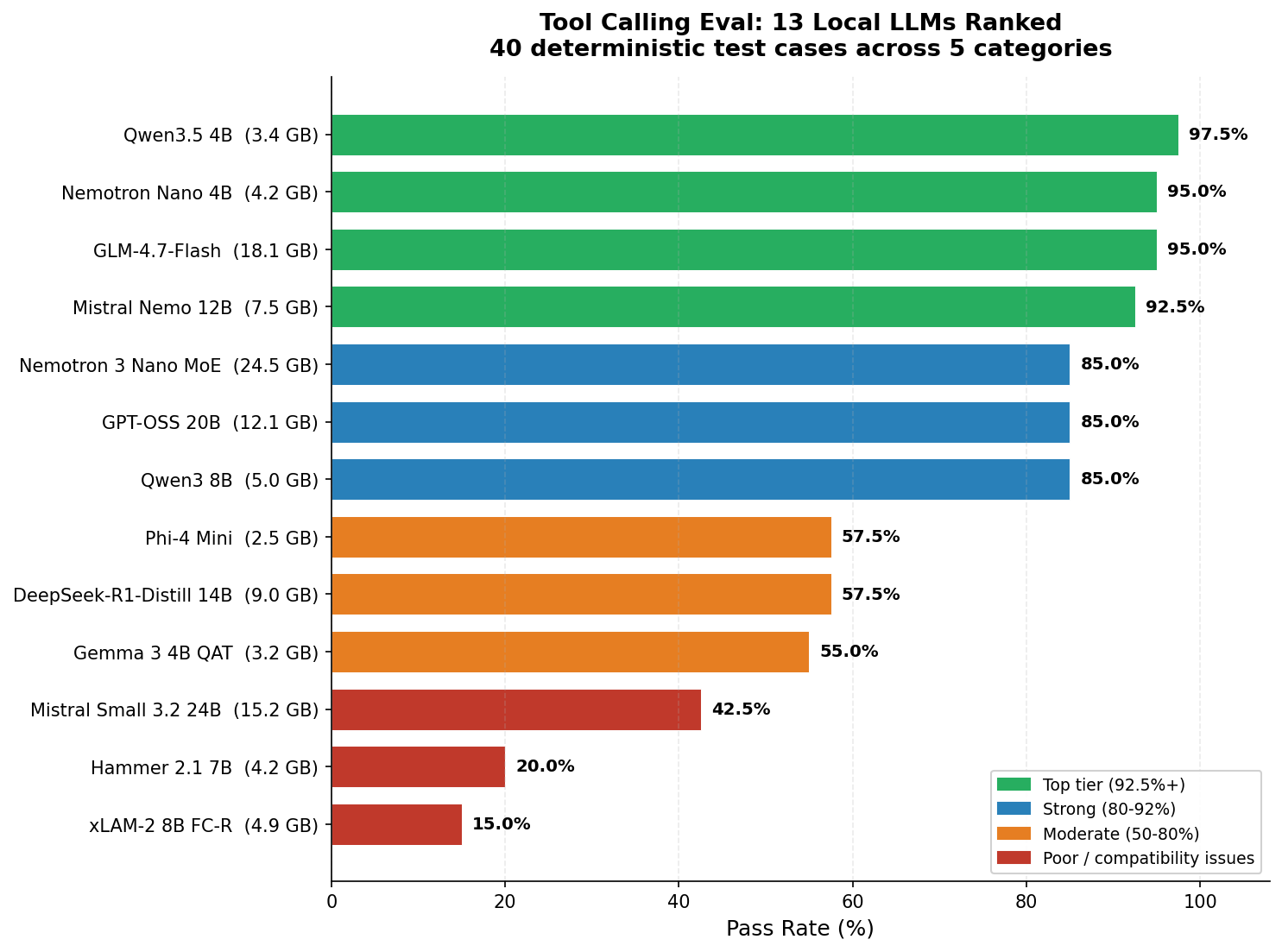
| Rank | Model | Size | Pass Rate | Selection | Args | Multi-Tool | Edge | Format | tok/s |
|---|---|---|---|---|---|---|---|---|---|
| 1 | Qwen3.5 4B | 3.4 GB | 97.5% | 8/8 | 8/8 | 7/8 | 8/8 | 8/8 | 48 |
| 2 | GLM-4.7-Flash | 18 GB | 95.0% | 8/8 | 8/8 | 6/8 | 8/8 | 8/8 | 52 |
| 2 | Nemotron Nano 4B | 4.2 GB | 95.0% | 8/8 | 8/8 | 6/8 | 8/8 | 8/8 | 44 |
| 4 | Mistral Nemo 12B | 7.5 GB | 92.5% | 8/8 | 7/8 | 7/8 | 7/8 | 8/8 | 26 |
| 5 | Qwen3 8B | 5 GB | 85.0% | 8/8 | 8/8 | 2/8 | 8/8 | 8/8 | 42 |
| 5 | GPT-OSS 20B | 12 GB | 85.0% | 8/8 | 8/8 | 2/8 | 8/8 | 8/8 | 65 |
| 5 | Nemotron 3 Nano MoE | 25 GB | 85.0% | 8/8 | 8/8 | 4/8 | 8/8 | 6/8 | 52 |
| 8 | DeepSeek-R1-Distill 14B | 9 GB | 57.5% | 4/8 | 5/8 | 1/8 | 7/8 | 6/8 | 23 |
| 8 | Phi-4 Mini | 2.5 GB | 57.5% | 8/8 | 5/8 | 0/8 | 4/8 | 6/8 | 57 |
| 10 | Gemma 3 4B QAT | 3.2 GB | 55.0% | 8/8 | 4/8 | 1/8 | 3/8 | 6/8 | 60 |
| 11 | Mistral Small 3.2 24B | 15 GB | 42.5% | 3/8 | 3/8 | 0/8 | 8/8 | 3/8 | 14 |
| 12 | Hammer 2.1 7B | 4.2 GB | 20.0% | 0/8 | 0/8 | 0/8 | 8/8 | 0/8 | 38 |
| 13 | xLAM-2 8B FC-R | 4.9 GB | 15.0% | 0/8 | 0/8 | 0/8 | 6/8 | 0/8 | 34 |
Qwen3.5 4B leads at 97.5% with just a single failure across 40 test cases. It’s followed by a tight pack at 95%: GLM-4.7-Flash and Nemotron Nano 4B. All three handle basic tool selection, argument parsing, edge cases, and format compliance near-perfectly. The differences only show up in the hardest category: multi-tool calling.
The bottom three models (Mistral Small, Hammer, xLAM-2) all scored below 43%. Before you write them off, there’s an important caveat: their low scores appear to be LM Studio compatibility issues rather than model quality problems. More on that below.
Where the Top Models Actually Differ
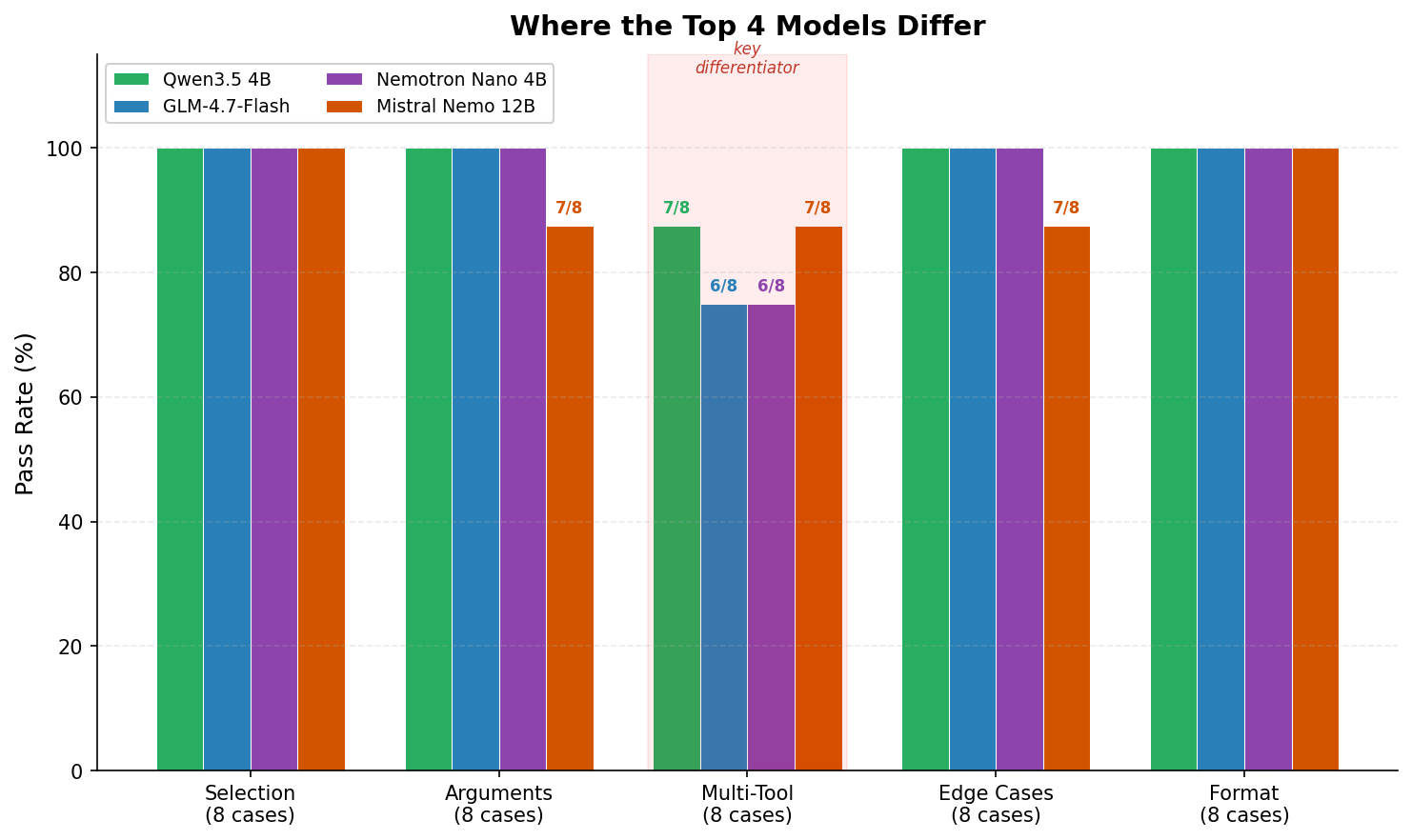
Most models that scored above 85% were nearly perfect on four of the five categories. The one category that separated them was Multi-Tool: calling two or more tools in a single response (parallel) or across multiple turns (sequential).
This matters because real agentic workflows depend on it. “Check the weather in Miami and Chicago” should produce two parallel weather calls, not one. “Search the web for the exchange rate, then convert 500 dollars to euros” requires calling search first, waiting for results, then calling the converter. These are the patterns that distinguish a capable tool-calling model from one that only handles simple one-tool requests.
The Parallel-Sequential Paradox
This was the most interesting finding in the entire eval. The models that were best at parallel tool calling turned out to be the worst at knowing when to wait.
One test case asks: “Search the web for the current exchange rate of USD to EUR, then convert 500 dollars to euros.” The expected behavior is two turns. First, call web_search and see the results. Then call convert_currency with the actual rate. The word “then” signals a sequential dependency.
Here’s what the top models did:
| Model | Turn 1 Behavior | Result |
|---|---|---|
| Qwen3.5 4B | Called web_search + convert_currency simultaneously | FAIL |
| GLM-4.7-Flash | Called web_search + convert_currency simultaneously | FAIL |
| Nemotron Nano 4B | Called web_search only, waited for results | PASS |
| Mistral Nemo 12B | Called web_search only, waited for results | PASS |
Both Qwen3.5 and GLM are strong parallel callers (7/8 and 6/8 on multi-tool). But that strength becomes a liability when the task requires patience. They’re so eager to parallelize that they ignore “then” and fire both tools at once. The model calls convert_currency before seeing the search results, making the conversion meaningless.
Meanwhile, Nemotron and Mistral Nemo, which are generally weaker at parallel calling, correctly recognized the sequential dependency and waited.
In other words: the best parallel callers were the worst at sequential multi-turn, and vice versa. This looks like a genuine architectural tradeoff rather than something any single model could easily fix.
Every Model Has a Personality
What struck me most about the top four models is that they don’t just score differently. They fail in completely different ways. Each has a distinct “personality” that maps to real-world tradeoffs.
Qwen3.5 4B: “The Eager Optimizer”
97.5% overall. Only one failure across 40 cases. It’s so good at firing multiple tool calls in parallel that it sometimes parallelizes things that need to happen in sequence. If your use case is mostly parallel calls (check weather in two cities, send an email and set a reminder), this model is near-perfect. If you need strict multi-turn sequential reasoning, you might occasionally see it jump ahead.
GLM-4.7-Flash: “The Parallel Powerhouse”
95% overall. Fast (52 tok/s) and accurate. Its weakness: it sometimes skips optional parameters. When asked to “look up the weather in Paris, then convert the temperature from Celsius to Fahrenheit,” it called get_weather without specifying units="celsius". The parameter was optional in the schema, and the model assumed the default would be fine. Technically reasonable, but not what the prompt implied.
Nemotron Nano 4B: “The Minimalist”
95% overall at just 4.2 GB. Excellent at sequential multi-turn reasoning. Its weakness is parallel same-tool calls: ask for weather in two cities at once and it sometimes only calls once. If your workflow is mostly single-tool calls with occasional multi-turn chains, Nemotron is a strong choice and remarkably small.
Mistral Nemo 12B: “The Helpful Rewriter”
92.5% overall, with the interesting distinction of tying for the best multi-tool score (7/8, same as Qwen3.5). Its failures are the most human-like: it paraphrases. “Set a reminder to call the dentist” becomes “Dentist appointment.” It also searched the web for “how photosynthesis works” instead of answering from training data. These are mistakes a helpful but over-eager assistant would make.
Model Size Didn’t Predict Quality
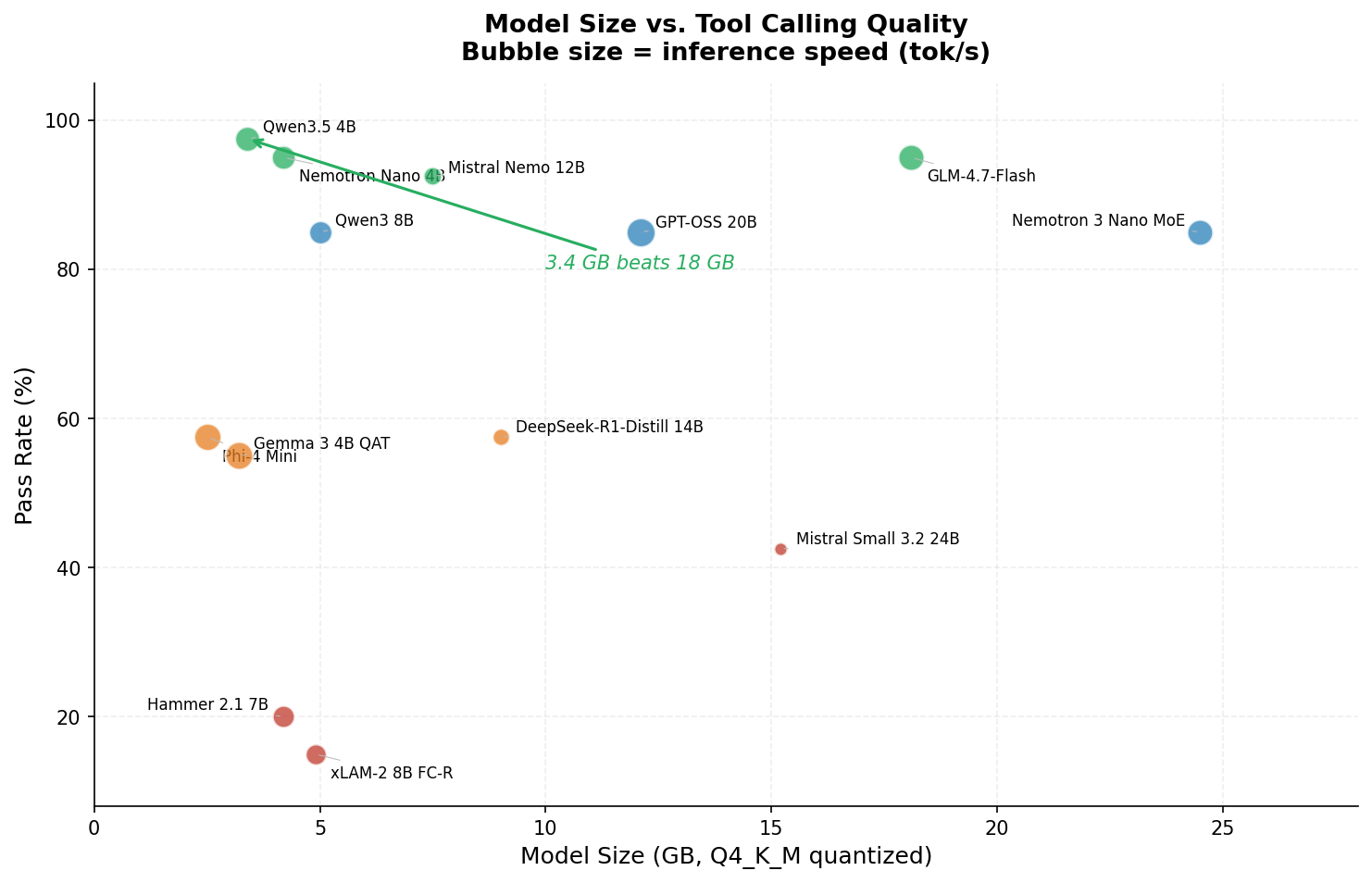
In this eval, there was no meaningful correlation between model size and tool calling quality. The 3.4 GB Qwen3.5 4B outperformed the 18 GB GLM-4.7-Flash, the 25 GB Nemotron 3 Nano MoE, and the 15 GB Mistral Small 3.2.
The 25 GB Nemotron 3 Nano MoE scored 85%, the same as the 5 GB Qwen3 8B. Mistral Small at 15 GB scored 42.5%. Meanwhile, three of the top four models are under 8 GB.
This won’t be true for all LLM tasks. But for structured output like tool calling, training methodology and architecture seem to matter more than raw parameter count, at least at Q4 quantization levels.
When Benchmark Scores Don’t Transfer
Three models in this eval are specifically marketed as tool-calling specialists: xLAM-2 8B (Salesforce), Hammer 2.1 7B (MadeAgents), and Mistral Small 3.2 (Mistral AI). They scored 15%, 20%, and 42.5% respectively.
This deserves context. xLAM-2 is currently ranked #1 on the Berkeley Function Calling Leaderboard (BFCL), where it outperforms GPT-4o and Claude 3.5 Sonnet. Hammer 2.1 claims best-in-class at its size on BFCL v3. So what happened?
In all three cases, the issue appears to be chat template compatibility rather than model quality. These models use custom tool-calling output formats that LM Studio’s OpenAI-compatible API doesn’t properly translate. The models literally could not emit structured tool calls through this particular inference server. Hammer scored 8/8 on edge cases (correctly declining to call tools when it shouldn’t) but 0/8 on every category that required actually producing a tool call. It understood the task. It just couldn’t produce the output format.
The takeaway isn’t that these models are bad. It’s that benchmark scores measured under ideal conditions with native APIs don’t always transfer to what you’ll see through a third-party inference server. If you’re picking a model for a local stack, test it with your actual server and endpoint. Don’t rely on the leaderboard alone.
I Found a Bug in My Own Eval
While analyzing why three models tied at exactly 95%, I found a bug in my test cases. One case asked the model to set a reminder for “tomorrow at 8 AM,” but the expected answer used today’s date instead of tomorrow’s. Models that correctly understood “tomorrow” were being penalized.
I also discovered that three test cases defined email body content checks that the scorer never actually validated (dead code), and that the system date used datetime.now() instead of a fixed date, making results non-reproducible across different days.
After fixing all three issues, I re-ran the top four models. Three scores stayed the same. Qwen3.5 4B picked up the point it deserved and pulled ahead from 95% to 97.5%, breaking the three-way tie.
I’m including this because I think it matters. If you’re evaluating models, check your eval too. The harness had been scoring correctly for 39 of 40 cases, but that one bug masked the true winner.
My Recommendations
Based on 40 test cases across 13 models, all served through LM Studio on the AMD AI Max+ 395:
- 🏆 Best overall: Qwen3.5 4B. 97.5% pass rate at 3.4 GB. Fast (48 tok/s), accurate, and the best multi-tool score of any model tested. If you can only pick one model for tool calling, this is where I’d start.
- Best for sequential workflows: Mistral Nemo 12B. 92.5% overall, but strong at multi-turn tasks where the model needs to wait for results before making the next call. If your application chains tool calls across turns, Nemo handles that better than the higher-ranked models in my testing.
- Best value: Nemotron Nano 4B. 95% at 4.2 GB and 44 tok/s. Nearly as good as Qwen3.5, with a proven track record across multiple runs. If Qwen3.5 doesn’t work well with your inference setup, this is a reliable fallback.
- Best speed/quality balance: GLM-4.7-Flash. 95% at 52 tok/s with 3-second median latency. Uses a MoE architecture (30B total parameters, ~3B active per token), so it’s fast despite the larger download.
- Honorable mention: GPT-OSS 20B. The fastest model tested at 65 tok/s with a solid 85% accuracy. If raw speed matters more than the last 10% of reliability, it’s worth considering.
- 📛 Not recommended for tool calling: DeepSeek-R1-Distill 14B. It’s a reasoning-focused model that tends to spend tokens thinking about whether to call a tool instead of calling one. The architecture is designed for chain-of-thought, not structured output.
The Eval Harness
The eval script is Python and requires only the openai, pyyaml, and requests packages. It works with any OpenAI-compatible API endpoint. Features include 40 test cases, eight tool schemas, deterministic scoring with fuzzy matching for locations and dates, automatic model loading/unloading via LM Studio’s management API, and per-model JSON results with comparison reports.
To run it yourself:
python eval_tool_calling.py --model "qwen3.5 4b"             # Full 40 cases
python eval_tool_calling.py --model "qwen3.5 4b" --dev       # Dev split only (20 cases)
python eval_tool_calling.py --all --max-size 27               # All models under 27 GB
python eval_tool_calling.py --compare                         # Generate comparison report
You can download the eval script here: eval_tool_calling.py (zip). The archive includes the Python script and companion YAML files (tool_definitions.yaml and test_cases.yaml). Point LMSTUDIO_BASE at your LM Studio instance and you’re ready to go.
A Note on Speed and Methodology
The tok/s numbers in the results table are approximate, measured during a single eval run per model on the AMD AI Max+ 395. Relative rankings are reliable, but absolute values may vary by 5-10% depending on system load and LM Studio’s state. Treat them as ballpark figures.
All models used temperature=0, top_p=1, and seed=42 for reproducibility. The eval date is pinned to March 20, 2026, so relative date references (“tomorrow”) resolve consistently across runs.
I want to be upfront about what this eval measures and what it doesn’t. Forty test cases is enough to reveal clear patterns in how models handle structured output through a local inference server, but it’s not a comprehensive benchmark on the scale of BFCL. A model’s performance here reflects the intersection of three things: the model’s capabilities, the Q4_K_M quantization, and LM Studio’s chat template handling. Different inference servers, different quantizations, or different tool schemas could produce different rankings.
What’s Next
I plan to cross-validate the top three models against the Berkeley Function Calling Leaderboard to see how this eval correlates with industry benchmarks under more controlled conditions. I’m also curious how these results translate to Open WebUI’s native function calling mode, which adds its own template handling layer.
If you’ve run similar tests with other models or inference servers, I’d genuinely like to hear about your results in the comments. Especially if you’ve gotten xLAM-2 or Hammer working through a different API endpoint. I suspect both models would do much better with proper chat template support.
The bottom line: if you’re building a local AI stack in 2026, don’t assume bigger models are better at tool calling. In my testing, a 3.4 GB model beat everything else I threw at it.
PS if there are any models you would like tested, please mention them in the comments!