TurboTax Rental Income Bug: Why Your Schedule E Amount Keeps Disappearing
TL;DR: If you’re entering rental income (or other dollar amounts) in TurboTax and the amount vanishes when you click Continue, the fix is to open the supporting detail worksheet FIRST (by clicking in the field and starting to type) not trying to paste an amount into the field!
The Problem
You’re updating your Schedule E rental income for the current year. You click into the “Other income not on a 1099-MISC or 1099-K” field, paste your amount, and it shows up just fine. You click Continue. Next screen 👎 it’s gone. Zeroed out. No error, no warning. Just $0. 😥
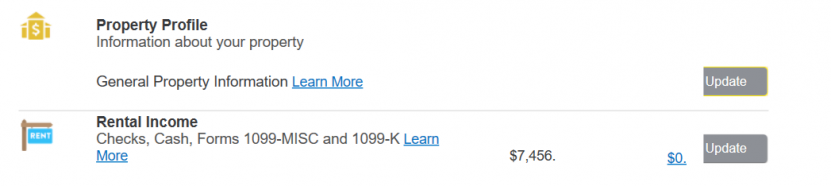
You go back, type it again. Continue. Gone again.
Why It Happens
If TurboTax transferred itemized detail from your prior year return (like a tenant name or breakdown), the summary field becomes read-only behind the scenes, even though it looks editable. The program calculates that field from the detail worksheet, so anything you paste into the summary gets overwritten with whatever the detail says (which is probably last year’s data or zero).
The Fix
Click the checkbox or detail link next to the field to open the supporting detail worksheet. You’ll see last year’s line items (tenant names, amounts) carried over. Edit the amount there, or delete the old entry and add a new one. Once the detail worksheet has the correct number, the summary field will populate correctly and survive the Continue button. 👇
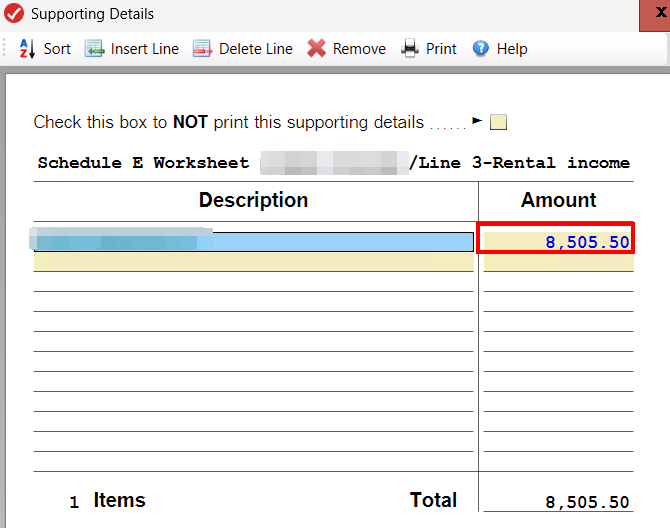
(Type the appropriate number in the Amount column and this is how to get it to KEEP your value 👍👍)
Bottom Line
I would describe this as a bug, b/c it lets you paste in a value and continue but then it $0’s it out. There’s no indication the field is locked, no tooltip, and no error when your entry gets silently discarded. If your rental income (or other data) keeps disappearing, check for transferred detail worksheets and make sure you click in the field to enter a number. ✅💪