Intel NUC Windows drivers [downloads] [SOLVED]
If you have a NUC with a clean install of Windows 7 (or 8, 8.1 and Windows 10) you may have some unknown devices and devices without drivers. You can download the driver pack here:
(Intel dl link)
Those drivers will enable the following devices:
- Ethernet Controller (Intel NUC Gigabit Ethernet Controller)
- PCI\VEN_8086&DEV_1503&SUBSYS_20448086&REV_04
ALTERNATIVE DOWNLOAD: https://downloadcenter.intel.com/download/18713/Intel-Network-Adapter-Driver-for-Windows-7-
(Suggested by Greg in the comments)
- PCI\VEN_8086&DEV_1503&SUBSYS_20448086&REV_04
- PCI Simple Communications Controller: (Intel Management Engine Interface)
- PCI\VEN_8086&DEV_9C3A&SUBSYS_20548086&REV_04
- SM BUS Controller:
- PCI\VEN_8086&DEV_9C22&SUBSYS_20548086&REV_04
- USB 3.0 controller: (Intel USB 3.0 eXtensible Host Controller)
- PCI\VEN_8086&DEV_9C31&SUBSYS_20548086&REV_04
- Unknown device: (CIR infrared device)
- ACPI\NTN0530
Screenshot of Device Manager on Haswell based NUC before installation of drivers:
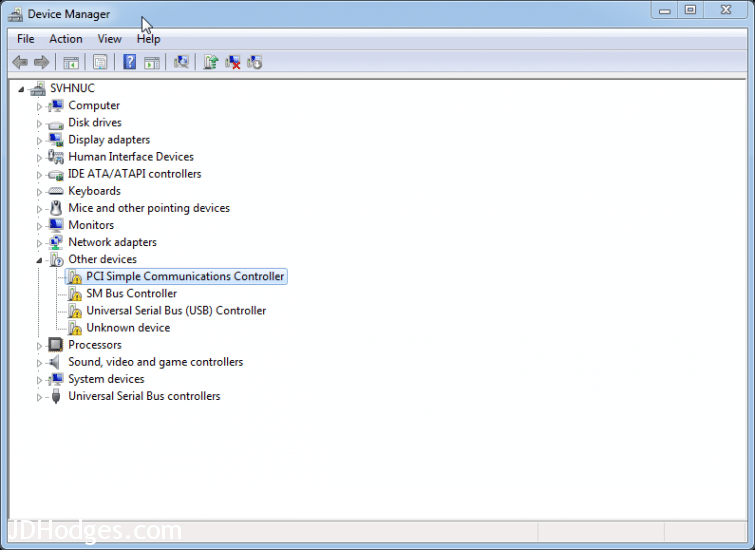
NUC devices that need drivers
These drivers may apply to NUC systems:
| Intel® NUC Board D33217CK |
| Intel® NUC Board D33217GKE |
| Intel® NUC Board D34010WYB |
| Intel® NUC Board D53427RKE |
| Intel® NUC Board D54250WYB |
| Intel® NUC Board DCP847SKE |
| Intel® NUC Kit D34010WYK |
| Intel® NUC Kit D54250WYK |
| Intel® NUC Kit DC3217BY |
| Intel® NUC Kit DC3217IYE |
| Intel® NUC Kit DC53427HYE |
| Intel® NUC Kit DCCP847DYE |
Top Search Terms:
- pci\ven_8086 (188)
- acpi\ntn0530 (138)
- acpi\ven_ntn (92)
- intel nuc drivers (51)
- ntn0530 (39)
- acpi ntn0530 (27)
- acpi\ntn0530\0 (23)
- acpi ntn0530 nuc (23)
- acpi\ntn0530\4 (20)
- acpi ntn0530 intel nuc (20)
searched the net for #ACPI\NTN0530 due to the unknown device listed in device manager. thinking already had installed the IR-driver, but I didn’t. so I noticed that and could fix it – thanx a lot!
Hi Toby,
Thank you for your comment! I am glad my page helped you get your IR-driver installed so you could have all your devices setup 🙂
Best regards,
-J.D.
Hi Toby,
Thank you for your reply! you’r helped IR-driver installed and Thanks a Lot…!!!
well you just saved me a lot of leg work! Thanks buddy!
Excellent, Jon!
I am very glad the driver pack helped 🙂 Enjoy your NUC and have a GREAT day!
Best wishes,
-J.D.
I needed the Ethernet Controller driver. Link you provided leads to a “page not found” error.
After much searching, i found the driver I needed here:
https://downloadcenter.intel.com/download/18713/Intel-Network-Adapter-Driver-for-Windows-7-
Dear Greg,
Thank you kindly for your comment and providing an updated link. I listed in the article above.
Have a GREAT weekend!
Best regards,
-J.D.
I need some help in this area. I screwed up my USB drivers. I now have ZERO access to my NUC using a keyboard or mouse. How can I possibly fix this w/o a working USB keyboard or mouse? None of my USB ports work. I can’t login using Remote Desktop from my laptop to access the NUC either.
Hey Dave, that’s a tough spot. A few options: if you have Bluetooth, try a Bluetooth keyboard (it may work even without USB drivers since BT runs through a different stack). If not, try connecting via a wired ethernet cable and using Remote Desktop or Windows Remote Management (winrm) from your laptop. If the NUC is on your network, you can run “mstsc /v:[NUC-IP]” from your laptop. If RDP fails, check if Wake-on-LAN or Intel AMT remote management is enabled in BIOS, which could let you recover remotely. Worst case, a PS/2-to-USB adapter won’t help here, but a USB keyboard plugged into a USB hub that pre-dates the driver issue sometimes enumerates differently. Hope one of those gets you back in!