Gmail to Claude: Line Breaks Disappear on Paste (Fix)
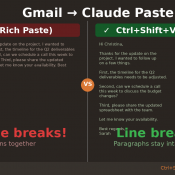
TL;DR: When you copy text from Gmail and paste it into Claude (or Claude Code), all your line breaks disappear and the text runs together into one giant wall of text. The fix: right-click and choose “Paste as plain text” (or press Ctrl+Shift+V on Windows/Linux, Cmd+Shift+V on Mac). Your line breaks will be preserved. The Problem You’re working in Claude and need to paste an email from Gmail. You copy the text, hit Ctrl+V, and… all your carefully formatted paragraphs
TurboTax Adding Rental Property Depreciation to the WRONG State Return

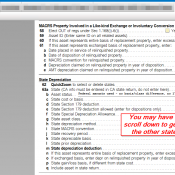
TL;DR: If you file in multiple states and have rental property in TurboTax Desktop, check your Asset Entry Worksheets. TurboTax may silently add state depreciation entries for every state on your return, not just the state where the property actually exists. The fix: go to the Asset Entry Worksheet, scroll to the State Depreciation section, and set “Include asset in state return” to No for any state where the property is not located. The Problem I have a commercial rental

Corsair Galleon 100 SD: Left Shift Key Triggers Caps Lock (Fix Available)

I recently picked up the Corsair Galleon 100 SD, Corsair’s new mechanical gaming keyboard with integrated Stream Deck LCD keys. I covered the full setup and first impressions in my earlier review. On paper, it’s a compelling product: Cherry MX-style switches, per-key RGB, and Stream Deck functionality built right into the keyboard. In practice, mine shipped with a defect that made it nearly unusable for serious work. Update (April 7, 2026) Corsair has published public beta firmware v1.4.75 for the

How Do You Set Up the Corsair Galleon 100 SD Keyboard?

The Galleon 100 SD is Corsair’s mechanical keyboard with a built-in Elgato Stream Deck where the numpad would normally be. It’s a slick piece of hardware, but the setup involves a few steps that aren’t immediately obvious out of the box. Here’s what the process looked like for me. Step 1: Connect Both USB-C Cables This is the first thing that caught me off guard. The Galleon 100 SD requires two USB-C to USB-A cables, not one. Both plug into

Google Drive file won’t sync? (SOLUTION)

Recently a client had a compressed .7z file that just would not sync in Google Drive desktop edition. It was a pretty normal backup file and was not huge (just a couple hundred MB and their internet connection was fast enough to back that up without issue). It just refused to sync. I retried, restarted and everything else to no avail. Eventually, I renamed the file and that FINALLY caused it to sync successfully for the client. ✅👍 Just posting this

MacBook Neo Tap to Click (how to turn on)

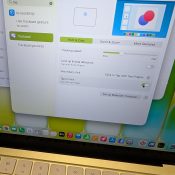
The MacBook Neo launched recently and at $599, Apple’s cheapest laptop ever is a legitimately impressive machine. I’ll have more to say about the Neo overall soon, but I wanted to quickly share something that tripped me up right out of the box: the trackpad. ⚡ TL;DR The MacBook Neo’s trackpad uses a mechanical click instead of the haptic feedback found on other MacBooks. If that bugs you, go to System Settings > Trackpad > Point & Click and toggle

TurboTax Rental Income Bug: Why Your Schedule E Amount Keeps Disappearing

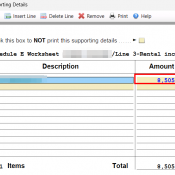
TL;DR: If you’re entering rental income (or other dollar amounts) in TurboTax and the amount vanishes when you click Continue, the fix is to open the supporting detail worksheet FIRST (by clicking in the field and starting to type) not trying to paste an amount into the field! The Problem You’re updating your Schedule E rental income for the current year. You click into the “Other income not on a 1099-MISC or 1099-K” field, paste your amount, and it shows

MacBook Neo Review: A18 Pro CPU, 8GB Reality, and the Thermal Wall

Disclosure: This post contains affiliate links. I have not been paid by Apple or anyone else to write this. I used Claude AI as a research and drafting assistant, then verified all benchmark data against the source results before publishing. The Short Verdict The MacBook Neo is the fastest single-core laptop you can buy for $599 or even lower at $499 educational pricing! It also drops to phone-class performance after about 60 seconds of sustained CPU load. Both of those

« Older Entries Recent Entries »