Disable side channel mitigations for better performance [VMware]

On Workstation Pro: More info here:
On Workstation Pro: More info here:
Network speeds were super slow, turns out I needed to power cycle my inexpensive gigabit switch as after transferring ~3TB of virtual machines and connecting a variety of clients it had basically become stuck in Fast Ethernet LAN speeds of 100 Mbps (resulting in real world SAMBA2 speeds of 10-11mb/s, rather than the normal Gigabit Ethernet speed 1000 Mbps (~100mb/s file transfer speeds)
Update (Feb 2026): The original download link below no longer works and has been removed. Since Broadcom acquired VMware, a LOT has changed. Here’s the updated info: The Big News: VMware Workstation Pro is Now FREE VMware Workstation Pro no longer requires a license key. It’s free for commercial, educational, and personal use. When you install it, you’ll be asked for a license key — just click Finish to skip it. The latest version is 17.6.4 (Broadcom is also introducing a new naming convention: 25H2). Direct Downloads
Lenovo ThinkPad T14 Gen4:
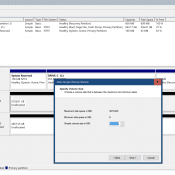
Recently I started to repurpose a 4TB 2.5″ SATA SSD but ran into an issue utilizing the entire SSD. Specifically, even after deleting the existing partitions I could only allocate ~2TB and ~2TB (as shown on Disk1 below) Eventually, I realized that the issue was the drive had been setup as MBR instead of GPT. Here are the steps to remedy that and create a large contiguous 4TB partition. First the screenshot shows the steps, then the commands are listed
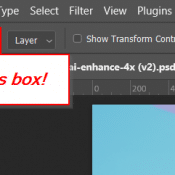
Recently when using Photoshop 2024 to move some small rasterized calendar text with a transparent background, Photoshop kept moving the wrong layer. Specifically the layer behind the object that I wanted to move. I checked that I was on the correct layer (and I was). Finally I realized that “Auto-Select” was checked in the move tool options dialog. After unchecking that, all was well! Short summary: if you are having difficulty getting photoshop to move the correct layer, try checking

https://www.irs.gov/instructions/iss4#:~:text=For%20trusts%2C%20the%20responsible%20party,personal%20representative%2C%20or%20other%20fiduciary. https://www.calt.iastate.edu/article/settling-revocable-living-trust-death-grantor