Category Archives: Software Tips

Chrome ‘Downloading proxy script’ ?! [solved]
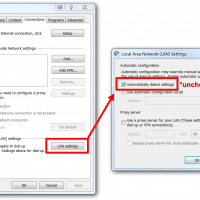
If Google’s Chrome web browser seems to take forever to load a web page, you may see a “resolving proxy” or “downloading proxy script” message appears in the lower-left corner of the browser’s window. Thankfully, you can change your proxy setting (for Windows) and fix Chrome’s corresponding behavior: Click the Chrome menu button  on the browser toolbar Select Settings Click Show advanced settings In the “Network” section, click Change proxy settings. This will open the Windows Internet Properties dialog Click LAN settings Deselect
Use Thunderbird to find online transactions for Quicken

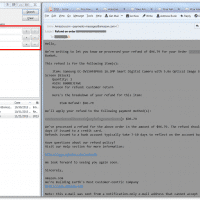
Tax time approaches. Thus around the Hodges household we are catching up on our Quicken data entry. We track every cent we spend and anything that can make that process easier/faster is appreciated 🙂 That is one reason why I like Thunderbird so much, it makes it very simple to find emails that contain online transaction info (invoices, receipts, etc.) Here is the basic process: #1 Download the latest transaction info using Quicken This will give us a list of transactions

Thunderbird auto spell check not working [SOLVED]

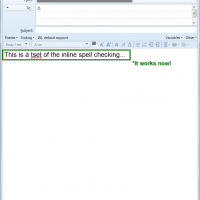
Thunderbird’s ‘check spelling at you type’ feature quite working for me last month. Since that time I have been working without inline spell check in Thunderbird (and it has been quite annoying ;-)). Today I finally took the time to figure out how to fix the issue! First I tried simply checking my settings: The box was already checked to ‘Enable spell check as you type’ but I went ahead and unchecked/checked it and hit ‘OK’ just to make sure

[Err] 2006 – MySQL server has gone away Navicat/WordPress [solved]

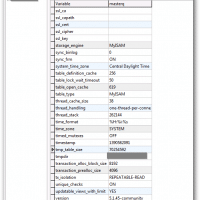
Recently I tried upgrading to the latest version of the WordPress Download Monitor plugin. It did not go well 🙁 Thus, I tried to revert from a backup made using Navicat. Unfortunately, the restore would fail every time while trying to import my wp_posts table (a pretty important table!) I tried exporting the backup to a SQL dump and importing that. No luck. Finally, I tried resolving the actual ‘MySQL server has gone away’ issue itself and I had success. This tip

Dell Windows 8 Unknown Device SMO8800 [solved]

Q. I saw you help people with SMO8800 unknown device issues, but can you help me on my Dell Windows 8 laptop? Thanks! -Wobe A. Here is the download link for a Windows 8 driver for Dell laptops that will resolve the unknown device SMO8800 issue: (free fall sensor) OS Compatibility: MS Windows 8 64-bit, MS Windows 8 32-bit Laptop Compatibility: Dell E5420 Vostro 3450 Vostro 3750 XPS 15 (L502X) XPS 15z (L511z) XPS 17 (L702X) And many other similar

iPad Air cannot access (hotmail) mail server?! [SOLVED]

Q. My new iPad Air stopped downloading my Microsoft Hotmail and now I am stuck at about a month ago on my email! I have it set to download all time email in my settings yet every time I try to download it says something like ‘cannot connect to mail server’. Any ideas? -Ian G. A. Hi Ian, I am sorry to hear about your Hotmail problem. 🙁 It seems that in iOS7 there are a number of issues with

MySQL: Count the total occupancy rate for a time period (month)

Recently I encountered a somewhat interesting MySQL/PHP task: determine occupancy for a reservation system. This entailed determining how many reservation days fall within a particular month. It was not possible to simply determine each reservation length (datediff from/to) and sum them because some reservations started before the month in question and other reservations lasted until the month was over. Therefore, one solution is to get the reservation lengths then compare the start and end of the reservation to the start

Reverse order of individual items in a delimited string

Topic: Reversing the order of individual items in a string. Specifics: I had a date contained in a GET query string that was formatted as follows: 01/27/2013 and I needed it reversed to 2013/01/27 Here is a simple method to do the reversing in PHP: $toDate = htmlentities($_GET[‘to’]); $toDateNew = implode(“/”,(array_reverse(explode(“/”,$toDate)))); Explanation of code: First you explode the $toDate variable, then reverse the resulting array, finally you implode that array back into a string. Of course there are other date

« Older Entries Recent Entries »