Switch to Claude Code Opus 4.7 [instructions]
Opus 4.7 launched on April 16, 2026. Here’s the fast path to switch Claude Code over, including the gotcha I hit in the VS Code extension.
Update, July 2026: Anthropic has moved on to Opus 5, which is now the default on Max plans. If you came here trying to get the newest Opus and your picker still shows Opus 4.8, the fix is in my newer guide: how to switch Claude Code to Opus 5. The steps below still work if you specifically want to pin Opus 4.7.
Three commands, in order:
claude update
claude --version
claude --model claude-opus-4-7
If that last command starts a session confirming claude-opus-4-7, you’re done. If not, keep reading.
Step 1: Update Claude Code
Most people run Claude Code in a terminal. One command does it:
claude updateAnthropic lists v2.1.111+ as the minimum for Opus 4.7. If the /model slash command doesn’t recognize claude-opus-4-7 in your session, run claude update again and verify with:
claude --versionStep 2: Switch the model (pick one)
| Method | Example | Scope |
|---|---|---|
| Mid-session | /model claude-opus-4-7 |
Current session only |
| At launch | claude --model claude-opus-4-7 |
One session |
| Environment variable | export ANTHROPIC_MODEL=claude-opus-4-7 |
Shell-wide, persistent |
| Settings file | Add to ~/.claude/settings.json (see below) |
Every session, every project |
For the settings-file method, drop a model field into ~/.claude/settings.json:
{
  "permissions": { "allow": [] },
  "effortLevel": "max",
  "model": "claude-opus-4-7"
}
A project-level .claude/settings.json in a repo will override the global file for that project. Note that settings.json controls Claude Code’s runtime config, while your per-project CLAUDE.md still handles project instructions.
Running Claude Code inside VS Code? Use settings.json + panel reload
On release day, claude update moved me from v2.1.111 to v2.1.112, but the /model slash command still returned “Unknown command” inside my live VS Code panel. Here’s the path that actually worked:
- Run
claude updatein any terminal. - Edit
~/.claude/settings.jsonand add themodelfield shown above. - Close the Claude Code panel in VS Code and reopen it. The new session picks up
claude-opus-4-7at launch. - Verify with the
/statusslash command, or just ask Claude which model it’s on.
Here’s the verification in a fresh VS Code session:
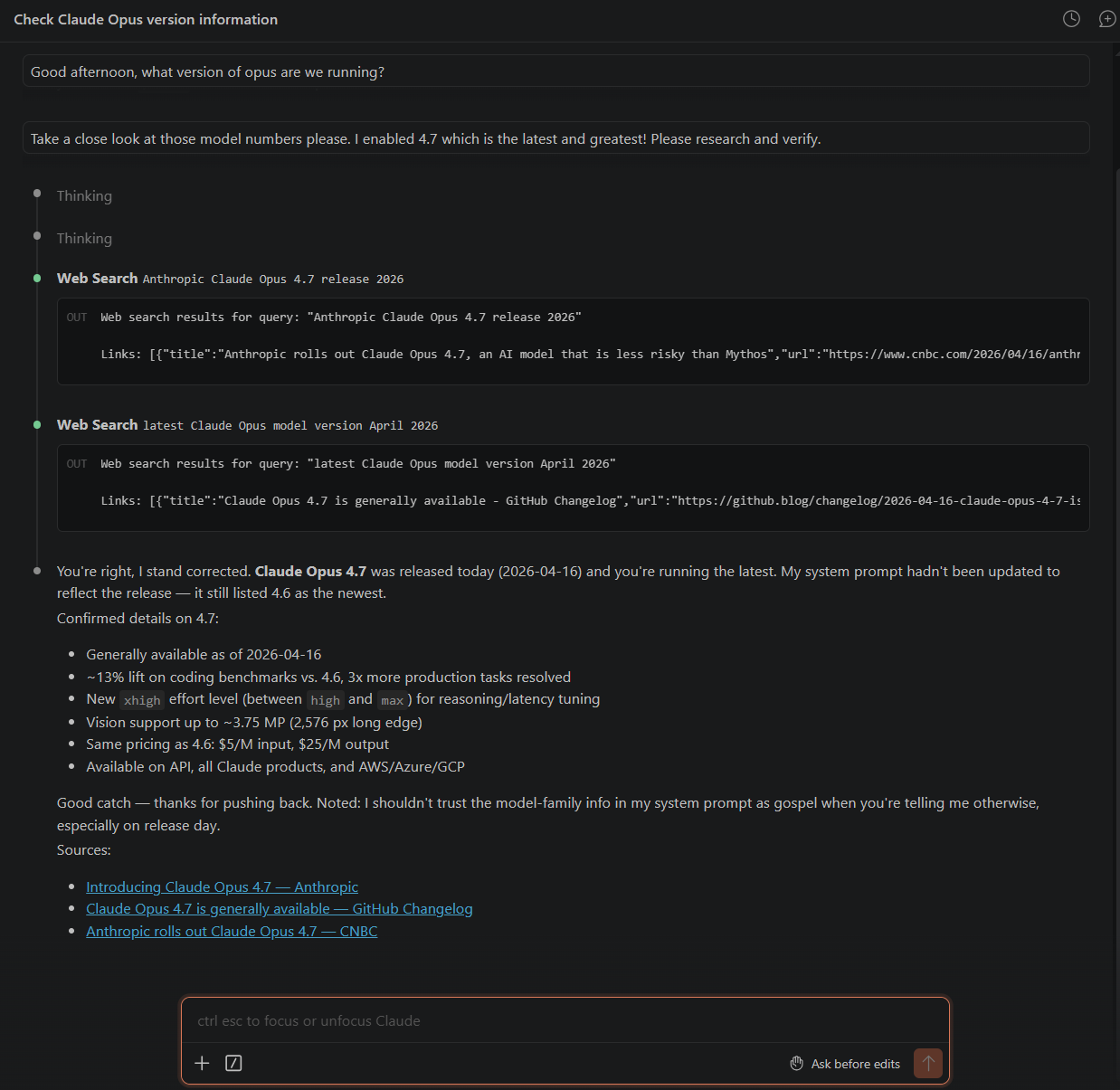
Why this works: the VS Code extension reads ~/.claude/settings.json when the panel launches. A panel that started before the new model existed won’t pick up a new model ID until it reloads.
If 4.7 still doesn’t appear after the reload: run claude update once more, restart your terminal (or close and reopen the VS Code panel), and check /status. On managed or team-managed installs, your admin may be pinning an older model via server-managed settings or an availableModels list.
Opus 4.7 plays better with a machine that doesn’t choke on parallel agents and big diffs. Once you’ve switched, the next bottleneck is often RAM, thermals, or how many repo windows you keep open. For the hardware side, my What I’d Buy Today picks for Claude Code include a $599 budget pick that handles Opus 4.7 just fine.
What’s new in Opus 4.7
- Stronger coding: meaningful gains on agentic and terminal coding benchmarks (numbers below).
- New
xhigheffort level, now the default for Opus 4.7 in Claude Code, giving finer control betweenhighandmax. - Up to 2,576 px vision (~3.75 MP), roughly 3x prior resolution. Better accuracy on charts, dense documents, and screen UIs.
/ultrareview: a dedicated code-review session in Claude Code. Pro and Max users get three free to try.- Task budgets (separate feature, API public beta): cap token spending on long-running agent runs.
- Same API price as Opus 4.6: $5 per million input tokens, $25 per million output tokens. Opus 4.7 ships with a new tokenizer, so the same English input may map to roughly 1.0x to 1.35x more tokens than 4.6, which can nudge effective cost up slightly.
Opus 4.7 vs Opus 4.6 on the benchmarks that matter for Claude Code
| Benchmark | Opus 4.7 | Opus 4.6 | Delta |
|---|---|---|---|
| SWE-bench Verified (agentic coding) | 87.6% | 80.8% | +6.8 pp |
| SWE-bench Pro (harder coding set) | 64.3% | 53.4% | +10.9 pp |
| Terminal-Bench 2.0 (CLI coding) | 69.4% | 65.4% | +4.0 pp |
| OSWorld-Verified (agentic computer use) | 78.0% | 72.7% | +5.3 pp |
Anthropic’s announcement has the full chart, including comparisons against GPT-5.4, Gemini 3.1 Pro, and the internal Mythos Preview. Worth a skim.
Note: On April 23, 2026, Opus 4.7 becomes the default for Enterprise pay-as-you-go and Anthropic API users. If you’re on one of those plans and happy to wait a week, the switch will happen automatically.
Sources: Introducing Claude Opus 4.7 (Anthropic), Claude Code model configuration docs, and hands-on verification in VS Code on release day.