Corsair Galleon 100 SD: Left Shift Key Triggers Caps Lock (Known Defect)
I recently picked up the Corsair Galleon 100 SD, Corsair’s new mechanical gaming keyboard with integrated Stream Deck LCD keys. I covered the full setup and first impressions in my earlier review. On paper, it’s a compelling product: Cherry MX-style switches, per-key RGB, and Stream Deck functionality built right into the keyboard. In practice, mine shipped with a defect that made it nearly unusable for serious work.
The Problem
Most every time I pressed the left Shift key, Caps Lock would activate. You can imagine how quickly that derails any kind of productive typing, coding, or gaming. Tab and other keys in the row seem to also be somewhat affected.
What I Tried
Before filing a return, I wanted to rule out every possible software and driver explanation. Here’s everything I tested:
- Keyboard Tester — Pressing left Shift clearly showed Caps Lock firing alongside it. No ambiguity.
- Windows On-Screen Keyboard — Same result. The OS was receiving a Caps Lock signal every time left Shift was pressed.
- iCUE software — Updated to the latest version and reset the keyboard profile. No change.
- Disabled Caps Lock — Tried remapping Caps Lock to disabled/no action in key remapping. The defect persisted — Caps Lock still toggled on frequently on a left Shift press.
- Reassigned keys — Attempted various key reassignments. No lasting effect on the behavior.
- Full keyboard reset — Factory reset the keyboard to default settings. Still broken.
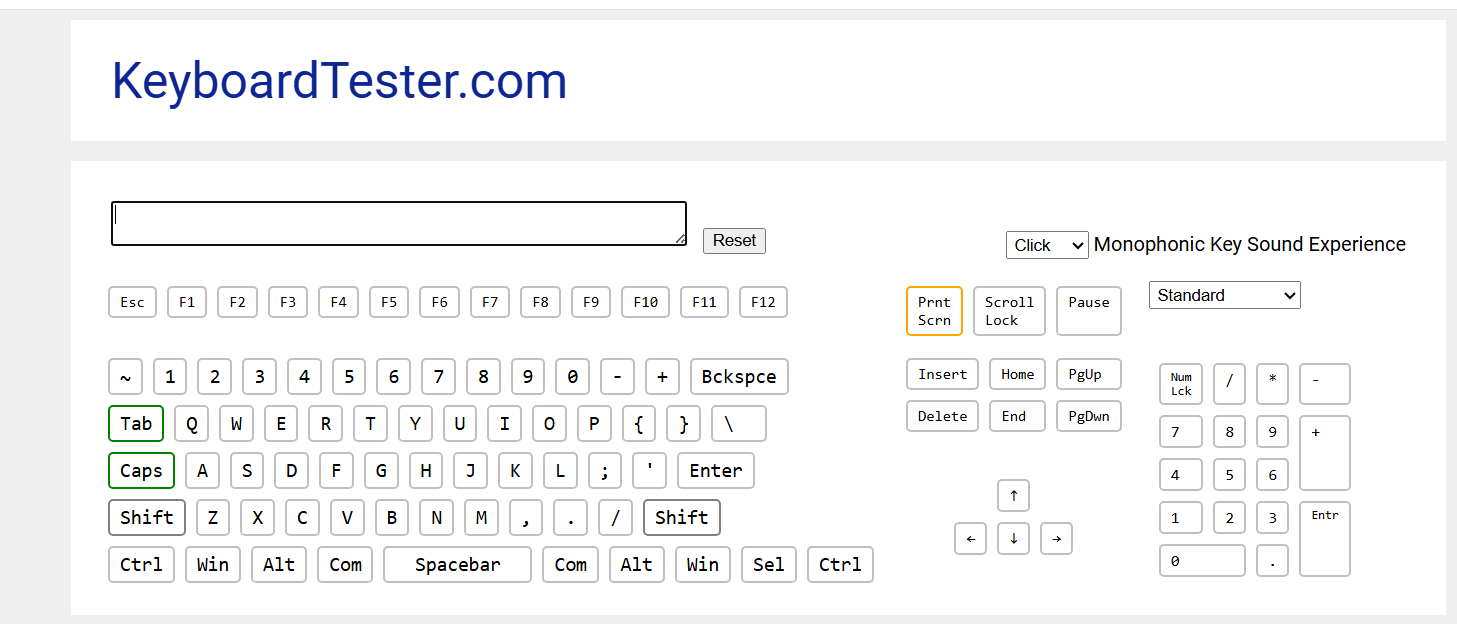
The screenshot above shows both Shift and Caps Lock registering simultaneously from a single left Shift press. This confirmed it’s a hardware-level issue, not a driver or configuration problem.
I’m Not the Only One
A quick search turned up other users on Reddit reporting the exact same behavior on the Galleon 100 SD. Left Shift triggering Caps Lock appears to be a defect affecting at least some units in this product line.
The Support Experience
Corsair’s and Elgato (since Corair owns them now) support process routes you through an AI chatbot: 😞
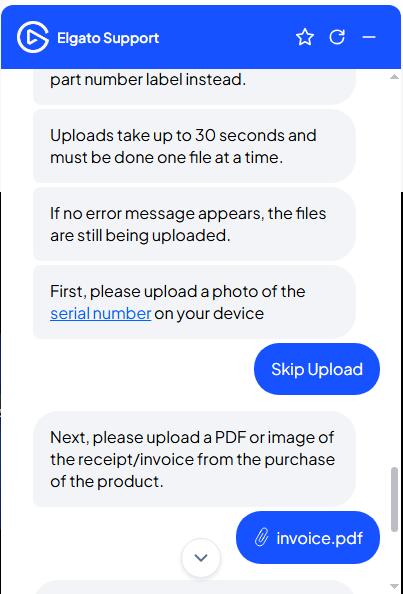
The bot correctly identified that the device likely needed a warranty exchange, but the flow required filling out a multi-step form inline in the chat window: name, contact info, shipping address, part number, serial number, photo uploads, and a copy of your invoice.
The photo upload process deserves special mention: uploads reportedly take up to 30 seconds per file, must be done one at a time, and the only confirmation that an upload is still in progress is the absence of an error message. Not exactly confidence-inspiring UX.
That said, the form did eventually go through and generate a support ticket. We’ll see how the replacement process goes.
Potential Workaround: Disable Caps Lock Entirely in Windows
If you’re dealing with this issue and need to keep using the keyboard while waiting for a replacement, you can disable Caps Lock at the OS level. Note that this doesn’t fix the underlying hardware defect — it just prevents Caps Lock from toggling while you wait for a replacement unit.
Option A: Microsoft PowerToys (Easiest)
Install PowerToys from the Microsoft Store or GitHub. Open Settings, go to Keyboard Manager → Remap a key, and set Caps Lock to Disable. Done.
The catch: PowerToys has to be running for the remap to work, and it won’t apply at the Windows login screen.
Option B: Registry Scancode Map (System-Level)
For a system-level fix that works everywhere — including the login screen — with no background app required:
- Open Registry Editor and navigate to:
HKEY_LOCAL_MACHINE\SYSTEM\CurrentControlSet\Control\Keyboard Layout - Create a new Binary Value named
Scancode Map - Set the value data to:
00 00 00 00 00 00 00 00 02 00 00 00 00 00 3A 00 00 00 00 00 - Reboot to apply.
This maps the Caps Lock scancode (0x3A) to nothing. To undo it later, just delete the Scancode Map value and reboot.
Alternative Keyboards Worth Considering
If you’re returning yours or just shopping for alternatives, here are a few solid options in the premium mechanical keyboard space:
- Corsair K100 RGB — Corsair’s own flagship. No Stream Deck integration, but rock-solid build quality and proven reliability.
- Razer BlackWidow V4 — Full-size with dedicated macro keys and Razer’s Synapse software for customization.
- SteelSeries Apex Pro — Magnetic switches with per-key actuation point adjustment and a built-in OLED display.
If the Stream Deck LCD keys are the main draw, consider pairing a standalone Stream Deck with a dedicated mechanical gaming keyboard, you get the same functionality without the single-point-of-failure risk.
Bottom Line
The Galleon 100 SD is an interesting concept, but if your unit has this left Shift/Caps Lock defect, it’s not a software fix as far as I can tell… I think I tried everything. Return it or open a warranty ticket with Corsair.
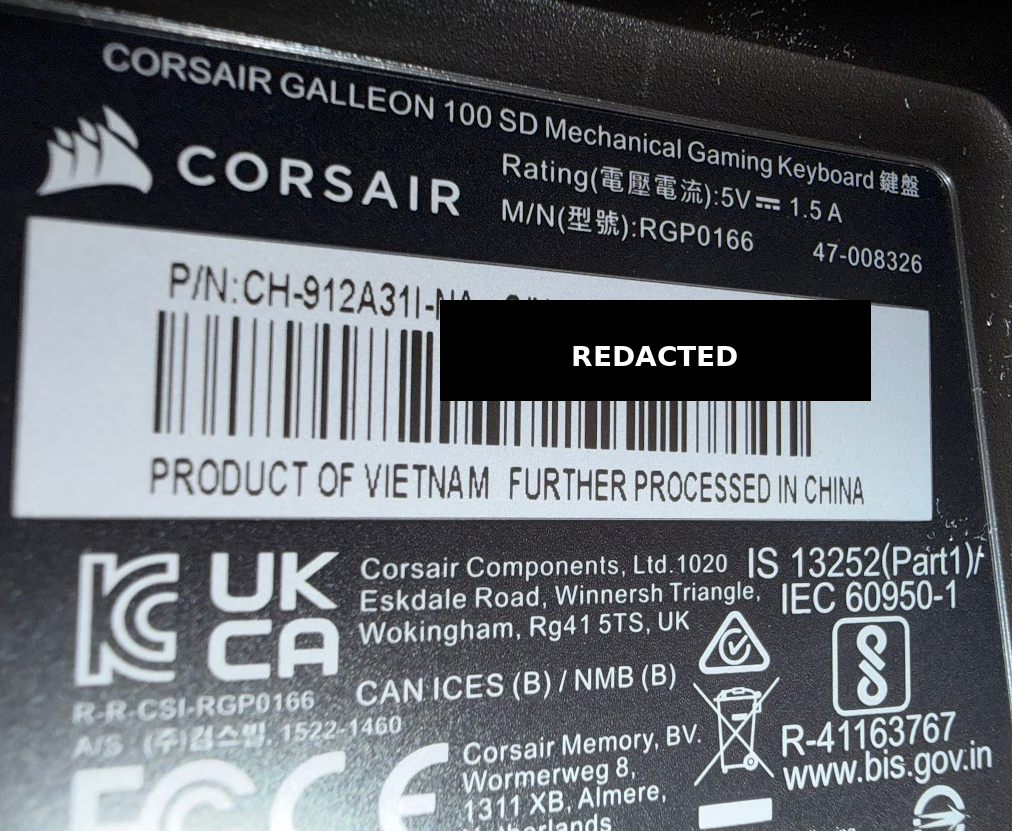
Part Number: CH-912A31I-NA
If you’re seeing the same behavior, drop a comment below. The more reports Corsair gets, the faster this gets addressed at the manufacturing level.