Claude Project Instructions: Examples & Templates (2026)
TL;DR: Claude project instructions tell Claude how to behave inside a specific project. Here’s a starter template you can paste right now:
This project is for [brief description, e.g. "a Next.js SaaS app -or- financial guidance for 2026"].

Tech/context/purpose: [key tools, frameworks, or domain info, and what you are trying to accomplish]

Rules for this project:
* Follow existing patterns in the [codebase or documents or resources] before introducing new ones.
+If you see opportunities to improve, let User know!
* When I ask for changes, confirm scope before executing.
* Cite specific sources when referencing documentation or standards.
+Stay current and research frequently
* Flag anything that looks wrong, even if I didn't ask about it.

Do NOT:
* Suggest switching frameworks or tools unless I ask.
* Give generic advice when project-specific guidance exists.
* Skip error handling or validation in code suggestions.
+We always want a reliable good product/output.
Customize the bracketed parts for your workflow. That template covers 80% of what most people need. The rest of this post gives you more examples and explains when project instructions are the right tool vs. profile preferences.
If you’re looking for Claude’s account-wide custom instructions (the ones that apply to every conversation), that’s a different feature. I have a full guide here: Claude Custom Instructions: Real Examples & Best Practices.
What Are Claude Project Instructions?
Claude has a feature called Projects that lets you group conversations around a specific task, client, or workflow. Each project gets its own knowledge base (uploaded files, documents, code) and its own project instructions. You can have a LOT of projects and some may need detailed instructions, while others can probably get by with the basics.
Project instructions are rules Claude follows for every conversation inside that project. They’re separate from your profile preferences (which apply globally to all conversations). Think of it this way: profile preferences define how you work. Project instructions define what you’re working on within a particular project and how you want to handle those items.
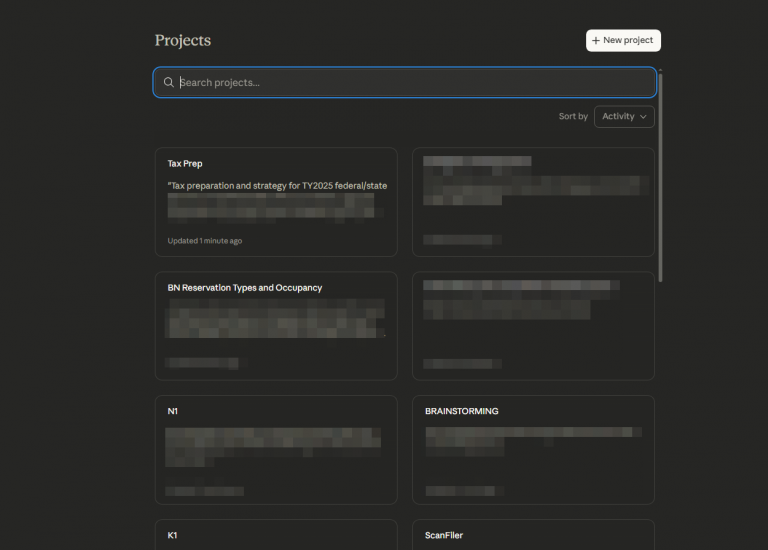
Projects can be super handy for keeping track of work or life projects NOTE: I always recommend redacting financial info/identifiers/etc BEFORE uploading ANYTHING to Claude. I wrote a (local) script to redact any personal info BEFORE I upload it in a project! (if you want to hear more about that, just comment at the end of the article)
Projects are available on all Claude plans, including free accounts. Free users can create up to 5 projects.
How to Set Project Instructions
- Go to claude.ai/projects
- Click + New Project (or open an existing one)
- Click “Set project instructions” above the document area
- Write your instructions and click Save
Every conversation you start inside that project will have these instructions loaded automatically. You can also upload documents to the project’s knowledge base for additional context.
Project Instructions vs. Profile Preferences
This is the most common point of confusion. Here’s the short version:
| Profile Preferences | Project Instructions | |
|---|---|---|
| Scope | Every conversation | One specific project |
| What goes here | Who you are, how you work | What this project is, how it’s built |
| Example | “Research before advising. No flattery.” | “This is a React app using Supabase. Follow existing patterns.” |
| Where to find it | Settings → Profile | Inside each Project |
| Available on | All plans | All plans (free: 5 projects) |
They stack. Your profile preferences load first, then project instructions add context on top. You don’t need to repeat “be concise” or “challenge my reasoning” in every project if that’s already in your profile preferences.
For a full guide to profile preferences with copy-ready templates, see my Claude Custom Instructions guide.
Copy-Ready Project Instruction Templates
These are real templates based on workflows I use or have helped set up for others. Copy, customize the bracketed parts, and paste into your project.
Software Development Project
This project is a [language/framework] application.

Tech stack: [e.g. Python 3.12, FastAPI, SQLite, deployed on AWS]

Conventions:
* Use type hints on all function signatures.
* Tests go in /tests mirroring the /src structure.
* No ORM. Raw SQL with parameterized queries.
* Never commit API keys or credentials. Use env vars.

When suggesting code:
* Follow existing patterns before introducing new ones.
* Include error handling. No bare except clauses.
* Run linting mentally before presenting code.
* If you're unsure about a library or API, say so.

When debugging:
* Ask for the error message and relevant code first.
* Don't guess at fixes without seeing the actual error.
Content and Editorial Project
This project is for [blog/newsletter/marketing content].

Voice and style: [e.g. conversational, direct, no jargon]
Audience: [e.g. small business owners, not technical]

Rules:
* Match my writing voice. Don't default to generic AI prose.
* When editing, explain what's weak and why. Don't rewrite
  my voice out of the piece.
* Cite sources I can verify. Don't fabricate quotes or stats.
* Keep paragraphs short. Use subheadings for scannability.
* No em dashes. No "in today's fast-paced world" filler.

SEO context (if applicable):
* Target keyword: [keyword]
* Competing pages: [URLs if known]
* Word count target: [range]
Research and Due Diligence Project
This project is for researching [topic/industry/question].

Context: [why this research matters, what decisions it informs]

Rules:
* Always use web search before stating current facts, prices,
  or market data. Training data goes stale.
* Distinguish between verified facts and your inferences.
  Label each clearly.
* When citing sources, include enough detail that I can verify
  them independently.
* If a question has multiple credible answers, present the
  range with evidence for each position.
* Flag gaps in available information rather than filling them
  with confident guesses.
Client or Consulting Project
This project is for [client name / engagement type].

Client context: [industry, size, key constraints]
My role: [consultant, advisor, contractor]

Rules:
* All output should be client-ready in tone. Professional,
  clear, no internal shorthand.
* When drafting deliverables, follow [client's style guide /
  formatting conventions] if provided.
* Flag scope creep. If a request goes beyond [defined scope],
  note it before proceeding.
* Maintain confidentiality. Don't reference other client work
  or proprietary methods in suggestions.
* When recommending tools or vendors, disclose if there are
  alternatives I should consider.
Best Practices for Project Instructions
Keep them focused. Project instructions should cover what’s specific to this project. Your universal rules (“be concise”, “verify before advising”) belong in profile preferences, not repeated in every project.
Front-load the context. Start with what the project is and what tech or domain it involves. Claude uses the opening lines to frame everything that follows.
Use “Do NOT” lists. Telling Claude what to avoid is often more effective than telling it what to do. “Do not suggest switching frameworks” prevents a common annoyance that positive instructions miss.
Upload supporting documents. Project instructions set the rules. The knowledge base provides the reference material. Upload your style guide, API docs, or spec sheets so Claude can cite them directly.
Iterate after a few conversations. Your first set of project instructions won’t be perfect. After 3-5 conversations in the project, you’ll notice patterns: Claude keeps making the same mistake, or keeps asking for context you could have included. Update the instructions each time. This compounds fast.
Common Mistakes
Duplicating your profile preferences. If you already told Claude “always web-search before giving product advice” in your profile preferences, you don’t need to repeat it in every project. Project instructions stack on top of your profile. Use them for what’s different, not what’s universal.
Writing an essay instead of rules. Claude responds better to short, specific directives than to long paragraphs of context. “Use TypeScript strict mode” works better than a paragraph explaining why TypeScript strict mode matters to your team.
Forgetting to update them. Project instructions go stale. If your stack changes, your conventions evolve, or you switch from one project phase to another, update the instructions. A five-minute review every couple of weeks keeps them current.
Frequently Asked Questions
Is there a character limit for project instructions?
Anthropic does not appear to publish a project instructions character limit in the help docs as of March 2026. In practice, you can write several paragraphs without hitting a wall. That said, shorter is better: project instructions consume tokens in every conversation, so keep them tight.
Can free users create projects?
Yes. Projects are available on all Claude plans, including free accounts. Free users are limited to 5 projects.
Do project instructions work on mobile?
Yes. Projects and their instructions are available on the Claude mobile app (iOS and Android) as well as the web interface.
What about Claude Code? Is this the same as CLAUDE.md?
No. Project instructions in claude.ai and CLAUDE.md files in Claude Code serve a similar purpose (project-scoped rules) but are separate systems. CLAUDE.md is a file in your code repository that Claude Code reads automatically. Project instructions are set through the Claude web/app interface. If you use Claude Code, I cover CLAUDE.md in detail in my custom instructions guide.
Bottom Line
Project instructions take about two minutes to set up and they make a real difference in how useful Claude is for focused work. The starter template at the top of this post covers most use cases. Customize it, iterate after a few conversations, and don’t overthink the length.
If you haven’t set up your account-wide profile preferences yet, start there. That’s the foundation everything else builds on. My Claude Custom Instructions guide walks through the whole process with real examples.
I used Claude to help research and draft this post. The templates are based on real project setups I use or have helped others configure.