Author Archives: J.D. H.

Olympus OM-D not showing live view [SOLVED]
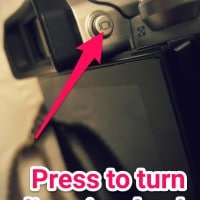
If your Olympus micro four thirds camera ever refuses to show live view, you may need to press the following button: If you are having this problem, I hope this tip helps! 🙂 Top Search Terms:https://www.jdhodges.com/blog/olympus-omd-live-view-fix-solved/ (7)olympus no liveview (2)olympus camera live view (1)olympu live view not showing (1)olympis live view (1)my olympus camera isnt showing the menu on the screen (1)liveview olympus em 10 2 (1)liveview broken omd em5 (1)em10 live view (1)www.jdhodges.com (1)
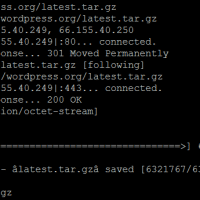
Downloading and extracting WordPress via command line

# wget http://wordpress.org/latest.tar.gz –2015-05-04 10:44:46– http://wordpress.org/latest.tar.gz Resolving wordpress.org… 66.155.40.249, 66.155.40.250 Connecting to wordpress.org|66.155.40.249|:80… connected. HTTP request sent, awaiting response… 301 Moved Permanently Location: https://wordpress.org/latest.tar.gz [following] –2015-05-04 10:44:46– https://wordpress.org/latest.tar.gz Connecting to wordpress.org|66.155.40.249|:443… connected. HTTP request sent, awaiting response… 200 OK Length: 6321767 (6.0M) [application/octet-stream] Saving to: âlatest.tar.gzâ 100%[==========================================================>] 6,321,767 6.63MB/s in 0.9s 2015-05-04 10:44:47 (6.63 MB/s) – âlatest.tar.gzâ saved [6321767/6321767] # tar xfz latest.tar.gz 🙂

HP 23xi black border when using HDMI [SOLVED]

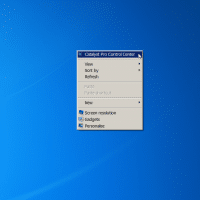
If you connect your HP 23xi display to a PC with a ATI or NVIDIA video card you may encounter a black border around the edge of the screen. Thankfully, there is an easy fix! For ATI/AMD, change scaling options: Right Click on Desktop Select “Catalyst Pro Control Center” Advanced -> ATI Catalyst Control Center -> Graphics -> Desktops & Displays Please select a display. (Click the black downaward arrow in the corner of the display graphic) -> Configure Scaling

LG G2 muffled call quality issues [SOLVED]

QUESTION: I bought the G2 at Amazon on sale and everyone I talk to on the phone complaints that they can hear themselves if the volume is turned up. I also have some sporadic muffled call issues and want it to be louder without affecting the person on the other end. Are these issues defects? I hope there is a fix because I love the rest of this phone and do not want to return it! -Nicole S. ANSWER: You

Open PDF files in different Foxit Reader windows (not tabs) [SOLVED]

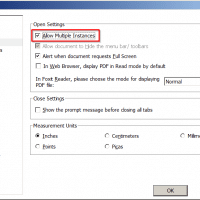
Foxit is a very nice PDF reader, however, a few versions back they made a change that is limiting for multiple monitor users. Specifically, PDFs open in separate Foxit tabs rather than their own windows. This can make it tough to compare two documents side-by-side etc. Thankfully, there is an easy fix to allow multiple Foxit PDF windows: File -> Preferences -> Documents -> Check the “Allow Multiple Instances” box -> Click OK That is all there is to it!

Stop Foxit Reader from opening the “start” tab [SOLVED]

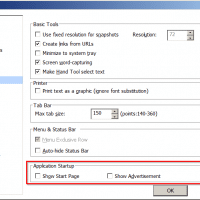
Foxit is a nice PDF reader, but they recently made some changes that I find annoying. Primarily the new “Start” tab that opens every time you open a document 🙁 Thankfully, the start tab is easily disabled in Foxit Reader: File -> Preferences -> General -> uncheck Show Start Page I also like to disable the advertisement: File -> Preferences -> General -> uncheck Show Advertisement 🙂 Top Search Terms:stop foxit reader from opening (2)how to remove foxit start at

Best Samsung Galaxy S6 screen protector

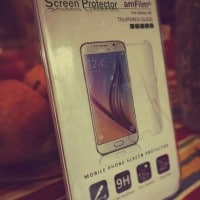
UPDATE: new screen protectors are now on the market, with great new features and even better warranties. We are currently testing the new contenders are will be updating our review. Until the new screen protector testing is completed, here is our original review winner:   We recently spent a week testing to find the best screen protector for the new Galaxy S6. The best overall protector was the amFilm Tempered Glass (Front) and PET (Back) Screen Protector for Samsung Galaxy S6 with

Link AdSense with Google Analytics [HOWTO]

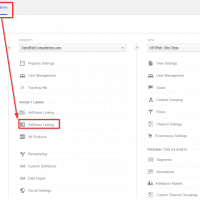
One of my favorite features of Google Analytics is the ability to see which web pages are generating the most AdSense revenue. However, before this option is enabled for reporting, you must link your two accounts: AdSense -> Admin -> Property -> AdSense Linking After you click that link and complete the steps, you should have a plethora of new AdSense data to look through! 🙂 Top Search Terms:jdh analytics (1)

« Older Entries Recent Entries »