How can I monitor my monthly bandwidth usage? [OPTIONS]
Bandwidth monitoring can be accomplished in a variety of ways, therefore these options are organized by category:
Use your router to monitor bandwidth usage
Measuring bandwidth usage directly at the router level is my preferred method. Specifically, it allows you to accurately measure ALL incoming and outgoing traffic, whereas most of the other options are specific to a particular computer/device. If you want to know exactly how much you are using each hour/day/month/year for your entire household or business, down to the individual kb, then a router based solution is probably going to be a great fit for you. 🙂
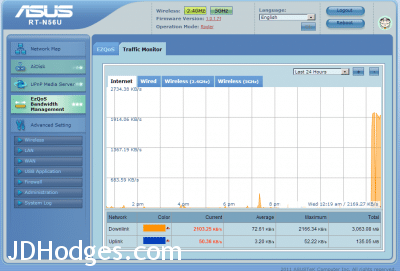
NOTE: before going to the trouble of buying a router specifically for bandwidth monitoring, or switching the firmware on your router, make sure to check your router’s settings… if it is a newer model then there is a chance that it already has some bandwidth monitoring built in 🙂 Here’s a screenshot of my ASUS router’s built-in traffic monitor:
If you check your router and do not find any bandwidth monitoring features, here are some relevant router links:
Options using a PC to monitor usage
If you do not want to use a router to measure bandwidth usage, you can also use applications on your PC. Here are some guides on the topic.
NOTE: some of these applications/scenarios are particularly handy for measuring bandwidth used by a particular application. 🙂 Application level monitoring is one of the few areas where I actually prefer these PC based options over router based solutions. 😉


Monitoring Software
Specific software and links to more monitoring software…

[end]
- asus router traffic monitor (5)
- how to monitor monthly bandwidth usage (3)
- asus bandwidth monitor (3)
- asus router bandwidth usage (2)
- bandwith monitor (2)
- asus router usage monitor software (2)
- asus download meter (2)
- howtogeek.com how-can-i-monitor-my-bandwidth-usage (2)
- monitor bandwidth asus (2)
- asus router monitor usage (2)
JohnJD, Your insight to use routers to manage bandwith is a great one. We install a Netgear N300 with just about every Exede install we do. It is easier to keep track of, as opposed to having to log on every time. We are not quite off the grid, but just found a new place in the boonies near another mark twain national forest . We do all of our Exede business using Exede ! If you could please contact me with your contact info, as i could not find an email address for you. GeoHi Geo,
Thank you for your helpful comment, it is great to hear of another router that can track usage. 🙂 Could you send a screenshot of the traffic meter on the N300?
Best regards,
-JD
How accurate are readings from a Asus AC66R?
Comcast says I have used 921.6GB (27 days) this month but my Asus router says I’ve only used 490.63 GB(30 days).
Because Comcast is now metering my connection and charging $50.00/MB oover 1024 I need to figure out if Comcast is trying to pull a fast one.
Thanks!
Hey Doug, that does sound like a real discrepancy, but I can’t say for certain where it is coming from. Best guess is that the modem and router may be measuring different things, so it may help to compare the time period and what each meter includes before drawing conclusions.
They have adjusted there overage change to $10.00 per 50 GB Block