Claude Code or VS Code Still Showing Opus 4.8? How to Switch to Opus 5
Anthropic shipped Claude Opus 5 on July 24, 2026. It is the new default model on Claude Max and the strongest model you can pick on Claude Pro. So why does the model picker in your VS Code panel still say Opus 4.8?!
Before you go digging through your account or your plan, check the version. Opus 5 requires Claude Code v2.1.219 or later, and the list of models in that picker is compiled into the build you have installed. If your build predates the model, go ahead and update Claude Code so you have access to Opus 5. More info below:
Start with the right one of these two
Claude Code can exist twice on one machine, and the two copies update separately. Pick the path that matches where you are seeing the outdated listing for Opus 4.8.
Seeing it in the VS Code chat panel? Skip the terminal entirely. Open the Extensions sidebar, update Claude Code, then reload the window. Details are two sections down, and the terminal commands below will not touch this.
Seeing it in a terminal session? Three commands:
claude update
claude --version
claude --model opus
If claude --version reports 2.1.219 or higher and that last command opens a session on Opus 5, your terminal is sorted.
Why Opus 5 may be missing from your picker
1. There is a hard version floor
Anthropic requires Claude Code v2.1.219 or later for Opus 5. I did not want to take that on faith, so I checked it against the actual builds sitting on my machine. The VS Code extension ships a JavaScript bundle with the model registry baked into it as an object literal, which means every model ID is a searchable string inside that one file. This is the command I ran on Linux, where VS Code Server keeps its extensions:
for f in ~/.vscode-server/extensions/anthropic.claude-code-*/extension.js; do
  [ -f "$f" ] || { echo "No matching extension bundles found"; break; }
  printf '%s: ' "$(basename "$(dirname "$f")")"
  grep -o "claude-opus-5" "$f" | wc -l
done
Three builds were still on disk, and the result was clean:
anthropic.claude-code-2.1.218-linux-x64: 0
anthropic.claude-code-2.1.219-linux-x64: 32
anthropic.claude-code-2.1.220-linux-x64: 32
The string is simply not present in 2.1.218. That build cannot offer you a model whose identifier it does not contain, and restarting the panel, signing out and back in, or waiting a day does not change what is sitting in that file. Updating installs a newer build alongside it, and that newer build’s registry does contain the identifier. It is why three separate versions were sitting in my extensions folder in the first place.
That path is specific to VS Code Server on Linux, which is how I run it. A desktop install keeps its extensions in ~/.vscode/extensions instead. Windows stores them under your user profile, though there you would want a PowerShell equivalent rather than this Bash loop. Either way, treat this as a diagnostic for anyone curious about the mechanism, not as a required step. Reading the version number in the Extensions sidebar tells you the same thing in far less time.
2. The extension carries its own copy of Claude Code
Anthropic’s documentation states it plainly: the extension bundles its own copy of the CLI for the chat panel. That bundled copy is independent of any standalone claude you have on your PATH, and the two update through different channels:
| Install | Updates via | Controls |
|---|---|---|
| Standalone CLI | claude update |
Sessions you start in a terminal |
| VS Code extension | The VS Code Marketplace, through the Extensions sidebar | The Claude Code chat panel inside VS Code |
So claude update can move your terminal to a current build while the extension stays behind, and the panel keeps offering Opus 4.8. On my machine, three extension builds were still sitting on disk, 2.1.218 through 2.1.220, while the standalone CLI had already reached 2.1.220. Updating the one I used in the terminal did nothing for the one running the panel.
To fix the panel:
- Open the Extensions sidebar and find Claude Code.
- Click Update if the button is showing. If it is not, read the version number listed there. At 2.1.219 or higher you are already fine and your problem is further down this post. Below that, with no update on offer, check that extension auto update has not been turned off, then run Extensions: Check for Extension Updates from the Command Palette, or just uninstall and reinstall. Reloading by itself cannot upgrade an old build.
- Run Developer: Reload Window from the Command Palette. Closing and reopening the panel is not reliably enough to restart an extension that is already loaded, and this is the step that is easiest to skip.
- Start a new conversation, not a resumed one. Resumed sessions keep whatever model their transcript began with, so reopening yesterday’s conversation will still show Opus 4.8 even after a perfectly successful update.
- Run
/modeland confirm Opus 5 now appears in the list. That, rather than the header, is the real test. On Max it should already be selected. On Pro the default is Sonnet 5, so seeing Sonnet in the header does not mean the update failed. What you are checking is whether Opus 5 is there to pick at all. Pick it, then read the header to confirm.

Switching the model, four ways
Once you are on a build that knows about Opus 5, pick whichever of these fits how you work. Anthropic’s docs present them in priority order, so anything higher in this table takes precedence over anything below it.
| Method | Example | Where it works | Scope |
|---|---|---|---|
| Mid session | /model opus |
Terminal and the VS Code panel | Documented to save as your default for new sessions. See the caveat below. |
| At launch | claude --model opus |
Terminal only | That one session only |
| Environment variable | ANTHROPIC_MODEL=claude-opus-5 claude |
Terminal only | That one session only |
| Settings file | "model" in ~/.claude/settings.json |
Terminal and the VS Code panel | Every session, reapplied at launch |
The “where it works” column matters more than it looks. Two of these launch the standalone CLI, so they cannot reconfigure a VS Code panel that is already running. Inside the panel you have the slash command, the settings file, and the picker itself.
Note the shape of the environment variable example. Setting it inline like that applies to the one session you are launching. If you export it instead, it applies to every Claude Code session started from that shell until you unset it or close the shell.
For the settings file method, add a model field. If the file already exists, merge this in rather than pasting over what is there, and remember the comma if it is not the last property:
{
  "model": "claude-opus-5"
}Reach for /model opus rather than the full claude-opus-5. Claude Code’s own help text describes these family names as aliases for the latest model, so a build that knows about Opus 5 points opus at it. I confirmed that on v2.1.220 by having a session report its own model ID, and it came back as claude-opus-5. The practical payoff is that you are not left pinned to an exact ID you typed months ago.
One inconsistency is worth knowing about before you rely on that first row. The docs say typing /model <name> directly saves your choice as the default for new sessions, and that is exactly what I saw in a terminal session on 2.1.219, which reported back “saved as your default for new sessions.” Inside the VS Code panel on 2.1.220, the same command reported “for this session only” instead. I have not pinned down whether that is a difference between the panel and the terminal, a change between those two builds, or a project settings file quietly overriding it.
So do not assume it stuck. Note that /status only tells you about the session you are in, which means it cannot answer this question. The only real test is to start a genuinely new session, not a resumed one, and see which model it opens on.
What about that [1m] option?
Start typing /model claude-opus-5 and the autocomplete offers a second entry with a [1m] suffix.
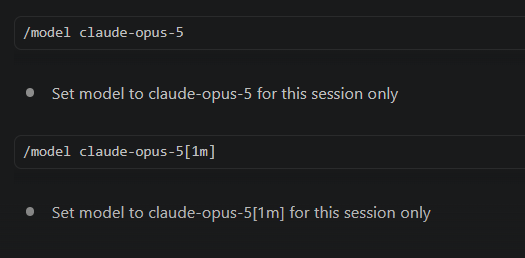
You can skip it. The [1m] suffix asks for a 1 million token context window, and Opus 5 already has one. Anthropic’s documentation is blunt on this point: 1M is both the default and the maximum, and there is no smaller context variant. Plain claude-opus-5 gets you the identical window.
The suffix is not pointless in general, which is exactly why it is easy to assume it must be doing something here. It has a job on models whose native window is smaller. The same model registry inside the extension bundle lists Haiku 4.5 with a 200K window and support for the 1M suffix, which is the shape you would expect where the suffix has room to change something. Opus 5 is already at its ceiling, so there is nothing left for it to raise.
One caveat on syntax. The documented form of the suffix attaches to the alias, as in opus[1m]. The full model name version is what the autocomplete offered me on 2.1.220, so the client clearly recognizes it, but I could not find it in the docs and I have not tested what the API does with it. If you want the suffix elsewhere, the documented forms are opus[1m], sonnet[1m] and opusplan[1m].
Still showing 4.8 after all that?
Work down this list in order.
- You resumed an old session. Sessions started with
--resumeor--continuekeep whatever model the transcript began with, regardless of your current settings. Start a genuinely fresh session before concluding anything is broken. - A project settings file is overriding you. A
.claude/settings.jsoninside the repo beats the user level default that/modelwrites, and it reapplies every single launch. Check it for amodelkey. - You are on a managed install. On a work machine,
availableModelsandenforceAvailableModelsin managed settings override everything above. Your admin controls that list. - You never actually restarted the panel. Updating the extension does not restart a chat panel that is already open.
- Verify instead of assuming. Run
/status, or read the session header. Both report the model actually in use.
Claude Code’s local check accepts any model string that begins with claude-, whether or not that model actually exists. A typo like claude-opus-50 passes that check, so you get no useful complaint at the moment you type it. If a model string is not behaving the way you expect, read it back one character at a time before you go hunting for anything more exotic.
What you actually get on your plan
- Claude Max, Team Premium, Enterprise pay as you go: Opus 5 is the new default. If you never touched your settings, a fresh session on a current build should already be on it.
- Claude Pro: the default stays Sonnet 5. Anthropic describes Opus 5 as the strongest model on Pro, so it is there for you to pick. You just have to pick it.
- Team Standard: the default is Sonnet 5 here as well. On Enterprise, which side you land on depends on whether your seat is pay as you go or a subscription seat, so check your own plan rather than assuming.
- Knowledge cutoff of May 2026, against January 2026 for Fable 5.
- 1 million token context by default, with no flag or suffix to configure.
- Effort defaults to high, per the model registry shipped in the extension. If you have been running a different effort level out of habit, it is worth a fresh look now that the model underneath it has changed.
- Fable 5 remains a deliberate choice. It is not the default on any account type, and sessions only use it once you pick it. The banner Claude Code shows Max subscribers also points out that Fable draws down your usage faster than Opus, which is worth weighing before you switch.
If you went through this same drill back in April, the shape will feel familiar. I wrote up the Opus 4.7 version of this switch on release day, and the VS Code panel was the sticking point that time too. The fix was different then, so it is worth reading the current one rather than repeating what worked last quarter.
Since Opus 5 defaults to high effort, this is also a reasonable moment to look at how effort levels work in the VS Code panel if you have never adjusted yours.
Sources: Introducing Claude Opus 5, the Claude Code model configuration docs, the Claude Code VS Code docs, plus hands on verification against extension builds on my own machine.
Information in this post was accurate as of July 25, 2026.