MCP Server Token Costs in Claude Code: Full Breakdown
TL;DR: Every MCP server you connect to Claude Code silently costs tokens on every single message, even when idle. A typical 4-server setup runs about 7,000 tokens of overhead. Heavy setups with 5+ servers can burn 50,000+ tokens before you type your first prompt. Here’s the exact cost of every tool across four common MCP servers.
Why MCP Servers Cost Tokens
MCP (Model Context Protocol) servers let Claude Code interact with external tools: browse the web, query databases, send emails, review code. Each server registers its tool definitions (name, description, parameters, expected output) into Claude Code’s context window.
The catch: these definitions load on every request, not just when you use them. A Playwright server with 22 browser automation tools? Those 22 tool definitions ride along with every message you send, whether you’re browsing a website or just editing a Python file.
This is the “hidden cost” that most Claude Code users don’t realize exists until they run /context and see the breakdown. The problem was first raised on GitHub when users noticed 10-20k tokens of overhead on their first message.
Token Cost by Server
Here’s the real token overhead from a working Claude Code session with four MCP servers connected:
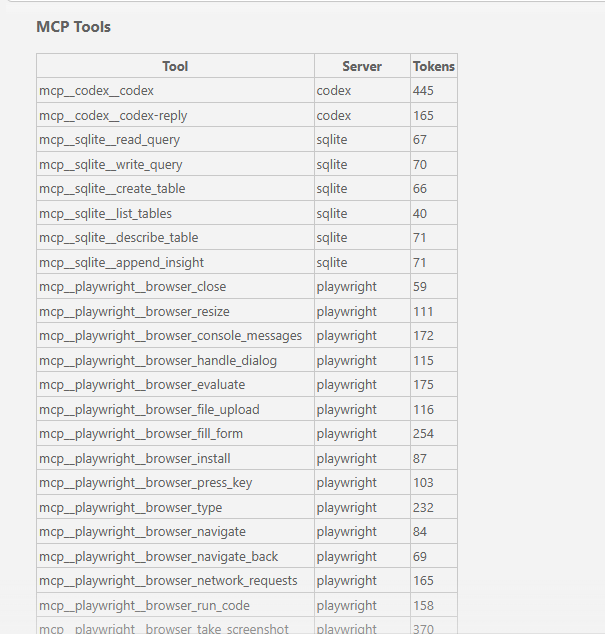
| Server | Tools | Total Tokens | What It Does |
|---|---|---|---|
| Playwright | 22 | ~3,442 | Browser automation and testing |
| Gmail | 7 | ~2,640 | Email read/write/search |
| Codex | 2 | 610 | AI code review (OpenAI Codex) |
| SQLite | 6 | 385 | Local database queries |
| Total | 37 | ~7,077 |
Playwright is the heaviest single server at nearly 3,500 tokens. Gmail punches above its weight with only 7 tools but 2,640 tokens because its tool definitions are more complex (the gmail_create_draft tool alone costs 820 tokens). SQLite is a lightweight champion: 6 useful tools for under 400 tokens.
Full Per-Tool Breakdown
Playwright (22 tools, ~3,442 tokens)
| Tool | Tokens | Purpose |
|---|---|---|
| browser_take_screenshot | 370 | Capture page screenshot |
| browser_fill_form | 254 | Fill form fields |
| browser_click | 236 | Click elements |
| browser_type | 232 | Type text into elements |
| browser_drag | 222 | Drag and drop |
| browser_select_option | 182 | Select dropdown options |
| browser_evaluate | 175 | Run JavaScript on page |
| browser_console_messages | 172 | Read console output |
| browser_network_requests | 165 | Monitor network activity |
| browser_run_code | 158 | Execute Playwright code |
| browser_tabs | 137 | Manage browser tabs |
| browser_wait_for | 132 | Wait for elements/conditions |
| browser_hover | 131 | Hover over elements |
| browser_file_upload | 116 | Upload files |
| browser_handle_dialog | 115 | Handle alerts/confirms |
| browser_snapshot | 112 | Take accessibility snapshot |
| browser_resize | 111 | Resize browser window |
| browser_press_key | 103 | Press keyboard keys |
| browser_install | 87 | Install browser binaries |
| browser_navigate | 84 | Navigate to URL |
| browser_navigate_back | 69 | Go back one page |
| browser_close | 59 | Close browser |
The costliest Playwright tool (browser_take_screenshot at 370 tokens) is 6x more expensive than the cheapest (browser_close at 59 tokens). Screenshot and form interaction tools have complex parameter schemas, which is why they cost more.
Gmail (7 tools, ~2,640 tokens)
| Tool | Tokens | Purpose |
|---|---|---|
| gmail_create_draft | 820 | Create email draft |
| gmail_search_messages | 660 | Search inbox |
| gmail_list_drafts | 316 | List draft emails |
| gmail_list_labels | 267 | List email labels |
| gmail_read_message | 218 | Read a specific email |
| gmail_read_thread | 208 | Read email thread |
| gmail_get_profile | 151 | Get account profile |
Gmail has the single most expensive tool in this entire list: gmail_create_draft at 820 tokens. That one tool definition costs more than the entire Codex server. The create and search tools need detailed schemas to describe recipients, subject lines, body content, and search operators, which drives up the token count.
Codex (2 tools, 610 tokens)
| Tool | Tokens | Purpose |
|---|---|---|
| codex | 445 | Send code for AI review |
| codex-reply | 165 | Continue a review conversation |
The Codex MCP server (OpenAI’s code review tool) is efficient: just two tools with clear, focused definitions. At 610 tokens total, it’s a reasonable cost for a second-opinion AI code reviewer.
SQLite (6 tools, 385 tokens)
| Tool | Tokens | Purpose |
|---|---|---|
| append_insight | 71 | Save analysis notes |
| describe_table | 71 | Get table schema |
| write_query | 70 | Execute write query |
| read_query | 67 | Execute read query |
| create_table | 66 | Create new table |
| list_tables | 40 | List all tables |
SQLite is the most token-efficient server here. Six tools averaging 64 tokens each. Simple, focused tool definitions keep costs low.
How Tool Search (Deferral) Saves Context
Claude Code has a built-in optimization called tool search that automatically defers tool definitions when they exceed a percentage of your context window. Instead of loading all 37 tool definitions on every message, deferred tools are loaded on-demand only when Claude Code actually needs them.
In the session this data came from, deferral saved 13.2k tokens:
| Category | Tokens Saved |
|---|---|
| MCP tools (deferred) | 5,900 |
| System tools (deferred) | 7,300 |
| Total saved | 13,200 |
That’s nearly double the cost of the active MCP tools. Without deferral, this session would have 20k+ tokens of tool overhead instead of ~7k.
You can control the deferral threshold with the ENABLE_TOOL_SEARCH environment variable. The default triggers at 10% of your context window. Setting ENABLE_TOOL_SEARCH=auto:5 lowers it to 5%, deferring more aggressively and saving more context for your actual work. Anthropic’s official cost management docs cover this in detail.
What About Other Popular MCP Servers?
The numbers above are from a specific 4-server setup. Other popular MCP servers can cost significantly more. The figures below are reported by developers who have measured their own setups:
| Server | Approx. Tools | Approx. Tokens |
|---|---|---|
| Jira | varies | ~17,000 |
| mcp-omnisearch | 20 | ~14,100 |
| Playwright (no deferral) | 22 | ~13,600 |
| SQLite tools (full) | 19 | ~13,400 |
| GitHub MCP | varies | ~8,000-12,000 |
One developer reported a 5-server setup consuming approximately 55,000 tokens before a single message was sent. Others have reported MCP tools consuming 66,000+ tokens: a third of a 200k context window gone before the conversation even started.
These numbers vary by server version, configuration, and how many tools each server exposes. Your mileage will vary. The point is that they add up fast and you should measure your own setup with /context.
How to Check Your Own Costs
- Type
/contextin Claude Code to see your full token usage breakdown - Scroll to the MCP Tools section for per-tool costs
- Type
/mcpto see connected servers and disconnect ones you’re not using - Consider using CLI alternatives (
ghinstead of GitHub MCP,awsCLI instead of AWS MCP) for tools you only use occasionally
Bottom Line
MCP servers are useful, but they’re not free. Every tool definition costs tokens on every message, and those costs are invisible unless you look. Run /context, check what you’re paying for, and disconnect what you’re not using. A few hundred tokens per tool sounds small until you multiply it by 37 tools and hundreds of messages per session.
Sources and Further Reading
- Manage costs effectively – Anthropic’s official docs on reducing token usage, including MCP server overhead and tool search
- Connect Claude Code to tools via MCP – Official MCP server setup and configuration guide
- GitHub Issue #3406 – Original report of 10-20k token overhead from built-in tools + MCP descriptions loading on first message
- Optimising MCP Server Context Usage in Claude Code by Scott Spence – Detailed per-server token measurements and optimization strategies
- The Hidden Cost of MCP Servers by Mario Giancini – Analysis of when MCP servers are worth the context cost
This post was drafted with assistance from AI tools (Claude). All facts, opinions, and recommendations are my own and have been verified.
Information in this post was accurate at the time of writing. MCP server tool counts and token costs can change with updates. Run /context in your own session for current numbers.