How to set the time zone & time on Synology NAS DSM
Recently I needed to setup a scheduled shutdown task for my Synology DS 1813+ NAS. After I created the task, I wanted to check the time to make sure it would be triggered at the correct time.
Turns out that my timezone had never been set correctly, so here is how I fixed it:
Login to NAS via web brower -> Control Panel -> Regional Options -> Time Zome
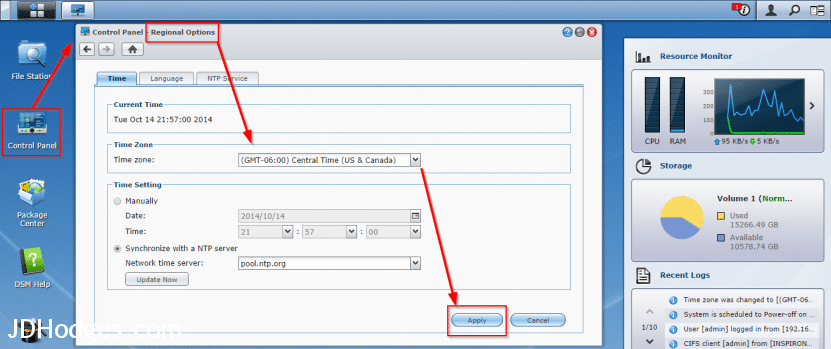
Screenshot showing how to set the timezone in Synology’s DSM NAS software
Just FYI here is the awesome NAS in question (though DSM runs on many different Synology units)
Amazon.com: Synology America DiskStation 8-Bay Diskless Network Attached Storage (DS1813+): Computers & Accessorieshttp://www.amazon.com/gp/product/B00CRB53CU?ie=UTF8&tag=pixensity-20&linkCode=as2&camp=1789&creative=390957&creativeASIN=B00CRB53CUI’ve been working in IT for years. This is one of the best buys on the market. I loaded mine up with many 4TB Enterprise class WD4000F9YZ disks.
Top Search Terms:
- synology set time (10)
- how to change time synology nas (7)
- synology change time (7)
- synology time server (7)
- change system time on synology 1812 (5)
- synology change time zone (4)
- synology time settings (4)
- set time synology (4)
- how to set synology nas switch on and off time (4)
- set time on synology (4)
help me please , why i changed date and time setting on everydays synology ds214
Hey Sawinkomyint, if the date and time on your Synology DS214 keeps resetting, the most common cause is that NTP (network time protocol) sync is not configured properly, or the internal clock battery on the NAS has died. Go to Control Panel > Regional Options and make sure NTP is enabled and pointing to a valid time server (like pool.ntp.org). If the time still resets after a reboot even with NTP enabled, the CMOS battery on the board may need replacing.