Tag Archives: ssh

How to Set Up a SSH Connection in Claude Code Desktop
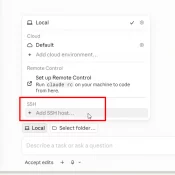
Summary: Claude Code’s desktop app can SSH into a remote machine and run sessions there against your repo, MCP servers, and ~/.claude config. Setup is a four-field dialog, assuming ssh user@host (where user is your username and host is the hostname or IP) already works from your terminal. The non-obvious caveat: session history is siloed. The desktop app, the CLI on the remote, and the VS Code extension (if you use it) on the remote each keep separate session lists.
Turnkey SSH tunnel for MySQL PHP access

Very useful examples at the Linux Journal: http://www.linuxjournal.com/content/creating-secure-tunnels-ssh and I finally found a connection specification that would work: root@lamp ~# mysql -h localhost -P 3308 -u root -psomepassword vlmdatabase ERROR 2002 (HY000): Can’t connect to local MySQL server through socket ‘/var/run/mysqld/mysq ld.sock’ (2) root@lamp ~# mysql -h localhost -P 3308 -u root -psomepassword vlmdatabase ERROR 2002 (HY000): Can’t connect to local MySQL server through socket ‘/var/run/mysqld/mysq ld.sock’ (2) root@lamp ~# mysql -h 127.0.0.1 -P 3308 -u root -psomepassword vlmdatabase The last one

Access MySQL server over SSH tunnel using Navicat

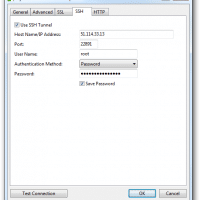
Today was my first time to access a MySQL server over a SSH tunnel in Navicat. After a bit of trial and error I was finally able to achieve success 🙂 Here are the main things I learned: #1 On the client machine running Navicat, use the same credentials that you would use if you were at the console of the remote server. In this case localhost and port 3306 #2 On the SSH tab, use the remote server’s IP