Tag Archives: rdp

Why Your RDP Session May Be Slow on a Fast LAN (The 56 Kbps Trap!)
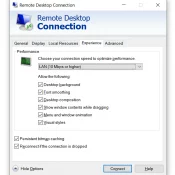
Remote Desktop Connection Experience tab set to LAN (10 Mbps or higher) with all visual features enabled

Summary: My Remote Desktop session into an old ThinkPad got progressively laggier. Ping said the network was perfect (1ms between host and client with no variation). Performance counters said the server was idle. I was about a day away from buying replacement hardware out of frustration with the lag 😣. The actual cause was a dropdown in the Remote Desktop Connection Experience tab that had the connection set to a 56 Kbps modem profile. 💡 Setting it to LAN (10

“Connect to GOG Galaxy Communication Service was lost and could not be restored!” [Remote desktop issue]

Please note, if you try to connect to a machine via MS Remote Desktop Protocol and start GOG Galaxy then you will likely encounter the following error: “Connect to GOG Galaxy Communication Service was lost and could not be restored!” Unfortunately, there is no resolution for this error other than to manually login to the machine locally (not remote desktop). If the error still persists, I recommend rebooting the PC and trying to start GOG again. Sorry to not have

Increase audio quality in Remote Desktop Connections

I really dislike fuzzy/tinny audio. Sometimes RDP connections with RDC clients results in laggy and/or poor quality audio. A two step tip that you can use to try and solve these problem in Windows7: #1 on the server (the machine you are connecting to) Using the Group Policy editor, Go to Computer Configuration:Administrative Templates:Windows Components: Remote Desktop Session Host:Device and Resource Redirection. Set “Limit audio playback quality.”  to “Enabled,” and set “Audio Quality” option “to High”. #2 on the client