MacBook Neo vs. Windows Laptops in 2026

Disclosure: This is my own personal opinion. I have not been paid by Apple, Intel, Qualcomm, AMD, or anyone else to write it. TL;DR: The MacBook Neo is not the most powerful laptop here, and it is not the best specs bargain. At $599, it is the simplest smart laptop buy in a very messy 2026 market. Buy the Neo for the cheapest Mac that still feels fast and polished. Buy the M4 MacBook Air for the better long-term Mac.

Quicken Categorizing Downloaded Transactions Incorrectly? Here’s the Real Fix.

TL;DR: Quicken’s auto-categorization guesses categories based on payee names and often gets them wrong. The fix: disable auto-categorization in Preferences, then set up Renaming Rules and Memorized Payee List entries so Quicken categorizes based on your explicit rules instead of its own guessing. Takes about 60 seconds per vendor. The Problem If you use Quicken Classic for Windows to manage your finances, you’ve probably run into this: you download transactions from your bank, and Quicken helpfully assigns categories to them.

Carbon Monoxide Detector Still Beeping After Replacing Batteries? (It’s Not the Battery!)

TL;DR: If your carbon monoxide detector keeps beeping after you replaced the batteries, it’s probably not a battery issue at all. Most CO detectors have a 10-year end-of-life timer built into the unit. Once it expires, no amount of fresh batteries will stop the beeping. The only fix is to replace the entire unit. Here’s how to tell the difference and what to buy next. What Happened My Kidde carbon monoxide detector started chirping. Two quick beeps every 30 seconds

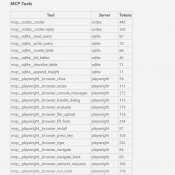
MCP Server Token Costs in Claude Code: Full Breakdown

TL;DR: Every MCP server you connect to Claude Code silently costs tokens on every single message, even when idle. A typical 4-server setup runs about 7,000 tokens of overhead. Heavy setups with 5+ servers can burn 50,000+ tokens before you type your first prompt. Here’s the exact cost of every tool across four common MCP servers. Why MCP Servers Cost Tokens MCP (Model Context Protocol) servers let Claude Code interact with external tools: browse the web, query databases, send emails,

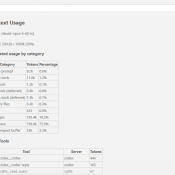
Claude Code /context Command: See Exactly Where Your Tokens Go

TL;DR: Type /context in Claude Code to see a full breakdown of where your context window tokens are being spent. It shows system overhead, MCP tools, memory files, conversation history, and free space. Use it to find bloated MCP servers, oversized CLAUDE.md files, and know when to run /compact. What Is /context? If you’ve ever had a Claude Code session start strong and then slowly degrade, the context window is probably the reason. Every message you send carries invisible overhead:

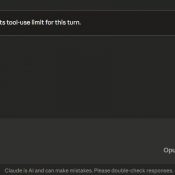
Claude Reached Its Tool-Use Limit for This Turn: What It Means and How to Fix It

TL;DR: This message means Claude hit its per-turn cap on tool calls (around 10-20 actions like web searches, file reads, or connected service requests). Click “Continue” and it picks up right where it left off. No work is lost. 👍 Tip: use handoffs to prevent single sessions from becoming unwieldy with token rot and waste. More info about that here: Claude handoff prompts 👍 What Does “Claude Reached Its Tool-Use Limit” Mean? If you use Claude with any connected tools

Welcome to the ride!

Guest Post by Jack

Hello! I will be putting up a website for guns, games, dirtbikes, and all sorts of other cool stuff! It is not up yet but it will be up within a few days. I am very excited because I will be able to share my knowledge and hopefully help people learn more about their stuff. The website’s name is jackhodges.com Please drop ideas on what you want to see on my website in the comments!

Claude Session Handoffs: How to Keep Context Across Conversations

TL;DR: Even with memory and context compaction, AI assistants still lose the detailed state of your project between sessions. A simple two-file system plus a handoff prompt takes seconds at the end of a session and saves minutes of re-explanation at the start of the next one. This works with Claude, ChatGPT, Gemini, Copilot, or any AI assistant. Likewise, this can help keep you from wasting tokens by letting a conversation run on for too long. Use handoff/handover prompts to

« Older Entries Recent Entries »