Category Archives: computer tips

Cyber Monday 2012 deals roundup

Here are some of the top shopping sites along with their cyber-monday deals URL all in a convenient list 🙂 Amazon.com: Cyber Monday Sale (started 11/24, Sunday) Best Buy: Cyber Monday Sale Dell: Cyber Monday Laptop, Computer, and Electronic Deals Walmart.com: Cyber Week Sale Cyber Monday 2012 Deals & Sales – Newegg.com (midnight PST) Cyber Monday 2012 : Target.com Online Deals TigerDirect.com – Electronics, Tablets, Phones, Office Supplies & Video Games Microsoft Store Online (sales currently active) [to be updated with more, stay

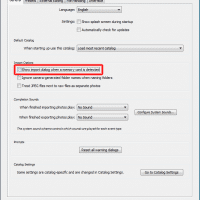
How to stop Adobe Lightroom from popping up when a SD card is inserted

For the past couple weeks Lightroom has been annoying me every time I insert a SD card or even plug in an external USB hard drive. Finally it bugged me enough I went to Lightroom’s settings screen: Edit->Preferences->General and did the following: No more popup!!! 🙂 Top Search Terms:how to keep lightroom from popping up (2)insert sd card starts lightroom (2)how to disable lightroom usb popup (1)how to avoid lightroom from popping (1)how do i stop lightroom opening up when

MS beats apple to the punch with a ARM powered (full) OS

With all the rumors of Apple switching to an ARM based architecture for Mac OSX, it is funny that Microsoft already beat them to it with Windows RT. Windows RT of course is basically Windows 8 for ARM devices. Perhaps with a ARM based Mac OSX Apple would choose to emulate x86 for older apps/programs, something MS declined to do. But still, it is impressive that Windows RT has virtually all of Windows 8’s functionality (sans legacy software compatibility) whereas

sdfv2000.exe SD Card Format download

Recently I was trying to recover a 32GB microsdhc card that had two partitions, one of which was inaccessible. One of the best tips I found was to try the sdfv2000.exe formatting program as it seems to be much more capable than the internal Windows formatting tools. However, I had a heck of a time finding the sdfv2000.exe program anywhere. Thankfully I finally found it and here is permanent mirror where you can download it too: [download id=”10489″ format=”1″] dl Best regards,

How to lookup Intel SSD warranty info online

Go here : http://www.intel.com/support/feedback.htm?group=ssd#ssd official Intel support site. Enter the live chat option and they can lookup your warranty info for you online.  Just make sure to have your drive’s model # and SA # ready! 🙂 Top Search Terms:intel ssd warranty check (61)intel ssd warranty check online (10)intel warranty check ssd (6)intel warranty lookup (5)intel ssd warranty checker (4)intel ssd garantie check (4)intel+ssd+warranty+check (4)intel ssd warranty lookup (3)intel ssd warranty (2)check intel ssd warranty (2)

IPCop ‘boot error’ occurs after successful installation

Summary of article: If you mount the IPCop (or smoothwall) ISO via IPMI and then install, you are likely to get a boot error once you reboot and the ISO is unmounted. A workaround is to install via an actual DVD drive* (USB, SATA or IDE should all work) *you can remove the drive after install. All the gory details: This weekend I was at the datacenter for work. Part of my task was to setup a new firewall using

How to reset iTunes Match, How to delete duplicate playlists

There are some very helpful iTunes Match tips in the second half of this Wired article: I restored my up-to-date offline library and left this machine without Match enabled for a few days while I looked up how you reset your iTunes Match account. And that’s where the fundamental problem with the service rears its head: you cannot reset it. I contacted Apple to find out if this was true, and it is. Fact of the matter, I was told,

Dell Inspiron 17R SE 7720 RAID setup?

My Inspiron 17R has no RAID option in the BIOS. I believe to access the Intel RAID settings it is necessary to have a mSATA drive installed (which I do not have installed at this time).  When a mSATA drive is installed it seems that the acceleration option (mSATA SSD caching) may be enabled in the BIOS, after which you can also do some RAID stuff. I ordered a nice mSATA drive to install in my 17R to see if

« Older Entries Recent Entries »