Category Archives: AI

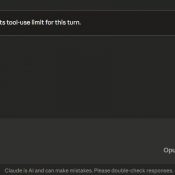
Claude Reached Its Tool-Use Limit for This Turn: What It Means and How to Fix It

TL;DR: This message means Claude hit its per-turn cap on tool calls (around 10-20 actions like web searches, file reads, or connected service requests). Click “Continue” and it picks up right where it left off. No work is lost. 👍 Tip: use handoffs to prevent single sessions from becoming unwieldy with token rot and waste. More info about that here: Claude handoff prompts 👍 What Does “Claude Reached Its Tool-Use Limit” Mean? If you use Claude with any connected tools

Claude Session Handoffs: How to Keep Context Across Conversations

TL;DR: Even with memory and context compaction, AI assistants still lose the detailed state of your project between sessions. A simple two-file system plus a handoff prompt takes seconds at the end of a session and saves minutes of re-explanation at the start of the next one. This works with Claude, ChatGPT, Gemini, Copilot, or any AI assistant. Likewise, this can help keep you from wasting tokens by letting a conversation run on for too long. Use handoff/handover prompts to

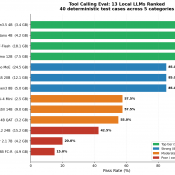
I Tested 13 Local LLMs on Tool Calling: March 2026

I built a deterministic eval harness and tested 13 local LLMs on tool calling (function calling) to find out which models work decently well for agentic tasks. The result that surprised me most: a 3.4 GB model scored higher than everything else I tested, including models five times its size. If you’re running a local AI stack with Open WebUI, LM Studio, or any OpenAI-compatible frontend, tool calling is one of the key features that enables agentic behavior. It lets

How to Drag Files into Claude Code in VS Code (Paste with Context)

TL;DR: In the Claude Code VS Code extension, hold Shift while dragging a file from the Explorer panel into the Claude Code prompt box. This attaches the file as context so Claude can read and reference it directly. Without Shift, VS Code just opens the file in a new tab. Hold Shift and drag a file into the prompt. The “Hold Shift while dragging to drop files into Claude Code” tooltip confirms you’re doing it right. What Is Paste with

How to Change Claude Code Effort Levels in VS Code (/effort)

TL;DR: In the Claude Code VS Code extension, type /effort in the prompt box and press Enter to cycle through four reasoning levels: Low, Medium, High, and Max. Each level controls how deeply Claude thinks, how many tool calls it makes, and how many tokens it burns. On Windows, it’s just /effort, Enter, done. The effort level picker in Claude Code for VS Code. This shows Max with all four dots lit up. What Are Effort Levels? Effort levels control

Gmail to Claude: Line Breaks Disappear on Paste (Fix)

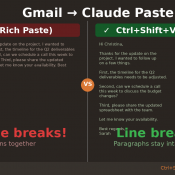
TL;DR: When you copy text from Gmail and paste it into Claude (or Claude Code), all your line breaks disappear and the text runs together into one giant wall of text. The fix: right-click and choose “Paste as plain text” (or press Ctrl+Shift+V on Windows/Linux, Cmd+Shift+V on Mac). Your line breaks will be preserved. The Problem You’re working in Claude and need to paste an email from Gmail. You copy the text, hit Ctrl+V, and… all your carefully formatted paragraphs

MacBook Neo Review: A18 Pro CPU, 8GB Reality, and the Thermal Wall

Disclosure: This post contains affiliate links. I have not been paid by Apple or anyone else to write this. The Short Verdict The MacBook Neo is the fastest single-core laptop you can buy for $599 or even lower at $499 educational pricing! It also drops to phone-class performance after about 60 seconds of sustained CPU load. Both of those things are true at the same time, and thankfully even (Apple) phone class performance is still quite speedy. I ran 30

How 25,000 Junk Folders Were Breaking My AI Doc Organizer (Garbage In, Garbage Out)

How 25,000 Junk Folders Were Silently Breaking My AI Document Organizer (Garbage In, Garbage Out) Thousands of (somewhat) zombie Quicken folders taken care of via compressing them into one 7z archive: Details: My AI File Organizer Was Fighting 25,000 Phantom Folders (And Losing 😜) For a while, my automated document filer was misbehaving. Scan an insurance card — it suggests filing it in a folder called Q-Final. Scan a bank statement — it wants to put it in Attach. The

« Older Entries Recent Entries »