HDCP stripper – HOWTO remove HDCP from HDMI signal
I recently encountered an issue where my DirecTV HDMI output was unusable on my new LCD. Thankfully, the following HDMI HDCP stripper allowed me to watch on my monitor 🙂
NOTE: The best price I could find was $19.95 on Amazon with free shipping and if you need the extra HDMI cable, they have them for ~$5.49.
The process is very simple:
- Connect power to the HDCP stripper
- Connect first HDMI cable from DirecTV receiver to “HDMI INPUT” on the stripper
- Connect second HDMI cable from the stripper’s “HDMI OUTPUT 1” to the HDMI port on the LCD monitor
- Enjoy the high quality image! 🙂
In other words, HDMI source -> HDCP splitter/stripper -> HDMI monitor/LCD
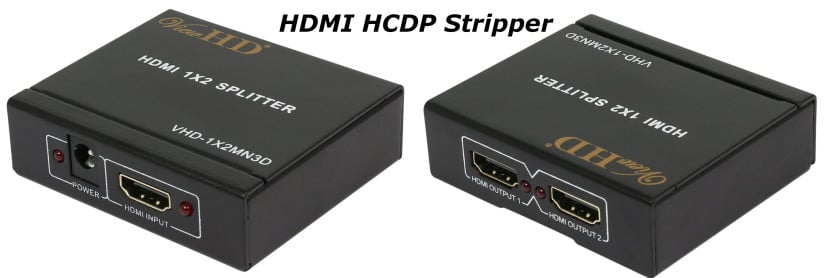
Click image for more details
Enjoy your game or movie! 🙂
Top Search Terms:
- hdcp stripper (113)
- hdcp remover (32)
- hdcp stripped from hdmi (16)
- hdcp strip (12)
- strip hdcp (11)
- hdmi hdcp stripper (11)
- hdcp strippers (9)
- hdcp striper (9)
- hdmi splitters that remove hdcp (8)
- hdmi splitter with hdcp stripper (6)
Saw your post on twitter. I have this stripper myself and FYI it also works to strip hdcp for PS4. Game on!
xoxoxo
Hi Mindy,
That is great news! My buddy Chad just got a new PS4 so I will have to let him know if he encounters any issues.
Thanks for commenting and have a great day 🙂
Best regards,
-J.D.
Hello J.D. Don’t know if you still check any questions posted here but I hope that you will. I need some help in solving an issue.
I recently purchased a 2nd smart Bluray player (Samsung BD-J6300). This model has 4K upscaling so It’s the latest model. I own an old CRT TV (Sharp 27C530). This was probably the last CRT tubes made by sharp in 2004. I’ve owed it for 12+ years. It still works. I recently cut the cord this year. So the purpose of the BD player is to connect to the internet and streaming aps via my wireless connection. One problem is that my TV is not HDCP compliant.
I tried researching this issue and had come across a HDMI to component adapter/converter. Basically it’s a adapter that allows you to connect an HDMI cable on one end while the other end holds the 5 component plugs (YPbPr). I tried connecting these wires to the TV and it didn’t work. The image was scrambled but when I inserted a DVD I did get sound. I could make out a little of the menu but not enough to access it.
I tried tossing this to a tech person at an electronic store. They had recommended to me a HDMI converter. When I went to purchase this item a more experienced sales person informed me that I had been misinformed because they had failed to tell me that the device does not support HDCP type devices. So right there I my first lesson on why the image on my TV was scrambled.
Again I searched around for ways to bypass HDCP. I’d hear of people talking about switches and splitters, or strippers. So I tried the whole splitter route which ended up leading to switchers. So I purchased a Belkin splitter, an extra HDMI cable. I connected the BD player to the switcher and the other cable to the HDMI to component/convert adaptor. For a small fraction of time I was able to see the Samsun logo floating around the screen. But there was a long line down the center of the screen. I switched the cables, no image, switched them back and I couldn’t even get the logo anymore. So from what I saw it was like I was getting closer but not close enough. I know there has to be a way. I have seen older vids where people have used older CRT monitors to hook up their PS4s, or Roku sticks. But I haven’t seen much vids where someone hooked up a smart BD player to anything older. Mostly, projector models, early HDTVs, flats, LCD that did or didn’t have HDMI jacks. At most they either have S-Video, DVI, composite and component. Their set ups are more complicated but they were before smart BD players. The whole point of their vids was to prove that you can do it. What I’m trying to do is make use of my older TV. I know you’re probably saying it would be cheaper to just buy a new TV. But I want to get a few my years out of this TV. And if there is a way that I can make this old CRT TV compliant with this new BD player I want to know what I can do to make it happen. If you have any tips on any extra equipment I can add to the HDMI to component adaptor please let me know that would bypass the HDCP issue making my old tv into a smart TV please send it my way.
Hi Karin, sorry for the late reply! Your setup should work with an HDCP stripper. The path you want is: BD player HDMI out, into the HDCP stripper’s input, then from the stripper’s HDMI output into an HDMI-to-component converter, then component cables to your CRT. The key is that the stripper needs to be before the converter in the chain, not after, since the HDCP handshake happens at the HDMI stage. If you already tried this order and still got a scrambled image, make sure the stripper has power and its activity LED (if any) is on, since without power it’s just a passthrough and won’t strip anything.
Thank you for this! Worked a trick for me. Now nothing can keep me from viewing!
Hi GoGo,
Thank you kindly for your comment 🙂
I am very glad this tip helped you watch your content!
Best regards,
-J.D.
Why did u need strip the HDMI at all?
Hi Zachi,
I have an old monitor that does not support the “High-bandwidth Digital Content Protection” (HDCP) system that many satellite and cable TV devices use with their HDMI outputs. A stripper helps remove the HDCP portion of the digital signal so I can utilize my old school monitor with newer content.
Best regards,
-J.D.
What is the power source for the stripper? Is it USB?
Can you connect a single non-HDCP monitor into an HDMI output or do you need to connect at least one HDCP compliant device to one of the HDMI outputs to allow the other to support a non-HDCP compliant monitor?
Hi Daryl!
Thank you for your great questions about this HDCP stripper. Here are the anwsers:
#1 It uses a small power supply that plugs into the wall (I will try to check the voltage, there is a chance it is 5V in which case you could use a USB cable to barrel plug to power it)
#2 When I used mine, it did not require a HDCP device (i.e. you could hook up a single non-HDCP monitor and it worked fine)… I don’t think they have changed anything about the adapter, but your mileage may vary (thankfully Amazon does have a good return policy if you encounter any issues).
Please let me know if you have any other questions and have a great day Daryl! 🙂
Best regards,
-J.D.
Hi,
I bought one for my old TV and I am still getting the HDCP unauthorised. Any idea why?
Hey Wendy, a few things to check. First, make sure the stripper is getting power from its USB cable since without power it won’t do anything. Second, some newer source devices (Blu-ray players, streaming boxes) have updated HDCP versions (2.2 or 2.3) that older strippers can’t handle. If the device outputting HDCP is fairly new, you may need a stripper that specifically supports HDCP 2.2. Can you tell me what device you’re connecting it to? That would help narrow it down.
I bought this exact splitter off amazon and all I get is a green screen. It does not strip the HDCP. Purchased beginning of Dec 2017. Am I doing something wrong? I just plugged everything in and tried it.
Hey Dave, a solid green screen usually means the stripper is outputting a signal but HDCP negotiation is failing (or the stripper isn’t working). A couple of things to try: make sure the USB power cable is plugged in and the unit has a few seconds to initialize before you turn on the source. Also, newer devices may use HDCP 2.2 which many of these budget strippers don’t handle. If the source device is a newer streaming box or Blu-ray player, that could be the issue. It’s also possible you got a counterfeit or non-functional unit since the market for these is full of clones that don’t actually work.
I have a Epson Projector that gives me an error HDCP enabled blue screen. Will this allow the HDMI signal to be played on the projector?
Hey Joe, yes, this should work for your Epson projector. The HDCP error means your projector is receiving an HDCP-encrypted signal and can’t authenticate it. Putting the stripper in between the source and the projector removes that restriction. The chain would be: source HDMI out, into the stripper input, then from the stripper’s HDMI output to the projector. Just make sure the stripper is powered on before you start the source device.
I have an older (but great) Panasonic DVD recorder that only has component inputs. I bought an HDMI -> component converter, but wouldn’t you know it . . . the signal from my Spectrum cable box seems to be HDCP encrypted, so the signal is not usable now going into the DVD recorder.
And then I saw this little device. Would this now work:
Spectrum cable box -> HDCP stripper -> HDMI/component converter -> DVD recorder
I wonder what the signal quality might be at the end???
curiously yours,
D
Hey Darrel, your proposed chain should work in theory: cable box HDMI to stripper input, stripper HDMI out to the HDMI-to-component converter, then component into the DVD recorder. The signal quality at the end will take a hit compared to native HDMI since component is analog and tops out at 1080i, but for recording purposes that’s probably fine. One thing to note: recording cable TV content may have additional technical and legal considerations depending on your jurisdiction and your Spectrum agreement, so factor that in.
Where can i purchase this model of splitter
Hey Francois, the post links to it on Amazon (the link in the post goes to an HDMI HDCP splitter/stripper). Searching Amazon for “HDMI HDCP stripper” or “HDMI splitter HDCP remover” will bring up several options in the $15-25 range. Just make sure whatever you buy supports the HDCP version your source device uses (1.4 vs 2.2 matters, and newer streaming devices tend to use 2.2).