CTRL+V to paste images & screenshots not working in Claude Code? [SOLVED]
So this took me a minute to realize, and if it saves even one person some frustration, it’s worth a post.
I’m working in Claude Code, trying to paste a screenshot or image like I can in VS Code with Claude Extension:
CTRL+V… nothing.
Try again. Nothing.
Different image. Still nothing.
A few thoughts are running through my head?
- Clipboard permission issue?
- Keyboard issue?
- Claude glitch?
- Am I losing my mind?
Turns out… nope. I was just using the wrong shortcut.
The magic combo is: ALT + V
After which you should see something beautiful like this:
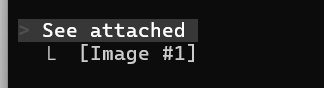
After that, I could do all the sweet image pasting that my heart desired lol
The difference between pasting txt and pasting images
Just remember:
- CTRL+V = text only
- ALT+V = images
So when you copy a screenshot and hit CTRL+V, Claude just stares at you. No error. No message. Just… silence which is no bueno, it’s like nothing happened.
With ALT+V, the image dropped instantly. 👍👍
How I’m using it now
This is actually super handy for:
- Pasting terminal output (when using remote access that is image only without clipboard etc.
- UI bugs/interfaces
- Error dialogs
- Anything visual I want Claude to look at but don’t want to leave the command line
No saving files. No uploading. ALT+V and then you’re done. Yay!
Final thought
No idea why this isn’t more obvious, but now you know and hopefully you won’t be caught off guard like I did thinking something’s broken. If you find any other weird Claude quirks, let me know. I’m clearly collecting these now. 😄