Claude Code CLAUDE.md: How to Write Project Instructions That Actually Work
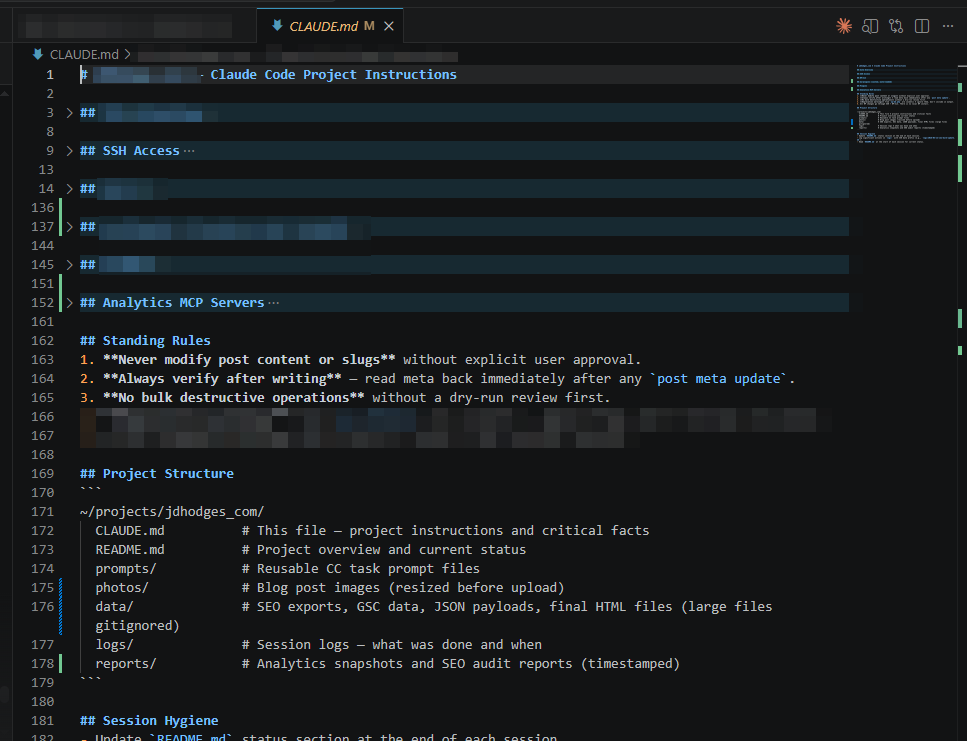
TL;DR: CLAUDE.md is a markdown file that gives Claude Code persistent project instructions. Put it in your repo root. Keep it under 200 lines. Use settings.json for permissions and hooks, CLAUDE.md for coding standards and workflow guidance. Down below the screenshot is a real working example and the full breakdown of what goes where.
What Is CLAUDE.md?
Every time you start a Claude Code session, the first thing it does is read your CLAUDE.md files. These are plain markdown documents that tell Claude how to work in your project: your coding standards, build commands, architecture decisions, common workflows. Think of it as a memo to a new teammate. Except this teammate reads it fresh every single session and follows it reliably. Without a CLAUDE.md: Claude makes reasonable guesses about your project. Sometimes those guesses are wrong. With a good CLAUDE.md: Claude already knows your stack, your conventions, and your preferences before you type a single prompt.
Where CLAUDE.md Files Live
There are three scopes, loaded from broadest to most specific:
| Scope | Location | Purpose | Shared? |
|---|---|---|---|
| User | ~/.claude/CLAUDE.md |
Your personal preferences across all projects | No (local only) |
| Project | ./CLAUDE.md or ./.claude/CLAUDE.md |
Team-shared project instructions | Yes (commit to git) |
| Managed | System-level (/etc/claude-code/ on Linux) |
Organization-wide policies | IT-managed |
The most specific file wins. If your user-level CLAUDE.md says “use tabs” but your project CLAUDE.md says “use 2-space indentation,” Claude follows the project file when working in that repo. You can also add CLAUDE.md files in subdirectories. Claude loads those lazily when it reads files in that directory. Useful for monorepos where different packages have different conventions.
A Real Working CLAUDE.md Example
Here is a simplified version of the CLAUDE.md I use for one of my projects. This is what actually works, not a theoretical template:
# Project Instructions

## Stack
- FastAPI + Alpine.js + SQLite
- Python 3.11, Ruff for linting
- `python server.py` starts dev server on localhost:8000

## Code Standards
- 2-space indentation in HTML/JS, 4-space in Python
- Type hints on all public functions
- No bare `except:` or `except Exception: pass`
- Error handling: fail loudly in dev, gracefully in prod

## Git Conventions
- Commit format: `type(scope): description`
- Types: feat, fix, refactor, style, docs, test, chore
- Create feature branches from `main`

## Build and Test
- Lint: `ruff check .`
- Test: `pytest tests/`
- Run both before claiming work is done

## Architecture
- API handlers: `src/api/`
- Database models: `src/models/`
- Frontend: `src/static/`
- Tests live alongside code with `.test.py` suffix
That is 25 lines. It covers the things Claude needs to know to write correct code in this project. Notice what is NOT in there: no life story, no paragraphs of explanation, no redundant context Claude can figure out from reading the code itself.
What Goes in CLAUDE.md vs. settings.json
This is where people get confused. Both configure Claude Code, but they work very differently: CLAUDE.md = guidance. Claude reads it and tries to follow it. Like a style guide for a human developer. settings.json = enforcement. Claude Code enforces it at the client level before Claude ever sees your prompt. Like a linter config or CI gate.
| Need | Use |
|---|---|
| Coding standards and conventions | CLAUDE.md |
| Build and test commands | CLAUDE.md |
| Architecture decisions | CLAUDE.md |
| Tool permissions (allow/deny) | settings.json |
| Environment variables | settings.json |
| Auto-format after edit (hooks) | settings.json |
| MCP server configuration | settings.json |
The rule of thumb: if you want Claude to know something, put it in CLAUDE.md. If you want Claude Code to enforce something, put it in settings.json.
Hooks: Deterministic Automation
Hooks are shell commands that fire at specific lifecycle points in Claude Code. They are configured in settings.json, not CLAUDE.md. Where CLAUDE.md says “please format code with Prettier,” a hook actually runs Prettier after every edit. No hoping, no forgetting. Common hook events:
- PreToolUse: runs before a tool executes (can block it)
- PostToolUse: runs after a tool succeeds (auto-format, lint)
- SessionStart: runs when a session begins (setup tasks)
- Stop: runs when Claude finishes responding
When to use hooks vs. CLAUDE.md: If the action must happen every time with no exceptions, use a hook. If it is guidance that allows for judgment calls, use CLAUDE.md.
The .claude/rules/ Directory
If your CLAUDE.md is growing past 200 lines, break it up. Create a .claude/rules/ directory and drop markdown files in it:
.claude/
  CLAUDE.md         # Main file (keep short)
  rules/
    frontend.md     # React/CSS conventions
    api.md          # API endpoint patterns
    testing.md      # Test requirements
Rules files can include a paths: frontmatter to scope them to specific files:
---
paths:
  - "src/api/**/*.ts"
---
# API Development Rules
- All endpoints require input validation
- Return 4xx for client errors, 5xx for server errors
Claude loads these at startup alongside your main CLAUDE.md.
Tips for Writing Effective Instructions
1. Be specific, not vague. “Use 2-space indentation” works. “Format code nicely” does not. Claude follows concrete instructions better than abstract goals. 2. Keep it under 200 lines. Every line of CLAUDE.md costs context tokens. You can check the impact with the /context command. If your CLAUDE.md is eating 5% of your context, it is too long. 3. Do not repeat what the code already says. Claude reads your package.json, your tsconfig, your Dockerfile. You do not need to list every dependency in CLAUDE.md. Focus on the things Claude cannot infer from the codebase itself. 4. Use imports for shared content. If you have instructions shared across projects, keep them in one file and import:
@~/.claude/shared-rules.md5. Instructions persist across /compact. Unlike things you say in conversation, CLAUDE.md content survives the /compact command. If something matters enough to say twice, it belongs in CLAUDE.md.
Common Mistakes
- Putting enforcement in CLAUDE.md. “Never edit files in /prod” written in CLAUDE.md is a suggestion. Written as a
permissions.denyrule in settings.json, it is enforced. Use the right tool. - Making it too long. I have seen CLAUDE.md files over 500 lines. Claude still reads them, but adherence drops and you burn context you need for actual work.
- Conflicting instructions across files. If your user-level CLAUDE.md says “use semicolons” and your project CLAUDE.md says “no semicolons,” Claude picks one arbitrarily. Check with
/memoryto see everything loaded. - Forgetting it reloads live. CLAUDE.md has a file watcher. Edit it mid-session and Claude picks up the changes. You do not need to restart.
Bottom Line
CLAUDE.md is the highest-leverage thing you can add to a Claude Code project. 20-30 lines of clear, specific instructions and Claude goes from “reasonable guesses” to “knows your project.” Keep it short, keep it specific, commit it to your repo so your team benefits too. For the full scope of Claude Code configuration, check out my guides to Claude AI custom instructions (for the web app), Claude project instructions with examples, and the /context command for monitoring token usage.
I love to maximize productivity and for me that involves a triple monitor setup with a Keychron K2 Pro mechanical keyboard and LG 27″ 4K USB-C monitor. Having the code on one screen and Claude’s output on the other makes all the difference, with a 3rd for docs and review items. See my full Claude Code workstation setup.
As an Amazon Associate I earn from qualifying purchases.