Author Archives: J.D. H.

Elfa walk in closet (with 25% discount coupon) 2016
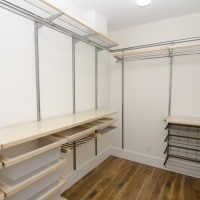
Elfa has some wonderful closet designs, but they can be very expensive. Thankfully there are easy ways to save 15%-30% on Elfa closets! 🙂 Click below or post in the comments section to find out how: NOTE: if you are looking for a less expensive closet solution, there are some viable options out there: Configurations Custom Closet Organizer, Deluxe, 4 to 8 Foot, Titaniumhttp://www.amazon.com/gp/product/B0009WG328/Make the most of your closet space with the adjustable and customizable Configurations Closet system. This system is easy
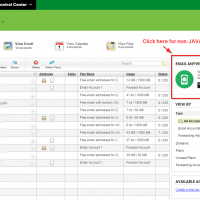
Setup GoDaddy POP/SMTP email instructions [without JAVA!]

GoDaddy’s automated email setup control app on requires the JAVA runtime, which can be a major pain to have installed on your computer. To get around this, simply use their alternative setup info option: EMAIL ANYWHERE/ANYTIME This will show you the setup instructions for your device, I generally choose ‘Android’ as it shows you all the POP/SMTP info that you need and it works well for other devices. You can even have them email you the instructions to another email account or print

Show passwords in FileZilla [Portable]

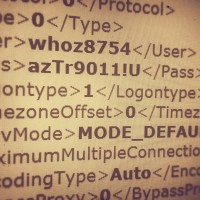
Recently I needed to regain access to a client’s FTP site where the password had been lost. Resetting the password was going to be problematic so instead we recovered the password by accessing FileZilla’s saved password list: For Portable FileZilla: FileZillaPortable\Data\settings\sitemanager.xml For regular FileZilla it should be similar to: %APPDATA%\filezilla\sitemanager.xml Open the sitemanager.xml file and browse to the Pass listing for the particular site that you need access to: This instructions are for Windows. I hope they are helpful to you 🙂

Online PHP code editors

Here are some rather interesting PHP code editors that run entirely online. They can be particularly helpful if you need to be able to develop from any machine anywhere (as long as you have an internet connection). 🙂 Online Code Editor – Codeanywherehttps://codeanywhere.net/Codeanywhere is compatible on all major browsers so you can work from the one you like, also if you on your mobile you can download the native mobile apps for iOS and Andriod. PhpFiddle – PHP/MySQL online IDE and execution

Olympus OM-D not showing live view [SOLVED]

If your Olympus micro four thirds camera ever refuses to show live view, you may need to press the following button: If you are having this problem, I hope this tip helps! 🙂 Top Search Terms:https://www.jdhodges.com/blog/olympus-omd-live-view-fix-solved/ (7)olympus no liveview (2)olympus camera live view (1)olympu live view not showing (1)olympis live view (1)my olympus camera isnt showing the menu on the screen (1)liveview olympus em 10 2 (1)liveview broken omd em5 (1)em10 live view (1)www.jdhodges.com (1)

Downloading and extracting WordPress via command line

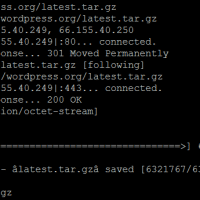
# wget http://wordpress.org/latest.tar.gz –2015-05-04 10:44:46– http://wordpress.org/latest.tar.gz Resolving wordpress.org… 66.155.40.249, 66.155.40.250 Connecting to wordpress.org|66.155.40.249|:80… connected. HTTP request sent, awaiting response… 301 Moved Permanently Location: https://wordpress.org/latest.tar.gz [following] –2015-05-04 10:44:46– https://wordpress.org/latest.tar.gz Connecting to wordpress.org|66.155.40.249|:443… connected. HTTP request sent, awaiting response… 200 OK Length: 6321767 (6.0M) [application/octet-stream] Saving to: âlatest.tar.gzâ 100%[==========================================================>] 6,321,767 6.63MB/s in 0.9s 2015-05-04 10:44:47 (6.63 MB/s) – âlatest.tar.gzâ saved [6321767/6321767] # tar xfz latest.tar.gz 🙂

HP 23xi black border when using HDMI [SOLVED]

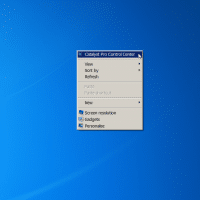
If you connect your HP 23xi display to a PC with a ATI or NVIDIA video card you may encounter a black border around the edge of the screen. Thankfully, there is an easy fix! For ATI/AMD, change scaling options: Right Click on Desktop Select “Catalyst Pro Control Center” Advanced -> ATI Catalyst Control Center -> Graphics -> Desktops & Displays Please select a display. (Click the black downaward arrow in the corner of the display graphic) -> Configure Scaling

« Older Entries Recent Entries »