Category Archives: WordPress tips

WordPress post/page revision side by side comparison? [SOLVED]
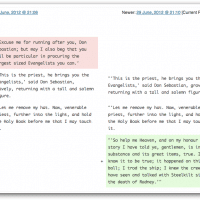
Q. Do you know of a plugin that will show my side-by-side page changes (compare what has changed side by side) it is imperative that I have good revision capabilities and workflow management for my school projects! – Ellyn O.C. A. Hi Ellyn, thank you for your question! If you use the latest version of WordPress then you will have some nice revision capabilities at your fingertips: You can find out more about handy WordPress revision capabilities here: WordPress â€ș Post Revisions I

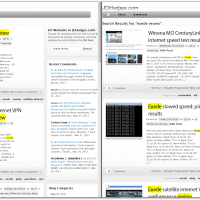
Drastically improved search for jdhodges.com (WordPress based blog)

While using the internal search feature on my blog recently, I realized how worthless it was. As an example, searching for ‘exede review‘ came up with a bunch of mildly relevant results but by far the most relevant search result was on the second page. Not good. 🙁 Default WordPress search stinks The reason this happened is that by default WordPress sorts search results by date. So if you happen to have some recent posts that contain a keyword, they will

How to fix Customized Recent Comments duplicate comments

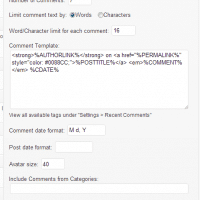
Customized Recent Comments is a great plugin for displaying recent comments on your WordPress blog. It has all the features I need and requires minimal install and setup. With most ‘recent comments’ plugins/widgets, if you (the blog owner) respond to a bunch of comments at once, you end up having your comments take up the entire recent comments listing 🙁 Thankfully, one of my favorite features of the plugin is its ability to exclude particular commenters from being listed. 🙂 However, the only issue I have

JPEG compression and JPEG quality in WordPress

While working on part of the Branson’s Nantucket website I needed to find a way to reduce page load times. Of course there are many ways to do this but one thing that immediately stood out was JPEG file size. Some JPEGs were 400kb+ and there were a number of them to be loaded on one page. That may be fine for people with super-fast internet connections, but alas many people (myself included) sometime make due with relatively slow connections. What

Custom menus CSS in WordPress

While working on a project I needed to use a particular CSS class for a particular WordPress menu item, thankfully the following resources told me how. The first link was the most helpful, but all of them have some insights into menus on WordPress. 🙂 How to Add a Custom Class to a WordPress Menu Item – SevenSparkhttp://sevenspark.com/tutorials/how-to-add-a-custom-class-to-a-wordpress-menu-itemThis is a question I get a lot related to UberMenu – WordPress Mega Menu Plugin, though it’s actually baked into WordPress Core.

Redirect a particular WordPress Page to another site URL?

Question. Does any one know how to redirect any WordPress Page to a particular other website? Pretty urgent, please help if you can. Thx Laurie Answer. Yes, there are some great plugins that can do exactly what you are requesting! Here are my top three choices: #1 Quick Page/Post Redirect Plugin « WordPress Pluginshttp://wordpress.org/extend/plugins/quick-pagepost-redirect-plugin/Redirect Pages/Posts to another page/post or external URL. Has edit box as well as global options. Specify the redirect Location and type. For PHP5+ Download Version 5.0.2 #2

Test of Blogsy

Testing out the Blogsy iPad app…   So far it is pretty cool. Nice photo uploading and integrated browser. I have not been impressed with the (in)ability to easily and seamlessly deal with linking 🙁 Also the featured image implementation is not as straightforward as I’d hoped for.     Top Search Terms:blogsy (1)blogsy featured image (1)blogsy for macbook free download (1)blogsy for windows (1)blogsy macosx (1)blogsy windows (1)ipad apps (1)

Google Page Speed Service (speed up your website with Google)

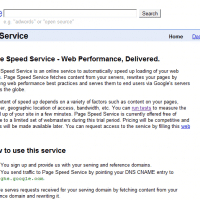
I came across Google’s Page Speed Service today, here is the description of their service: Page Speed Service is an online service to automatically speed up loading of your web pages. Page Speed Service fetches content from your servers, rewrites your pages by applying web performance best practices and serves them to end users via Google’s servers across the globe.  […] You can run tests to measure the speed up of your site in a few minutes. Page Speed Service is currently offered free

« Older Entries Recent Entries »