Category Archives: Software Tips

BCM20702A0 Dell drivers for Windows 7 and Windows 8 [SOLVED!]
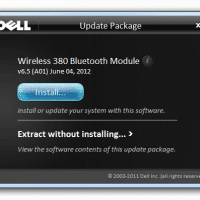
Q. Hello, I have a Dell laptop with an Unknown Device that has ‘BCM20702A0’ listed on it… do you know what driver I can download to to fix it? –Raymond K. A. Here is the download link for the driver that should solve your BCM20702A0 Unknown Device issue: [download id=”10498″ format=”1″], Dell dl link   NOTE: after downloading the drivers you may need to select the ‘Extract without installing… >’ option first and then run the extracted driver setup program 🙂 Otherwise just pressing the initial
Where can I find Intel NUC drivers?!

Here are two URLs directly from Intel: http://downloadcenter.intel.com/Product_Filter.aspx?ProductID=3590 http://downloadcenter.intel.com/Product_Filter.aspx?ProductID=3589 🙂 Top Search Terms:http://downloadcenter.intel.com/scripts-df-external/product_filter.aspx?productid=3590 (17)downloadcenter.intel.com/scripts-df-external/product filter.aspx?productid=3590 (11)nuc drivers (7)intel nuc drivers (7)downloadcenter.intel.com/scripts-df-external/product_filter.aspx?productid=3590 (6)http://downloadcenter.intel.com/scripts-df-external/product filter.aspx?productid=3590 (5)http://downloadcenter.intel.com/scripts-df-external/product filter.aspx?productid=3590e (4)downloadcenter.intel.com/scripts-df-external/product 3590 (3)www.downloadcenter.intel.com/scripts-df-external/product_filter.aspx?productid=3590 (3)http://downloadcenter.intel.com/scripts-df-external/product_filter.aspx?productid=3589 (3)

Gmail now adds unsubscribe options for spam

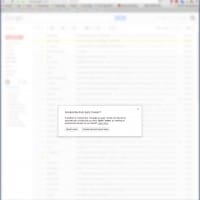
While marking some spam today in Gmail, I was surprised to find that it automatically offers an ‘unsubscribe’ option! Pretty cool 🙂 I love new Gmail innovations and I give this one a 5 out of 5 stars… Top Search Terms:gmail spam options (2)gmail how to unsubscribe from spam (1)gmail unsubscribe options (1)mark hotmail or yahoomail or rocketmail or gmail 50..100 (1)unsubscribe options (1)

JPEG compression and JPEG quality in WordPress

While working on part of the Branson’s Nantucket website I needed to find a way to reduce page load times. Of course there are many ways to do this but one thing that immediately stood out was JPEG file size. Some JPEGs were 400kb+ and there were a number of them to be loaded on one page. That may be fine for people with super-fast internet connections, but alas many people (myself included) sometime make due with relatively slow connections. What

aimersoft vs daniusoft: Daniusoft DRM Converter and Aimersoft DRM Converter

Q. Hello I need to remove DRM from Amazon and iTunes so I can convert them play them on my Android tablet, I heard that Aimersoft bought Daniusoft, so which is the best version to buy: Daniusoft DRM Converter -or- Aimersoft DRM Converter? -R.W. A. Of the two, Aimersoft DRM Converter is the one to buy, and here is why: Both Daniusoft DRM Converter and Aimersoft DRM Media Converter can help you convert protected WMA to DRM-free MP3 files. Their functions and stability are

n2acards.com coupon code! for Nook (HD+ & others) to Android

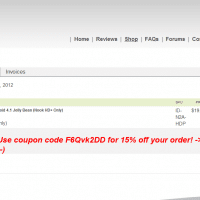
I recently purchased a Nook HD+ and the n2a card to go along with it. Here is a coupon code you can use during checkout to save some moolah: F6Qvk2DD Enjoy! 🙂 [end] Top Search Terms:n2a coupon code (307)n2a discount code (64)n2a coupon (56)n2acards coupon code (36)n2a card coupon code (35)n2a promo code (34)n2a cards discount code (33)n2a card discount code (32)n2a cards coupon code (31)n2a cards coupon (27)

Chrome Extensions For Tabs Management

Really nice listing of tab extensions for Google Chrome: 10 Useful Chrome Extensions For Efficient Tabs Management. I am evaluating three of the extensions from this list and I think one of them is going to be just the ticket! 🙂 Top Search Terms:chrome tab management (1)chrome tab managment (1)chrome tabs mahagement (1)error 103 (net::err_connection_aborted): unknown error (1)tabs management in chrome (1)

How to stop Adobe Lightroom from popping up when a SD card is inserted

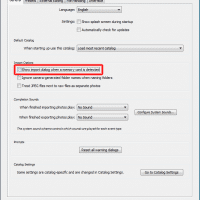
For the past couple weeks Lightroom has been annoying me every time I insert a SD card or even plug in an external USB hard drive. Finally it bugged me enough I went to Lightroom’s settings screen: Edit->Preferences->General and did the following: No more popup!!! 🙂 Top Search Terms:how to keep lightroom from popping up (2)insert sd card starts lightroom (2)how to disable lightroom usb popup (1)how to avoid lightroom from popping (1)how do i stop lightroom opening up when

« Older Entries Recent Entries »