How to Make a Post Sticky in WordPress (Pin to Front Page)
If you want to pin a blog post to the top of your WordPress front page so it always shows up first (regardless of when it was published), WordPress has a built-in feature for that called “sticky posts.” Here’s how to do it and a few things worth knowing.
⚡ TL;DR
Go to Posts > All Posts, hover over the post you want to pin, click Quick Edit, check “Make this post sticky”, and click Update. That’s it. The post will now appear at the top of your front page above all other posts.
📌 How to Make a Post Sticky in WordPress
- In your WordPress admin dashboard, go to Posts > All Posts
- Hover over the post you want to sticky and click Quick Edit
- Look for the “Make this post sticky” checkbox in the bottom-right area of the Quick Edit panel (near the Status dropdown)
- Check the box and click Update
Here’s what the Quick Edit panel looks like. The sticky checkbox is highlighted in red:
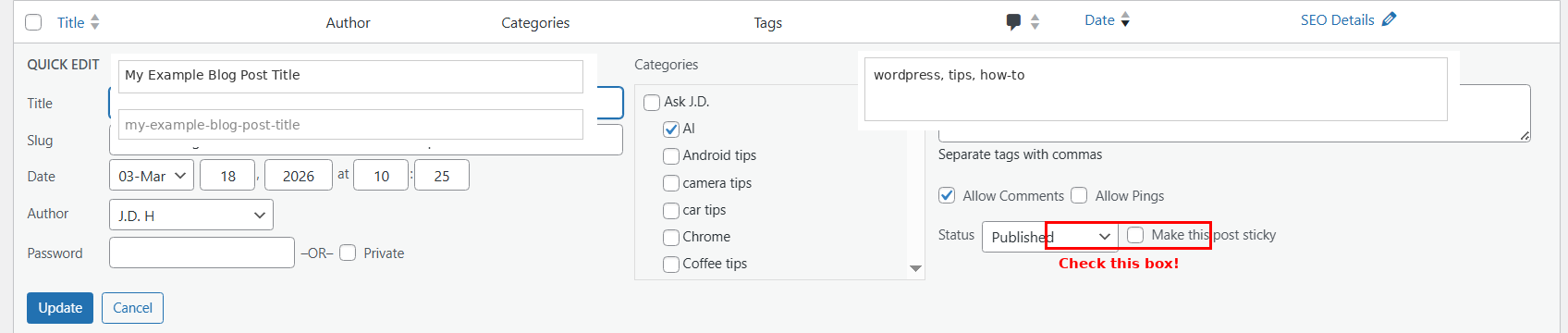
(The “Make this post sticky” checkbox is in the bottom-right corner of the Quick Edit panel)
That’s all there is to it. Your post will now be pinned to the top of the front page.
🤔 What Does “Sticky” Actually Do?
A sticky post floats to the very top of your blog’s main page (or any page that displays your latest posts), ahead of everything else, regardless of its publish date. Think of it like pinning a tweet or pinning a message in a chat. It’s a great way to highlight your best content, an important announcement, or a post you want every visitor to see first.
A few things to keep in mind:
- It only affects the main blog listing. Sticky posts don’t get special treatment on category pages, archive pages, or search results.
- You can sticky more than one post. If you do, all the sticky posts float to the top, but they’re ordered by date among themselves (newest sticky first).
- Your theme controls the styling. Some themes add a visual indicator (like a “Featured” badge or a different background color) to sticky posts. Others don’t style them any differently at all. If you want a visual callout, check your theme’s documentation or add some custom CSS targeting the
.stickyclass that WordPress automatically adds. - There’s no “priority” system. WordPress doesn’t support tiers of stickiness. Every sticky post has equal weight, sorted only by date.
📚 Want to go deeper with WordPress?
If you’re looking for a comprehensive, beginner-friendly guide to WordPress, check out WordPress for Beginners 2026 by Dr. Andy Williams. It’s a visual step-by-step walkthrough with nearly 600 screenshots, updated annually. No coding or technical background required.
📖 Browse WordPress Books on Amazon
As an Amazon Associate I earn from qualifying purchases.
⚙️ The Classic Editor Method
If you’re using the Classic Editor instead of Gutenberg (the block editor), the process is slightly different:
- Open the post for editing
- In the Publish meta box on the right side, click “Edit” next to Visibility: Public
(NOTE: you HAVE to click “Edit” FIRST to then get the “Stick this post to the front page” option)
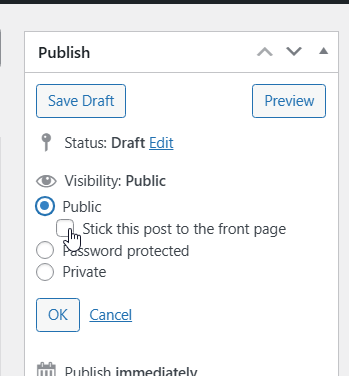
- Check “Stick this post to the front page”
- Click OK, then Update the post
Same result, just a different path to get there.
🚨 How to Unstick a Post
Changed your mind? Just reverse the process:
- Go to Posts > All Posts
- Quick Edit the sticky post
- Uncheck “Make this post sticky”
- Click Update
The post goes right back to its normal chronological position. No content is changed or lost.
💡 Tips for Using Sticky Posts Effectively
- Keep it to one or two. If you sticky five posts, nothing feels special anymore. Pick your single best piece of evergreen content or your most important announcement.
- Review periodically. A sticky post from six months ago that’s no longer relevant does more harm than good. Set a reminder to revisit it.
- Combine with a “Featured” label. If your theme doesn’t automatically style sticky posts differently, consider adding a short note at the top of the post (or some custom CSS) so visitors understand why it’s pinned at the top.
Got questions about sticky posts or other WordPress tips? Drop a comment below!