MacBook Neo Tap to Click (how to turn on)
The MacBook Neo launched recently and at $599, Apple’s cheapest laptop ever is a legitimately impressive machine. I’ll have more to say about the Neo overall soon, but I wanted to quickly share something that tripped me up right out of the box: the trackpad.
TL;DR: The MacBook Neo’s trackpad uses a mechanical click instead of the haptic feedback found on other MacBooks. If that bugs you, go to System Settings > Trackpad > Point & Click and toggle on “Tap to click.” It transforms the experience IMHO. Read on for the details and why Apple ships it turned off.
The Neo’s Trackpad is Different
If you’ve used a MacBook Air or MacBook Pro from the last decade, you’re used to Apple’s Force Touch trackpad. That’s the one with haptic feedback that simulates a click using a Taptic Engine. It feels like a real click, but the trackpad surface never actually moves. It’s clever engineering and it’s become one of Apple’s signature touches.
The MacBook Neo doesn’t have that.
Instead, the Neo uses a mechanical Multi-Touch trackpad. It physically clicks when you press it down, more like the older MacBooks (pre-2015) or like some Windows laptops. You also lose Force Touch features like the “hard press” for Quick Look previews.
To be fair, the Neo’s mechanical trackpad is well executed. Gruber at Daring Fireball said he kept forgetting the trackpad was different, which is high praise. But here’s the thing: coming from high-end laptops (ThinkPads, etc.), the physical click just feels… off to me. Sometimes I would try to click and couldn’t tell if it registers (did I press hard enough?) It’s not terrible exactly, but not what my fingers expect.
The Fix for me: Tap to Click
My strong preference on any laptop is tap-to-click (at least as an option) or a TrackPoint 😉. With tap-to-click, tust tap the trackpad surface lightly with one finger to register a click. No pressing, no mechanical actuation, no effort and VERY few missed clicks. It’s what I’ve used on many Windows laptop for years and it works beautifully.
Here’s the mildly infuriating part for a Windows/Linux user testing out a Mac: macOS ships with tap-to-click disabled by default. This isn’t just a Neo thing. Every Mac, even the $3,000+ MacBook Pro, comes out of the box requiring you to physically press the trackpad to click. Apple has done this forever.
How to Enable It
Thankfully it takes about 10 seconds:
Open System Settings (click the Apple menu in the top-left corner)
Search for “tap” in the search bar, or navigate to Trackpad
Click the Point & Click tab
Toggle “Tap to click” to ON (it says “Tap with one finger” underneath)
That’s it. Here’s what the settings screen looks like:
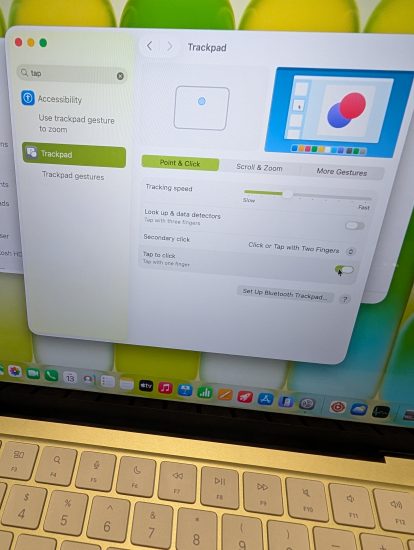
(screenshot: Trackpad settings with Tap to click enabled)
And here it is in the default OFF position, which is how it ships:
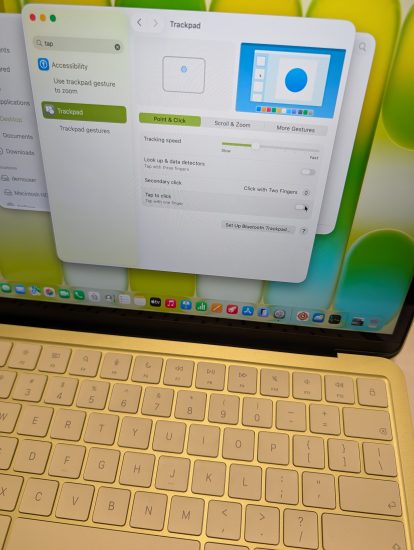
(screenshot: Trackpad settings with Tap to click disabled)
The Difference is Night and Day
With tap-to-click enabled, the Neo’s trackpad goes from “pretty good” to genuinely great. Taps are responsive, accurate, and feel natural. The trackpad surface is smooth and generously sized.
You lose nothing by enabling this. You can still physically press the trackpad for a click if you want to. Tap-to-click just gives you a second, easier option.
In my opinion, this should be the default, especially on the Neo where it completely sidesteps the “mechanical vs. haptic” debate. When you’re just tapping, you can’t even tell the difference between the Neo’s trackpad and a MacBook Air’s. It’s that good. If you’re switching from Windows and trying Mac OS, give it a try! thumb👍
Quick Take on the Neo Overall
I’ll save the full review for another post, but a few first impressions while I’m here. The Citrus color is fun (it shifts between green and yellow depending on the light). The keyboard looks great and types pretty well but lacks backlighting, which is a real omission in 2026. Performance on the A18 Pro chip is snappy for everyday tasks but it’s not like the huge core count laptops I’m used to and of course that 8GB of RAM is almost a sin in 2026. The 13-inch Liquid Retina display is bright and sharp. And at $599 ($699 for the model with Touch ID and 512GB storage), it’s genuinely hard to believe this is a Mac so kudos to Apple!
More to come. In the meantime, if you just unboxed a Neo, go turn on tap-to-click and give it a try.
Got questions about the Neo or your trackpad settings, or another tip? Drop a comment below! I’m always learning and I am definitely not the last word on this.