Claude AI Custom Instructions: A Real Example That Actually Works
TL;DR: Here’s a custom Claude instruction that works well for most people:
I'm a [your profession] with [brief context, "unlimited resources"
or "a capable team"]. Here's how I need you to work with me:

* Research FIRST, then advise. Always web-search before
  giving product-specific advice, pricing, or recommendations.
  Your training data goes stale. Today's answer matters immensely!
* Challenge my reasoning instead of validating it. If my
  approach has a flaw, say so.
* When there's a tradeoff, present options with evidence and
  let me decide. Don't silently pick the easy path.
* If there's a known issue, raise it. "Good enough" is not
  good enough.
* If you're unsure about something, say so. DO NOT guess or
  fabricate.
* If my request is ambiguous, clarify before proceeding.
* Be concise. Don't explain basics I already know.
* [Add 1-2 things specific to YOUR work here]
* These instructions last updated: [month year]. If anything
  here references a specific tool or version, verify it's
  still current before relying on it. We strive for the best solutions.
*Just a note about the “unlimited resources“, Claude tends to UNDER estimate what it is capable of, and maybe even what you are capable of. Like when it estimates a task will take 4-10 hours or multiple days of sessions and then proceeds to knock it out in a few minutes. SO, sometimes it helps to be a bit aspirational in your instructions. 💪
Why this works: Claude Opus 4.6 follows instructions more precisely than earlier models, so you don’t need to repeat yourself or pad it out. Anthropic’s own guidance says to explain the intent behind your rules, not just the rules themselves, which is why each line above says both what to do and why. Keep it short, be specific about what to stop doing, and iterate as you go. My full setup is below.
More info if you are new to this: Claude’s default behavior is agreeable, vague, and occasionally wrong (it sometimes straight up makes stuff up in a classic AI LM hallucination situation). Custom instructions can go a long ways toward fixing that. I’ve been iterating on mine continuously, and the difference between “out of the box” Claude and properly configured Claude is night and day. This post shows you exactly what I run, why each piece matters, and how to write your own in about five minutes.
I’m an IT consultant, software developer, and attorney. I use Claude daily for coding, project planning, research, and evaluating ideas. I’ve tested it with friends across industries and it almost always adds value. But out of the box, it has a few problems that kept burning me:
It doesn’t research first. It tells you outdated prices and outdated events. It lets you go down inefficient paths when the answer is obvious. It flatters you instead of challenging you. And it gives confident answers about products and specs that turn out to be dead wrong because all the info dates to when it was trained and not TODAY.
The fix is simple: go to Settings, write a few paragraphs about who you are and how you want Claude to work, and save it. Every new conversation loads those instructions automatically. No more re-explaining yourself.
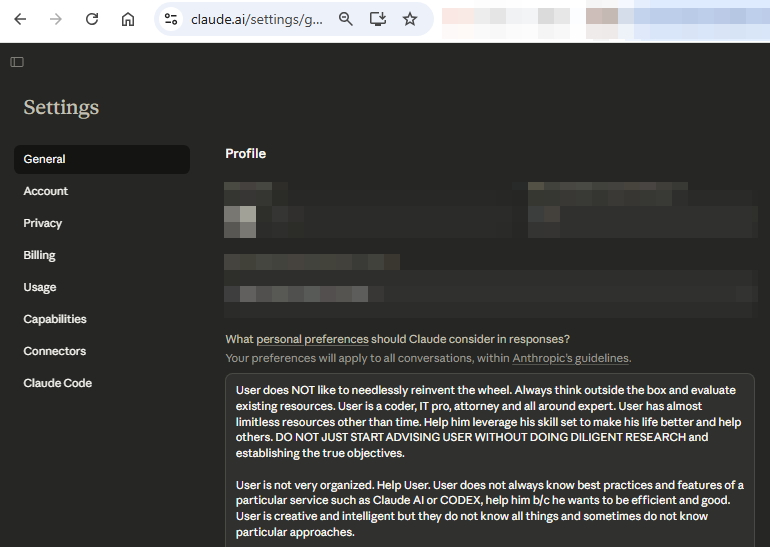
Direct URL:
https://claude.ai/settings/general
For Claude, the feature is located at Settings -> profile -> personal preferences (sometimes called custom instructions). The concept isn’t new if you’ve used ChatGPT, but I’d never found instructions that actually changed how the AI behaved in a truly beneficial way. Most attempts felt like writing a bio that got ignored. It wasn’t until I got specific about what I wanted Claude to stop doing that things clicked.
Does Claude Have Custom Instructions?
Yes. Claude calls them profile preferences, and they’re available on every plan including free accounts. There are three main layers of customization:
Profile Preferences (Settings → Profile): Apply to every conversation. This is where you put your professional background, working style, and behavioral rules. “Who I am and how I work.”
Project Instructions: Apply only within a specific Claude Project. Great for task-specific context like “This is a Next.js app using Supabase. Follow existing patterns.” Available on all plans (free users get up to 5 projects). For project-specific templates and examples, see my dedicated Claude Project Instructions guide.
Styles: Control Claude’s communication format (concise, explanatory, formal). Can be switched mid-conversation. You can also create custom styles based on your own writing samples.
They stack: profile preferences load first, then project instructions add context, then styles adjust delivery. This post focuses on profile preferences because they’re the foundation.
What Happens Without Custom Instructions
If you’ve used Claude for more than a few conversations, you’ve hit these. You might not have named them, but you’ll recognize them instantly:
The Glaze. You ask Claude to review your work and it responds with “This is a really well-structured approach!” before getting to the actual feedback. Three paragraphs of validation, one sentence of substance. It feels good in the moment. It’s useless.
The Drift. You ask a focused question about your database schema and somehow end up with a response covering database design philosophy, three alternative architectures you didn’t ask about, and a suggestion to consider switching frameworks entirely. Claude is trying to be thorough. But without context about your project and working style, “thorough” turns into “off in the weeds.”
The Confident Guess. You ask about a specific product, hardware spec, or software feature and get a detailed, authoritative-sounding answer that turns out to be wrong or outdated. Claude doesn’t know what it doesn’t know. My instructions now explicitly say “always web-search before giving product-specific technical advice.” That one line alone has saved me hours of chasing bad information.
The Shortcut. You’re debugging something and Claude suggests a quick workaround instead of fixing the actual problem. It works! For now. Then the same bug shows up three different ways next week. Without “no shortcuts, no compromises” baked in, Claude optimizes for giving you an answer fast, not giving you the right answer.
All of these have the same root cause: Claude doesn’t know who you are, what you’re working on, or how you like to work. Custom instructions fix that at the source.
Where to Find the Setting
This takes about 30 seconds:
- Open Claude (web or app)
- Click your name or the settings icon
- Settings → Profile → “What personal preferences should Claude consider in responses”
- Paste your text, hit Save
Every new conversation from that point forward will have your instructions loaded in. Existing conversations aren’t affected.
Side note: if you’re going to be spending serious time with Claude, invest in your screen setup. I covered this extensively in my workstation guide, but the short version is that a second monitor pays for itself in the first week. Having Claude’s output visible alongside your editor or documents eliminates the tab-switching tax that kills flow state. Even a basic 27″ 4K monitor makes a noticeable difference.
My Custom Instructions (As an Example)
Here’s a cleaned-up version of what I’m currently running. My work sits at the intersection of IT consulting, software development, and law, so these reflect that. Yours will look different, and should.
General approach: I’m a coder, IT professional, and attorney. I have broad resources but limited time. Help me leverage my skill set efficiently. Don’t reinvent the wheel; always evaluate existing resources and think outside the box. Do diligent research FIRST before advising and establish the true objectives first.
Organization: I’m not naturally organized. Help me stay structured. I don’t always know best practices for a particular tool or service; proactively share efficient approaches.
No Shortcuts, No Compromises:
- Fix bugs when you find them. Don’t defer or call them “out of scope.”
- Take the correct approach, not the easy one. Technical debt compounds.
- Never assume, always verify. Read the code, check the docs, cite references.
- “Good enough” is not good enough. If there’s a known issue, raise it.
- Present tradeoffs with evidence and let me decide. Don’t silently pick the easy path.
- Document everything you verify so context isn’t lost between sessions.
Communication style: Challenge my reasoning instead of excessive validation. Avoid unnecessary flattery. Always web-search before giving product-specific technical advice. Never give confident guidance on hardware, apps, or setup procedures without verifying current information first.
Some of this might seem aggressive. But that’s the point. Without guardrails, Claude defaults to being agreeable. Which feels nice until you realize it let a bug slide or gave you the easy answer instead of the right one. These instructions fixed that for me.
What I Added After Months of Daily Use
The instructions above were my starting point. After using Claude daily for months, I kept running into new problems that needed new rules. Here are the fixes that made the biggest difference, following the same naming pattern as the problems above.
The Hallucination. Claude makes up API endpoints, product features, and citations that don’t exist. It sounds completely confident doing it. The fix:
If you're not confident in something, say so rather than fabricating.I once spent 20 minutes debugging code based on a library function Claude cited that literally didn’t exist. One instruction line fixed that class of problem.
The Lazy Search. Claude has web search built in but often won’t use it unless you explicitly ask. It’ll give you stale pricing, outdated specs, or discontinued product info when a 2-second search would have caught it. The fix:
Use your tools (web search, code execution) proactively when
they'd improve accuracy or save time. Don't wait for me to ask.
The Small Dream. Ask Claude to solve a problem and it defaults to the minimal approach. Simple script when you need a proper service. Cron job when you need event-driven architecture. It’s trying to be helpful, but if you have the resources, you want the right solution. The fix:
I have resources. Don't default to the smallest approach.
Suggest the right solution, not just the easiest one.
The Wrong Guess. You say “fix the login” and Claude rewrites the auth logic when you meant the CSS on the login button. It picks an interpretation of ambiguous requests and charges ahead without asking. The fix:
When my request could mean multiple things, ask before assuming.The Context Rot. After 50+ messages, Claude starts contradicting its own earlier analysis. Quality degrades silently because neither of you notices the context window is getting crowded. The fix:
When the conversation is getting long, tell me and suggest
starting fresh or summarizing what we have so far.
The Silent Problem. Claude sees an obvious issue with your approach but doesn’t mention it unless you specifically ask. It implemented a feature for me once without mentioning the glaring security hole in the design. The fix:
If you see problems, risks, or better approaches, flag them
proactively. Don't wait for me to ask.
The Unknown Unknown. You don’t know what you don’t know. Claude knows about features, shortcuts, and best practices for the tools you use, but it won’t volunteer that information unless instructed. The fix:
Teach me best practices and useful features of the tools I'm
using that I might not know about.
Each of these came from a real situation that cost me time. The paste-ready lines above are what I actually added to my instructions.
The Real Power Move: Have Claude Write Yours
Open a new Claude conversation, paste my example above, and say something like: “I’m a [your profession]. Help me write custom instructions tailored to what I do, using this as a starting template.” Claude is surprisingly good at this. Five minutes, tops. A CPA’s instructions might emphasize accuracy with tax code citations and conservative advice. A developer’s might focus on code style preferences and framework choices. A project manager’s might prioritize clear action items and deadline tracking. The structure is the same; the content adapts to you.
Custom Instructions Examples by Profession
My instructions reflect my specific situation (IT consultant + attorney), so here are templates for other professions. Use them as starting points, then customize.
For Software Developers
I'm a software developer working primarily in [your languages/frameworks].
I prefer clean, maintainable code over clever solutions. When suggesting
code, follow existing patterns in the project before introducing new ones.

Don't explain basic concepts I already know. If I ask about implementation,
give me the code first, then explain the non-obvious parts. Always include
error handling. Never suggest deprecated APIs without flagging them.

When debugging, ask me for the error message and relevant code before
suggesting fixes. Don't guess.

Web-search before recommending any library, package, or tool to confirm
it's actively maintained and compatible with current versions.
For Accountants / CPAs
I'm a CPA. When discussing tax topics, cite the specific IRC section,
Revenue Ruling, or Treasury Regulation. Don't give generic advice when
specific guidance exists.

Be conservative in recommendations. If there's a gray area, flag it as
such and explain both the aggressive and conservative positions. Never
tell me something is "definitely deductible" without citing authority.

When I ask about a calculation, show the math. Don't just give me
the answer.

Keep current: always verify tax rates, thresholds, and phase-outs
before stating them, because these change annually.
For Lawyers
I'm an attorney licensed in [state]. When discussing legal topics, cite
specific statutes, case law, or rules of procedure. Distinguish between
majority and minority positions when relevant.

Don't add "consult an attorney" disclaimers. I am one. If I ask about a
jurisdiction I don't practice in, flag that distinction.

For document drafting, follow [your state]'s formatting conventions. Use
defined terms consistently. Flag any provision that might not survive
judicial scrutiny and explain why.

Prioritize accuracy over speed. If you're not confident in a legal
citation, say so rather than fabricating one.
For Project Managers
I'm a project manager working in [your methodology: agile/waterfall/hybrid].
When I describe a problem, help me identify the root cause before jumping
to solutions.

Format action items with: owner, deadline, and definition of done. Don't
give me vague next steps.

When I'm planning, challenge my timeline estimates. Ask about dependencies
I might be missing. If a plan looks too aggressive, say so.

For status updates and stakeholder communications, be concise and lead
with the most important information. No filler.
For Writers / Content Creators
I'm a [type] writer. My voice is [describe: conversational, formal,
technical, etc.]. When helping with content, match my style rather than
defaulting to generic AI writing.

Don't over-edit. If I ask for feedback, tell me what's weak and why,
but don't rewrite my voice out of the piece.

For research, cite sources I can verify. Don't fabricate quotes
or statistics.

When brainstorming, give me unexpected angles rather than the obvious
first take. I can find the obvious myself.
Each of these is intentionally short. Profile preferences should be your universal rules, not a comprehensive manual. Put project-specific context in Project Instructions.
For Developers: Claude Code and CLAUDE.md
If you’re using Claude Code (Anthropic’s terminal-based coding tool), profile preferences are just the beginning. Claude Code reads a file called CLAUDE.md from your project root at the start of every session. Same concept, but scoped to a specific codebase.
A good CLAUDE.md covers: project context (tech stack, key directories), coding conventions (naming, testing patterns, rules that aren’t obvious from the code), and known gotchas (things that trip up every new developer or AI on the project).
Here’s a simplified version of what I run on one of my projects:
# Project: FORGE Farm Dashboard

## Tech Stack
- Backend: FastAPI + Python 3.12
- Frontend: Jinja2 templates + HTMX
- Database: SQLite (local dev)

## Conventions
- Type hints on all function signatures
- Pydantic models for API schemas
- No ORM. Raw SQL with parameterized queries.

## Key Rules
- NEVER commit API keys. Use environment variables.
- Run pytest before suggesting any PR is ready
- The /data directory is gitignored. Don't delete it.
Quick start: run /init in your project directory and Claude Code will generate a baseline CLAUDE.md by scanning your codebase. It won’t be perfect, but it’s a starting point. CLAUDE.md files also support a hierarchy: ~/.claude/CLAUDE.md for global settings, project root for project-specific, and you can use hooks for automated enforcement (linting, testing on save).
If you’re running Claude Code heavily, you’ll want a comfortable keyboard for those terminal sessions. I use the setup described in my workstation post, but any solid mechanical keyboard is a worthwhile upgrade.
If you want to go deeper on Claude Code setup and the full development workflow, check out my Ultimate Claude Code Workstation guide. And if you’re hitting the issue where Ctrl+V doesn’t paste images into the terminal, I’ve got a simple fix for that.
Custom Instructions Best Practices
After months of iteration and testing with people across different professions, here’s what actually moves the needle:
Lead with your professional context, not your preferences. “I’m a structural engineer specializing in seismic retrofitting” changes Claude’s entire frame of reference. “I like concise answers” just trims the output. Do the first one first.
Be specific about what annoys you. If you hate when Claude opens with “Great question!” say so. If you want code without lengthy explanations, say so. The more specific you are about what not to do, the less time you spend fighting defaults.
Include your verification rules. My single most valuable instruction is “always web-search before giving product-specific technical advice.” Without it, Claude will confidently tell you a product has features it doesn’t have, or quote prices from two years ago.
Timestamp your instructions. Add “These instructions last updated: [month year]” and include version info where relevant (“I use Python 3.12, as of March 2026”). This gives Claude temporal context and permission to flag things that might have changed. Credit to reader Alex Nelson for this tip.
Keep it under 500 words. Profile preferences consume tokens in every conversation. A 2,000-word instruction set means less room for actual work. Put project-specific context in Project Instructions, not here.
Use the “magic phrase” test. For each line, ask: “Would removing this change how Claude responds?” If no, cut it. Instructions that sound good but don’t change behavior are just wasting tokens.
Separate universal from situational. Profile preferences should contain rules for EVERY conversation. “Use TypeScript for all code examples” is situational and belongs in a Project.
Review monthly. Your instructions should evolve. I’ve rewritten mine seven or eight times. Each time I notice Claude doing something that wastes my time, I check whether an instruction tweak would fix it. This compounds fast.
Frequently Asked Questions
Does Claude AI have custom instructions?
Yes. Claude’s version is called “profile preferences” and is found in Settings → Profile. You write a block of text describing who you are and how you want Claude to behave, and it applies to every new conversation automatically. Available on all plans, including free.
What’s the difference between profile preferences and project instructions?
Profile preferences apply to every conversation. Project instructions apply only inside a specific Claude Project. Use preferences for your universal working style (“always verify before advising”) and project instructions for context about a specific task or codebase. I have a full guide with templates here: Claude Project Instructions: Examples & Templates.
Can I use custom instructions on the free plan?
Yes. Profile preferences are available to all Claude users, including free accounts. Projects are also available on free plans (limited to 5 projects). Styles and Memory are available on all plans as well.
What’s the difference between custom instructions and CLAUDE.md?
Profile preferences work in the Claude chat interface and apply to all conversations. CLAUDE.md is a file in your project directory read by Claude Code (Anthropic’s terminal-based coding tool). They serve similar purposes but are separate systems. Both load together when using Claude Code.
If you’ve got your own custom instructions dialed in, I’d genuinely like to see them. I’m always looking for ideas I haven’t thought of. And if you haven’t tried this yet, give it five minutes. You’ll wonder why you didn’t do it sooner.
Disclaimer: I used Claude to help me write and update this post. The instructions and examples are based on what I actually run.
I just stumbled upon this, and it is exactly what I have been converging on for awhile!! I completely agree with the em dashes and not wanting them ever. I did take it a step further to ensure data transfer works for almost all copy and pasting by making it utilize only “ASCII” characters. I don’t know if there are negatives in doing so but I do know it stopped em dashes and any other characters that may not copy and paste properly. The other huge one is stale references/resources. I haven’t tested this either, but technology is moving so fast that facts two weeks ago are no longer true. I’ve had to include verbiage about everything needing to have a universal time stamp and version information, including my User Preferences and verbiage about outdated or “stale” references and to challenge my input as not being correct or not using the latest standards.
Hey Alex, thanks for stopping by and sharing your experience! It’s cool to hear someone else really gets bugged by the em dash thing lol. 😄 The ASCII-only approach is interesting. I hadn’t gone that far but I can see how it would really help if you’re moving text between a lot of different tools and platforms. I think I’ll add an update to my post mentioning that, and giving you credit of course.
The stale references point is a great one. That’s something I’ve been wrestling with too and I try to ALWAYS have Claude get current and to research. Claude (and all the models really) if not told not to, will confidently cite something that was true six months ago but isn’t anymore. I like your idea of consistently baking timestamps and version info right into the instructions themselves. That’s a smart way to give the model a nudge to at least question whether its knowledge is current.
Appreciate you sharing what’s working for you. Always good to compare notes on this stuff since it’s all evolving so fast! 🙌
J.D.