Author Archives: J.D. H.

MS beats apple to the punch with a ARM powered (full) OS

With all the rumors of Apple switching to an ARM based architecture for Mac OSX, it is funny that Microsoft already beat them to it with Windows RT. Windows RT of course is basically Windows 8 for ARM devices. Perhaps with a ARM based Mac OSX Apple would choose to emulate x86 for older apps/programs, something MS declined to do. But still, it is impressive that Windows RT has virtually all of Windows 8’s functionality (sans legacy software compatibility) whereas

iPod touch 64GB 3rd Generation

The latest entry in the Bought & Sold series: Apple iPod Touch I was a bit sad to depart with this lovely device. Samantha got it for me for Christmas in Hawaii 🙂 She really spoiled me as I never expected to get an iPod Touch, let alone the 64GB big-daddy version! This truly was one of my most used electronics devices and I got a LOT of good use out of it. It also held up to the test

Portable FTP server: Serva 32/64

While looking for a nice portable (no installation, etc.) FTP server today, I found the following: Serva is an all-in-one portable multi-server HTTP server FTP server TFTP server TFTP client DHCP server proxyDHCP server BINL server * DNS server SNTP server SYSLOG server * MS WAIK independent RIS and WDS install server alternative via Serva 32/64 – Serva32 – Serva64. Serva 32/64 – Serva32 – Serva64http://www.vercot.com/~serva/default.htmlHome HowTo Windows PXE Debian PXE Ubuntu PXE Advanced Serva Protocols TFTP Topics DHCP Topics

Exede slowed speed: ping results

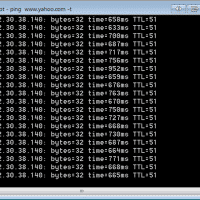
Here are ping times when Viasat slows your Exede service due to reaching 100% of your monthly data allowance: Reply from 72.30.38.140: bytes=32 time=989ms TTL=51 Reply from 72.30.38.140: bytes=32 time=606ms TTL=51 Reply from 72.30.38.140: bytes=32 time=1103ms TTL=51 Reply from 72.30.38.140: bytes=32 time=630ms TTL=51 Reply from 72.30.38.140: bytes=32 time=863ms TTL=51 Reply from 72.30.38.140: bytes=32 time=1360ms TTL=51 Reply from 72.30.38.140: bytes=32 time=719ms TTL=51 Reply from 72.30.38.140: bytes=32 time=838ms TTL=51 Reply from 72.30.38.140: bytes=32 time=1223ms TTL=51 Reply from 72.30.38.140: bytes=32 time=1391ms TTL=51 Reply

HTC One V how to access microsd card? [ANSWERED]

Here are easy instructions for removing the back (bottom) cover and installing a microsd card on the Virgin Mobile HTC One V Android phone: Bottom coverhttp://www.htc.com/help/in/howto_iframe.aspx?id=166989&type=1&p_id=439Replacing the bottom cover Important: Antennas are placed underneath the cover. To get the best signal for calls and data connection, be sure to secure the cover tightly. Storage cardhttp://www.htc.com/help/in/howto_iframe.aspx?id=166991&type=1&p_id=439Inserting the storage card Take the bottom cover off. Insert the microSD™ card into the storage card slot with its gold contacts facing down and push

sdfv2000.exe SD Card Format download

Recently I was trying to recover a 32GB microsdhc card that had two partitions, one of which was inaccessible. One of the best tips I found was to try the sdfv2000.exe formatting program as it seems to be much more capable than the internal Windows formatting tools. However, I had a heck of a time finding the sdfv2000.exe program anywhere. Thankfully I finally found it and here is permanent mirror where you can download it too: [download id=”10489″ format=”1″] dl Best regards,

New ARM dual core 3G Chromebook from Samsung & Google

While the new $249 model looks good, the $329.99 version with 100mb of free Verizon 3G (per month for 2 years) looks even better to me 🙂 Samsung Chromebook (XE303C1) | Samsung Chromebookhttp://www.samsung.com/us/computer/chrome-os-devices/XE303C12-H01USVerizon 3G WWAN included with this device for 2 years (up to 100MB per month) Fast Boot Technology allows you to boot in less than 10 seconds Weighing just under 2.5lbs and less… CPU / Processor: Samsung Exynos 5 Dual Top Search Terms:samsung xe303c1 review (2)arm chromebook upgrade ssd (2)chromebook

How to lookup Intel SSD warranty info online

Go here : http://www.intel.com/support/feedback.htm?group=ssd#ssd official Intel support site. Enter the live chat option and they can lookup your warranty info for you online.  Just make sure to have your drive’s model # and SA # ready! 🙂 Top Search Terms:intel ssd warranty check (61)intel ssd warranty check online (10)intel warranty check ssd (6)intel warranty lookup (5)intel ssd warranty checker (4)intel ssd garantie check (4)intel+ssd+warranty+check (4)intel ssd warranty lookup (3)intel ssd warranty (2)check intel ssd warranty (2)

« Older Entries Recent Entries »