Walkie talkie Android apps for your phone/tablet

Lately I have been looking for Android apps that can enable walkie talkie (intercom) functionality over LAN/wifi/bluetooth. Normal internet based options are not ideal as we live in a very remote area with no powerlines, phonelines or wired anything. We also don’t generally get reliable cell phone reception. So satellite internet (WildBlue) is our primary internet connection. Latency is too high and bandwidth too precious, to really support reliable voice communications when it has to be routed out over the internet

ASUS A53 laptop memory upgrade

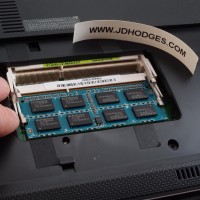
If you own one of the nice ASUS A53 laptops you may be wanting to maximize the amount of memory your lovely laptop have. Here is how a photo tutorial showing how to upgrade the RAM on an ASUS A53 notebook 🙂 UPDATE: Many readers have asked what memory I recommend for upgrading the A53 series. My recommendation is 8GB of Kingston memory because it offers a lifetime warranty, solid performance AND it is only about $37 with free shipping!

List of Android apps I have uninstalled

My LG Optimus V Android phone does not have much internal storage space, so I try to install as much to the SD card as possible and generally keep it pretty “lean”. Unfortunately, this means I sometimes uninstall apps that I really do like… but I just do not use them enough to justify keeping them and using up valuable space. So that I don’t forget these apps (in case I need them at some point in the future), here’s

Kindle Fire Unboxing Photos [Nov 16th]

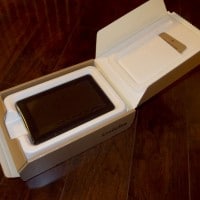
The Kindle Fire arrived today via UPS and here are the first photos: Review to be posted once I have a good feel for the device 🙂 Top Search Terms:kindle fire unboxing (11)"kindle fire lock screen (2)amazon kindle 2011 unboxing (2)umboxing kindle fire (2)unboxing+kindle+fire+picture (2)remove screenlock kindle fire (1)kindle+fire+unboxing (1)kindle fire unboxing photos (1)kindle fire preload (1)kindel umboxing (1)

How to sideload Android apps onto the Kindle Fire & Nook Tablet

Thank goodness both of the hottest new 7″ tablets support side loading Android apps onto the devices! There are a LOT of tutorials out there, some of them pretty complicated, so here are the TWO best sideloading tutorials I have found… Sideloading for the B&N Nook Tablet:   How to sideload apps on the NOOK Tablet (Amazon Appstore, GO Launcher EX) – Liliputinghttp://liliputing.com/2011/11/how-to-sideload-apps-on-the-nook-tablet-amazon-appstore-go-launcher-ex.htmlFortunately it’s pretty easy to install third party apps on the NOOK Tablet. You don’t even need to

iTunes match stuck at Step 2?! [Solved]

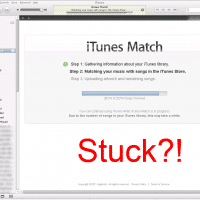
If you signed up for iTunes Match, it may finish with Step 1: Step 1. Gathering information about your iTunes library. and then eventually get stuck at Step 2: Step 2. Matching your music with songs in the iTunes Store. If you do get stuck, try going ahead and pressing the “Stop” button at the bottom of the iTunes Match screen, and then pressing the iTunes March “Start” button once it is available. It may take a bit,  and it

What does KDR stand for when gaming? Answer: Kill to Death Ratio

In a video game, your KDR, or kill/death ratio, is simply how many kills you get (when you kill/defeat another player) and how many deaths you suffer (how many times you are killed/defeated). So a KDR of 25/5 or 25-5 means you killed 25 enemies and were only killed 5 times. Not bad! However, a KDR of 6/20 or 6-20 means you only killed 6 enemies yet you died 20 times. Better luck next time! Normally these ratios are relevant

« Older Entries Recent Entries »