Category Archives: Software Tips

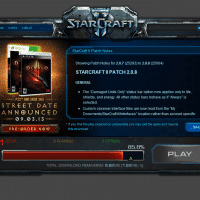
Starcraft 2 Patch 2.0.8 & Blizzard Setup -> Playable -> Optimal

Pretty cool that SC2* can let you go ahead and play before patch/updates are even in the ‘green zone’ 😉 See below… (sorry I didn’t get a screenshot in the yellow zone..) Setup -> Playable -> Optimal diablo 3 – What are the precise differences between “playable” and “optimal”? – Arqadehttp://gaming.stackexchange.com/questions/63323/what-are-the-precise-differences-between-playable-and-optimalWhen you download the Diablo 3 client there’s a “playable” stage and an “optimal” completion. I’m assuming “optimal” includes stuff like higher-quality textures but I could not find any precise…

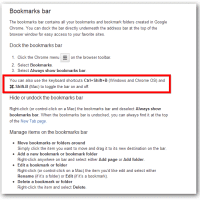
Show/Hide the Chrome Bookmarks Bar – Keyboard Shortcut

I am a big fan of Google Chrome and I generally browser with the bookmarks bar turned ON as I find it to be very useful. However, sometimes for screenshots or other purposes it is nice to hide that same bookmarks bar. Today I decided to find out how to quickly show/hide the bookmarks bar. Thankfully it is very easy, you can use these keyboard shortcut  toggle the bar on and off: Ctrl+Shift+B  on Windows and Chrome OS ⌘-Shift-B on Mac

How to take a screenshot on Chromebook? [answered]

Q. How do you take a screenshot on a Samsung Chromebook running Google’s Chrome OS? A. Easy! Press the CTRL + Page Flipper Key (the ‘Page Flipper’ Key is right above the 6 and 7 key on the keyboard) To view the resulting screen captures, simply press CTRL + M to open the File Mananger. 🙂 🙂 Top Search Terms:how do u take a screen shot on a chromebook (35)how to screenshot on chromebook (7)how to screenshot on samsung chromebook

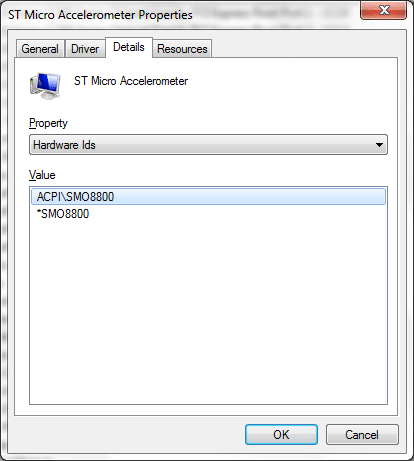
Dell Inspiron 14z (N411z) ACPISMO8800 Windows 7 driver [SOLVED!]

Question: Hello Sir/s, I have faced the same problem after formating the orginal windows 7 64bit operating system in my dell inspiron N 411z model no it ask every time to install SMO8800 driver for your unknown device in device manager please send me this driver to my e mail adddress,thanks from your kind help –M M K Answer: That unknown device is a ST Microelectronics DE351DL Motion Sensor. You can get the driver here: (Dell download link)   Installation Instructions

Upgrade to uTorrent 3.3 Stable? [yes]

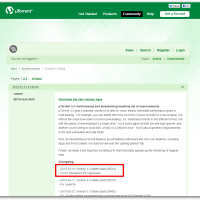
uTorrent has been making some nice performance changes and bug fixes lately, here are the latest: µTorrent 3.3 gets a dramatic rewrite to its disk i/o, which means noticeable performance gains in multi-tasking.  For example, you can delete files from a torrent or move torrents to a new location, but without the usual slow-down in torrent downloading.  Or, download torrents to two different drives, but with the speed of downloading to a single drive. You’ll notice gains at both low

uTorrent stopped, cannot start [SOLVED]

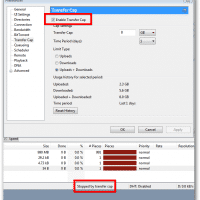
Q. I am having trouble with my uTorrent program. 🙁 Everything had been working great but now everything is stopped and I cannot get it to connect and download. I have made sure nothing is paused/stopped and I even tried ‘Force Start’ but that didn’t even work. Then things would work again for a bit and stop, it is driving me CRAZY! My internet connection is fine and nothing has changed there. I am hoping you have a suggestion to

Open multiple PDFs in seperate Foxit Reader windows

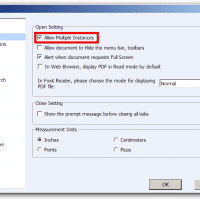
When doing taxes or any other task requiring document comparison, it can be very handy to view PDFs side-by-side. Unfortunately, many PDF readers today (including Foxit Reader) default to opening PDFs in tabs and you cannot ‘pull’ a tab out to make a new window. However, there is a simple workaround: open multiple instances of Foxit Reader and then open (or drag/drop) your files to whichever Foxit window you want. 🙂 First though, you need to do is enable the ‘Allow

« Older Entries Recent Entries »