Category Archives: computer tips

7mm SSD list / 7mm HD list

UPDATE 2012.05.30: added a list of 7mm SSD and 7mm HDD at the end of this post… The most-excellent Lenovo Thinkpad X220 laptop supports a rather odd thickness for its hard drive/SSD: 7mm This is unusual since most laptop drives are 9.5mm and some are fatties coming in at 12mm or 12.5mm. However, the 7mm thin drives are likely to become more and more common as Ultrabooks and other similar devices require thinner drives to maintain their low profile 🙂 So,

How to install telnet for Windows 7 [SOLVED]

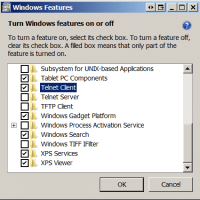
I occasionally need telnet to login to a remote power switch at the Weblogs.us datacenter. Frustratingly, Windows 7 ships with telnet disabled (or “turned off” in Win 7 parlance). Thankfully, with a bit of navigating around in Windows, it is simple to turn it back on: Start button Control Panel Programs (Programs And Features) Turn Windows features on or off Telnet Client (scroll down and check the box) Turn Windows 7 Telnet on (enable the feature) Click “OK” You are all done

ASUS A53 laptop memory upgrade

If you own one of the nice ASUS A53 laptops you may be wanting to maximize the amount of memory your lovely laptop have. Here is how a photo tutorial showing how to upgrade the RAM on an ASUS A53 notebook 🙂 UPDATE: Many readers have asked what memory I recommend for upgrading the A53 series. My recommendation is 8GB of Kingston memory because it offers a lifetime warranty, solid performance AND it is only about $37 with free shipping!

How to sideload Android apps onto the Kindle Fire & Nook Tablet

Thank goodness both of the hottest new 7″ tablets support side loading Android apps onto the devices! There are a LOT of tutorials out there, some of them pretty complicated, so here are the TWO best sideloading tutorials I have found… Sideloading for the B&N Nook Tablet:   How to sideload apps on the NOOK Tablet (Amazon Appstore, GO Launcher EX) – Liliputinghttp://liliputing.com/2011/11/how-to-sideload-apps-on-the-nook-tablet-amazon-appstore-go-launcher-ex.htmlFortunately it’s pretty easy to install third party apps on the NOOK Tablet. You don’t even need to

iTunes match stuck at Step 2?! [Solved]

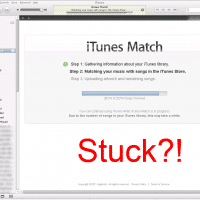
If you signed up for iTunes Match, it may finish with Step 1: Step 1. Gathering information about your iTunes library. and then eventually get stuck at Step 2: Step 2. Matching your music with songs in the iTunes Store. If you do get stuck, try going ahead and pressing the “Stop” button at the bottom of the iTunes Match screen, and then pressing the iTunes March “Start” button once it is available. It may take a bit,  and it

Building a random name generator

Last night I had fun building a  little random name generator for my friend Adam and my wife. They both write and sometimes it is difficult to come up with names for characters, that is where the new tool comes in handy: Character Name Generator Every time you refresh the page you get a new name 🙂 I used to code a lot of fun little projects like this but lately I have not made time for it. I do

Upgrade Acer Aspire One AO722 memory/RAM

UPDATE: Many readers have asked what memory I recommend for upgrading the A0722. My recommendation is 4GB of 1066MHz DDR3 Kingston memory because it offers a lifetime warranty, solid performance AND it is only about $22 with free shipping! 🙂 Another great way to improve performance is to replace the AO722’s slow hard drive with a SSD. The Crucial M4 128GB (which includes a data transfer kit) or the Kingston HyperX 3K 120GB (drive only) are my top two choices. They both offer 3 year warranties along with

[SOLVED] Shut down Windows 7 at “Set Up Windows” screen, without error?

Q. Hi, I am selling a new laptop after upgrading the RAM. It has a factory fresh install of Windows 7 on it. I booted it up once to make sure the RAM was recognized and now I am stuck at the creating a user name and computer name screen on the Windows 7 setup 🙁 If I power off the system the purchaser will get an error message the first time the notebook boots up saying Windows did not shutdown properly…

« Older Entries Recent Entries »