Author Archives: J.D. H.

iOS and Android development with JS / HTML5 /etc

Here is a link dump for some mobile development environments/frameworks that I am investigating.  Some of the links are well worth the read:   Impact – HTML5 Canvas & JavaScript Game Enginehttp://impactjs.com/   PhoneGaphttp://phonegap.com/PhoneGap is an HTML5 app platform that allows you to author native applications with web technologies and get access to APIs and app stores. PhoneGap leverages web technologies… Here is a working phonegap sqlite application example/tutorial for you to use – phonegap | Google Groupshttp://groups.google.com/group/phonegap/browse_thread/thread/07cf9f48e3cd0663?pli=1Hi I hope
7mm SSD list / 7mm HD list

UPDATE 2012.05.30: added a list of 7mm SSD and 7mm HDD at the end of this post… The most-excellent Lenovo Thinkpad X220 laptop supports a rather odd thickness for its hard drive/SSD: 7mm This is unusual since most laptop drives are 9.5mm and some are fatties coming in at 12mm or 12.5mm. However, the 7mm thin drives are likely to become more and more common as Ultrabooks and other similar devices require thinner drives to maintain their low profile 🙂 So,

How to install telnet for Windows 7 [SOLVED]

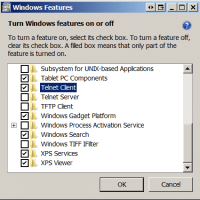
I occasionally need telnet to login to a remote power switch at the Weblogs.us datacenter. Frustratingly, Windows 7 ships with telnet disabled (or “turned off” in Win 7 parlance). Thankfully, with a bit of navigating around in Windows, it is simple to turn it back on: Start button Control Panel Programs (Programs And Features) Turn Windows features on or off Telnet Client (scroll down and check the box) Turn Windows 7 Telnet on (enable the feature) Click “OK” You are all done

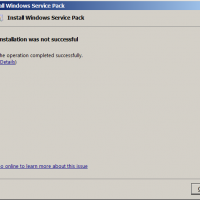
Funny MS Windows 7 Service Pack error message

Installation was not successful… the operation completed successfully Silly Microsoft 😉 Top Search Terms:funny ipod messages (6)installation was not successful the operation completed successfully (3)funny windows 7 errors (3)funny computer errors in win7 (2)funny msg on service pack on mobile (2)crazy windows messages (2)microsoft silly message (2)google comical error messages (2)bluetooth operation is not successful (2)80s computer error messages (2)

Walkie talkie Android apps for your phone/tablet

Lately I have been looking for Android apps that can enable walkie talkie (intercom) functionality over LAN/wifi/bluetooth. Normal internet based options are not ideal as we live in a very remote area with no powerlines, phonelines or wired anything. We also don’t generally get reliable cell phone reception. So satellite internet (WildBlue) is our primary internet connection. Latency is too high and bandwidth too precious, to really support reliable voice communications when it has to be routed out over the internet

ASUS A53 laptop memory upgrade

If you own one of the nice ASUS A53 laptops you may be wanting to maximize the amount of memory your lovely laptop have. Here is how a photo tutorial showing how to upgrade the RAM on an ASUS A53 notebook 🙂 UPDATE: Many readers have asked what memory I recommend for upgrading the A53 series. My recommendation is 8GB of Kingston memory because it offers a lifetime warranty, solid performance AND it is only about $37 with free shipping!

List of Android apps I have uninstalled

My LG Optimus V Android phone does not have much internal storage space, so I try to install as much to the SD card as possible and generally keep it pretty “lean”. Unfortunately, this means I sometimes uninstall apps that I really do like… but I just do not use them enough to justify keeping them and using up valuable space. So that I don’t forget these apps (in case I need them at some point in the future), here’s

« Older Entries Recent Entries »