MacBook Neo Deep Dive: Benchmarks, Wafer Economics, and the 8GB Gamble
Summary: the MacBook Neo is VERY fast for bursty everyday use but fairly limited for sustained, memory-heavy, or pro workloads.
If you don’t have an interest in the computer industry and its history, you can probably skip everything else below. Otherwise, read on!
Apple raised the Neo to $699 on June 25, 2026 (it launched at $599). Supply has finally normalized after months of somewhat tight supply, so now Amazon has the Neo in stock around $699, with delivery in a couple days on Prime.
Preface: I’m not really a Mac guy. But I have respect for what Apple has done with their silicon especially starting with the M1. I’ve been following their CPU journey since the Motorola 68k days through PowerPC, the Intel transition, and now their in-house Apple Silicon. What they’ve accomplished in the last five years is remarkable. Apple is one of the few original tech companies that has survived and thrived over the decades while still staying in the consumer tech space.
As a kid I used Apple, Compaq, and other contemporary computers in the text based OS days. Over the years I’ve purchased Apple systems periodically and their recent entrants (since the M1) are very capable. While in the modern era I’ve never fully made the switch away from Windoze and Linux, I do give Apple props for doing what they do. 💪
The following (attempted) analysis is something of a tribute to one of my all time favorites sites: AnandTech. It was one of my go-to sites when I built my first performance PC back in the day: Tyan motherboard dual slot, two Pentium II 233 MHz CPUs for a dual CPU system, SCSI hard drive, all with Anand’s articles as the guide (I was in HS at the time, and Anand was young as well). That was a blast, and Anand’s deep-dive hardware coverage was a huge part of what made the hobby so rewarding. (Anand eventually joined Apple, which tells you something about the caliber of talent they attract.) AnandTech had some of the best Apple silicon analysis ever published, and this article is written in that spirit: real data, real analysis, minimal fluff.
With all that said, here’s a look at how Apple can deliver this kind of vertically and horizontally integrated product at a $699 price point while maintaining a comparatively high-quality build. They designed the chip, they control the OS, they negotiate directly with TSMC, and they amortize their silicon costs across 230 million iPhones a year.
8GB of RAM is a real limitation but there’s also a silver lining to the tight memory envelope: Apple has to keep macOS running well within 8GB, which is actually a nice forcing function against bloat and inefficiency. We could all use a little more of that where software is optimized for users not able to afford current crazy RAM prices.
Technical Analysis
What processor is in the MacBook Neo?
The MacBook Neo runs Apple’s A18 Pro, the same chip used in the iPhone 16 Pro. Six CPU cores (2 performance + 4 efficiency), a 5-core GPU, a 16-core Neural Engine, fabricated on TSMC’s second-generation 3nm process (N3E).
- Geekbench 6 (cold, 3-run average): 3,569 single-core, 8,879 multi-core
- Single-core vs Apple Silicon: lands between the M3 and M4
- Sustained-load behavior: full burst for about 60 seconds, then thermal throttling drops CPU utilization 64% in 15 seconds (fanless chassis)
- Starting price: $699 base (8GB RAM, 256GB SSD); launched at $599, raised June 25, 2026
Below: the full benchmark data across three thermal states, how the A18 Pro compares architecturally to the M-series, and the wafer economics behind the price.
On March 4, 2026, Apple unveiled the MacBook Neo, its most affordable Mac laptop ever at $599. Instead of an M-series chip, the Neo runs the A18 Pro, the same processor from the iPhone 16 Pro.
“An iPhone chip in a Mac” sounds like a downgrade. The benchmarks tell a very different story.
The A18 Pro’s single-core performance lands between the M3 and M4, demolishes Intel and Qualcomm competitors single core performance at this price tier by 38-43%, and does it all in a fanless aluminum chassis with 16 hours of claimed battery life. The chip is not the constraint. The 8GB of RAM, with no upgrade path, and no real cooling strategy for long workloads can both be real limitation..
MacBook Neo Specs
The MacBook Neo is a 13-inch aluminum notebook built around the A18 Pro, fabricated on TSMC’s second-generation 3nm process (N3E). Here are the specs:
| Component | Specification |
|---|---|
| CPU | 6-core: 2 performance (4.04 GHz) + 4 efficiency (2.42 GHz) |
| GPU | 5-core Apple GPU, hardware ray tracing |
| Neural Engine | 16-core, 35 TOPS (Apple Intelligence supported) |
| Memory | 8GB unified LPDDR5x (soldered, no upgrade) |
| Storage | 256GB ($699) or 512GB + Touch ID ($799) |
| Display | 13″ Liquid Retina, 2408×1506, 500 nits |
| Ports | 1x USB-C 3 (10 Gbps) + 1x USB-C 2 (480 Mbps) + 3.5mm |
| Battery | 36.5Wh, up to 16 hrs video / 11 hrs web |
| Weight | 2.7 lbs, fanless |
| Colors | Silver, Indigo, Blush, Citrus |
To hit $599, Apple cut: MagSafe, Thunderbolt, backlit keyboard, haptic trackpad, P3 wide color, True Tone, Wi-Fi 7, and the 12MP webcam (replaced with 1080p). Touch ID is only on the $799 model. One of the two USB-C ports runs at USB 2.0 speeds, which is not good in 2026.
Hands-On: Three Thermal States
Since the Neo has no active cooling (no fan) it is rather important to evaluate it under a variety of thermal situations. The following MacBook Neo benchmarks were run under three different conditions, measuring what actually happens when you push a fanless 6-core chip past its comfort zone. The results were fairly dramatic.
Test Setup
The machine: MacBook Neo (Mac17,5), Apple A18 Pro, 8GB unified memory, 256GB SSD, macOS Tahoe 26.3.2. All tests run on the same unit within the same 12-hour window.
Three conditions, tested in this order:
- Cold start (fan-assisted): Machine rested overnight, then placed on a USB desk fan to keep the chassis at ambient temperature. Claude Code and screen sharing disabled. Three consecutive runs with 2-minute cooldowns between each.
- Dev workload (Claude Code active): Cold start, but with Claude Code (Opus 4.6, 1M context) running in the background. This represents a real developer workflow: an AI coding assistant consuming memory and occasional CPU while you try to get work done.
- Post thermal soak: After a 5-minute all-core stress test that drove CPU utilization to 570% and triggered aggressive thermal throttling. This is the worst case: what your Neo delivers after sustained heavy lifting.
Geekbench 6 Across Three States
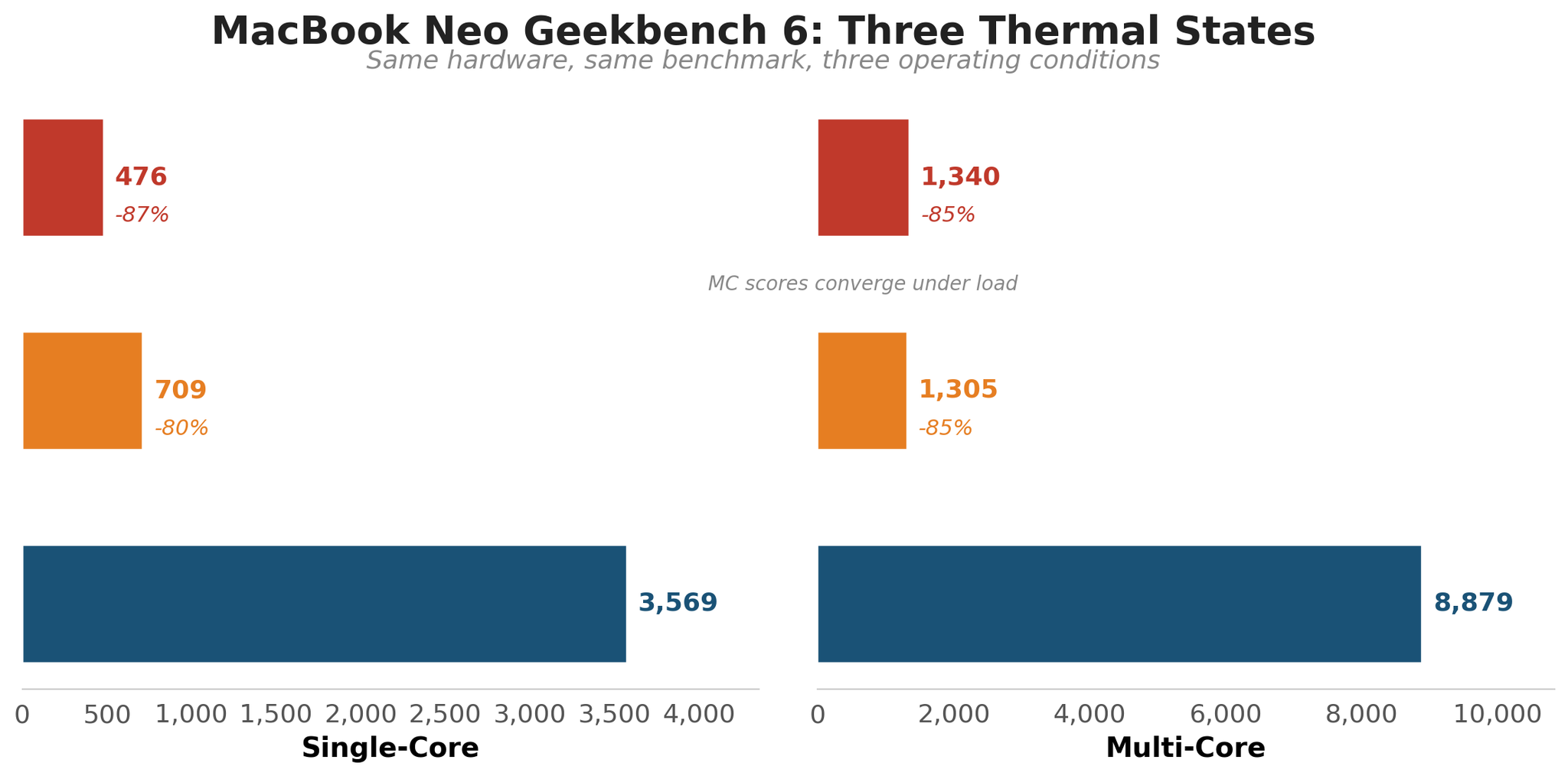
| Condition | Single-Core | Multi-Core | SC vs Cold Start |
|---|---|---|---|
| Thermal soak (5 min all-core stress) | 476 | 1,340 | -87% |
| Dev workload (Claude Code active) | 709 | 1,305 | -80% |
| Cold start (fan-assisted, 3-run avg) | 3,569 | 8,879 | Baseline |
The same chip that posts 3,569 single-core when cold delivers 476 after five minutes of sustained load. That is an 87% reduction in single-core performance on the same hardware, running the same benchmark, separated by nothing but heat.
The cold start numbers (3-run average: SC 3,569, MC 8,879) match published A18 Pro scores almost exactly. The variance across three pristine cold runs was just 7 points on single-core, confirming the test methodology is sound. (Run 1, Run 2, Run 3)
The 60-Second Thermal Cliff
To understand why the post-soak score is so low, I ran a 5-minute all-core stress test and logged CPU utilization every 15 seconds.
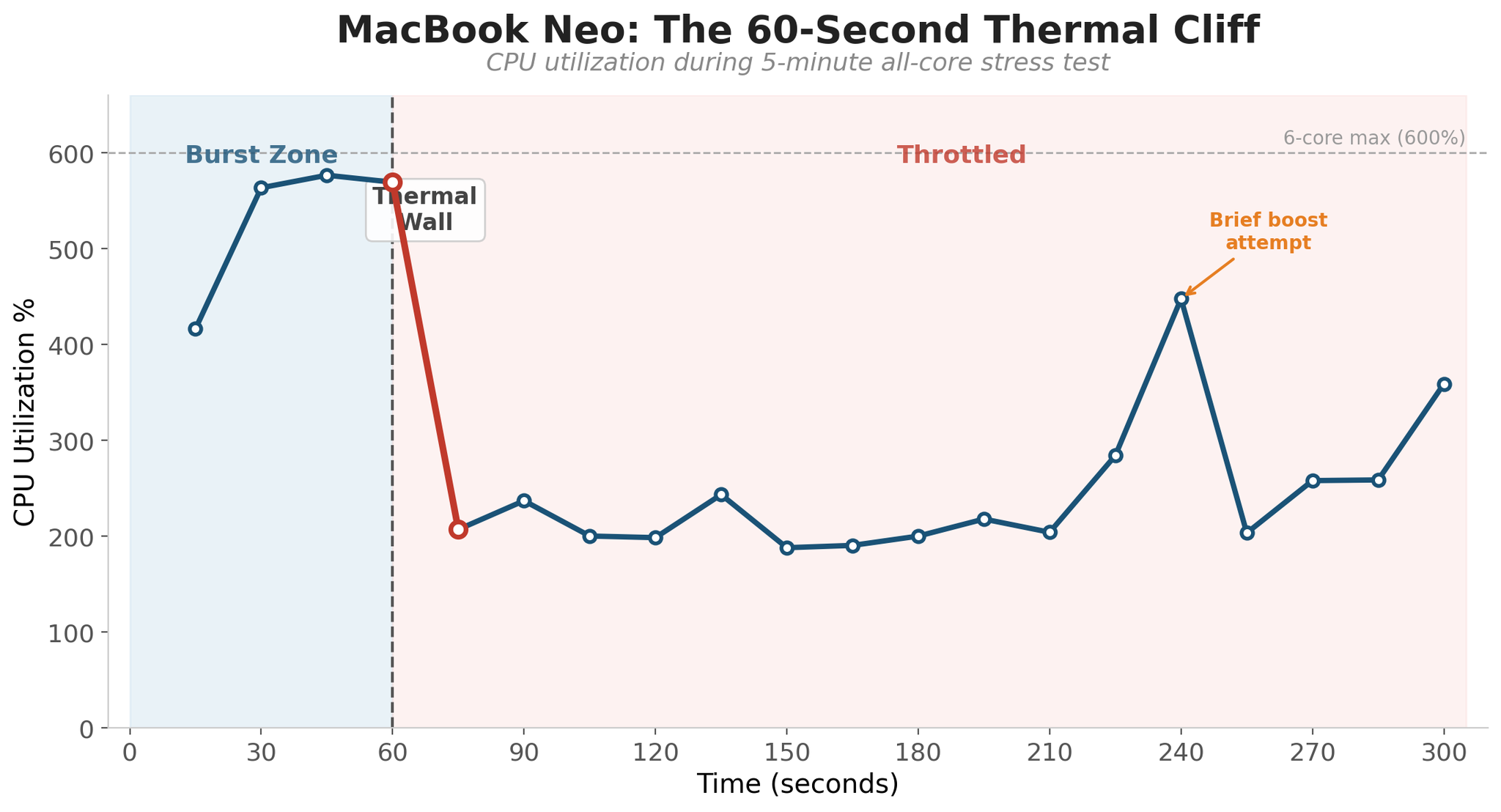
For the first 60 seconds, the A18 Pro runs at full tilt: all six cores near 100%, CPU utilization around 570%. Then the thermal wall hits. Between T+60 and T+75, utilization crashes from 570% to 207%, a 64% drop in 15 seconds. For the remaining four minutes, the chip bounces between 188% and 360%, never recovering its burst performance.
There is one interesting spike at T+240 (448%) where the SoC briefly attempts to boost before throttling right back down. The cooling system simply cannot dissipate the heat fast enough to sustain high clocks.
This matches what Technetbook found independently: the A18 Pro hits its 105°C thermal limit and drops from 3.3 GHz to approximately 2.3 GHz. Modders have confirmed the cooling is the constraint: TweakTown measured an 18% Geekbench improvement with liquid cooling, and Hackaday documented doubled gaming frame rates with a water cooling mod.
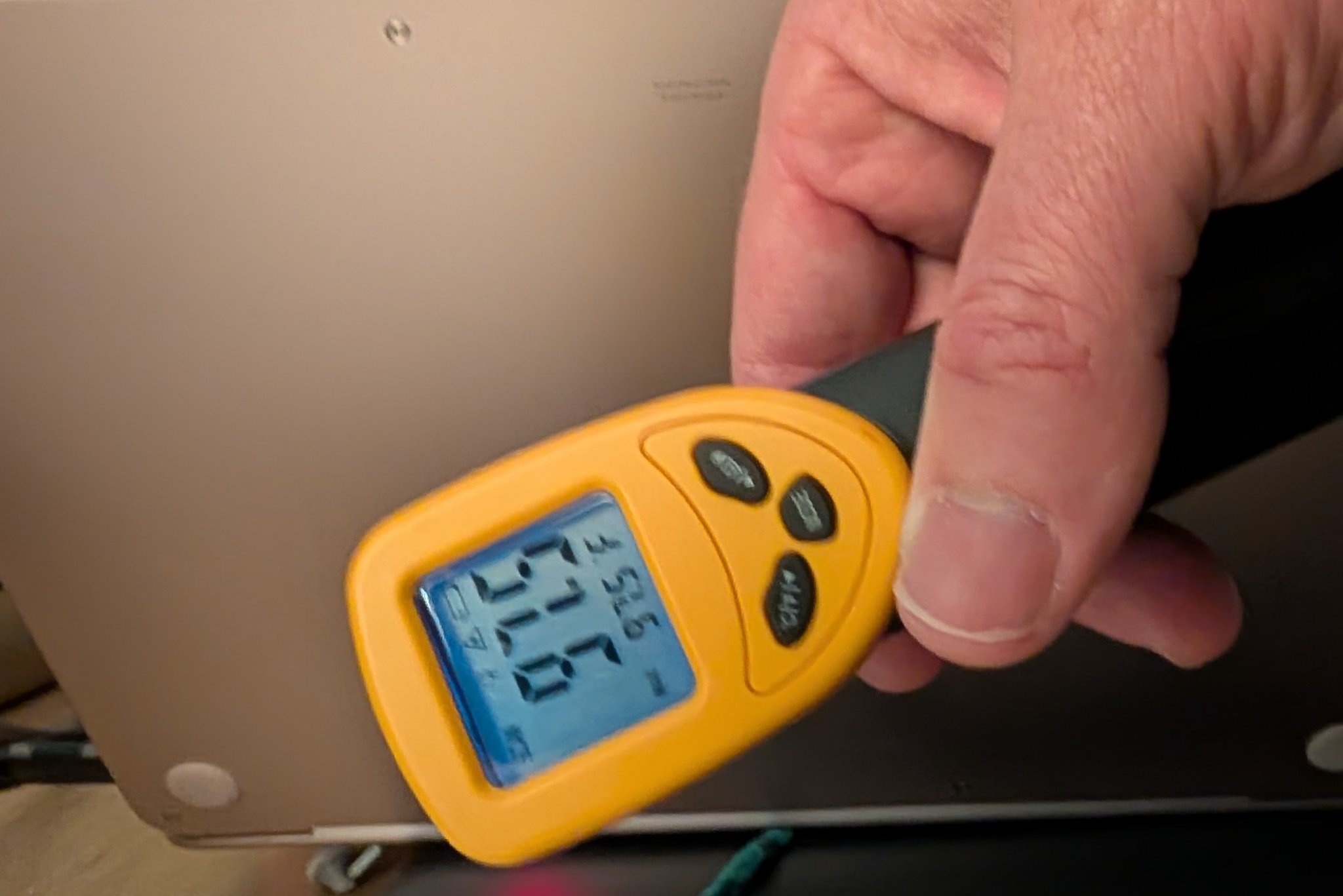
Here is what the outside of the machine tells you during all this: I measured 97.6°F (36.4°C) on the hottest spot of the case surface with an infrared thermometer during sustained load. That is barely above body temperature. The chip is internally at 105°C and shedding 87% of its performance while the chassis feels perfectly comfortable in your lap. Apple made a deliberate design choice: comfort over sustained power.
What This Means in Real Use
The MacBook Neo is a sprinter, not a marathon runner. For tasks that complete within 60 seconds (compiling a small project, processing a batch of photos, rendering a short video clip), you get desktop-class single-core performance that beats Ryzen chips! 👍 For tasks that sustain heavy load beyond a minute (long video encodes, large builds, training loops), you get dramatically less. 👎
The question is whether your workload fits inside the burst window. For many users (web browsing, video viewing, office work, light development, media consumption), every interaction is a burst or can be handled without much stress: a page load, a document save, an app launch. Those users will rarely see the thermal wall.
CPU Benchmarks Versus Competitors
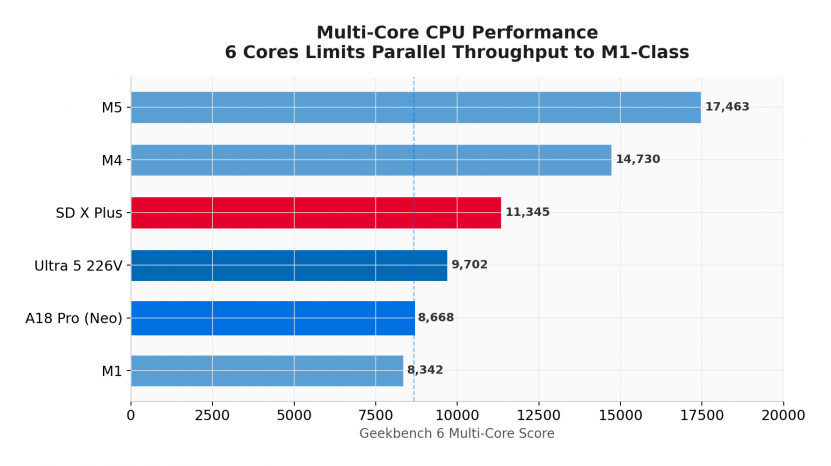
Geekbench 6 results for the MacBook Neo were published by MacRumors on March 5, 2026. The Neo scored 3,461 single-core, 8,668 multi-core, and 31,286 Metal (GPU).
Here’s how that stacks up against both Apple’s own lineup and the $600-class Windows/ARM competition:
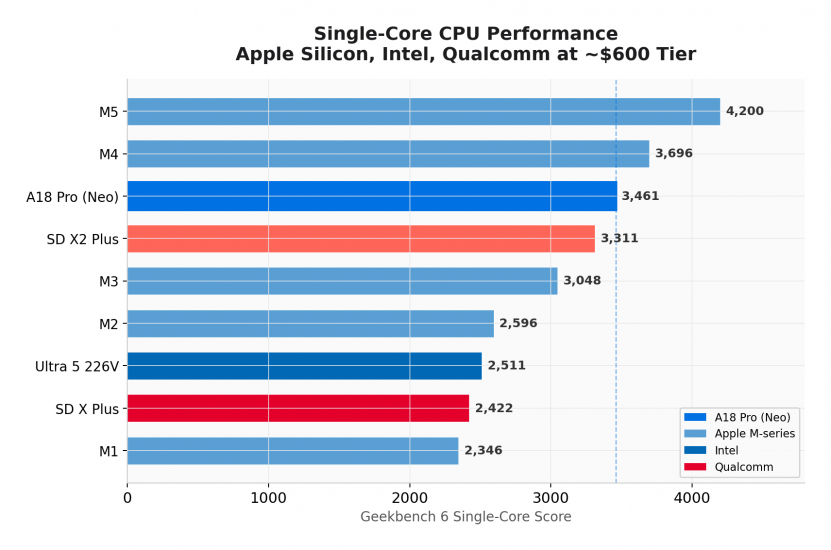
As alluded to earlier, the single-core story is remarkable. The A18 Pro at 3,461 is 47% faster than the M1 (2,346), outperforms the M2 and M3, and lands within 6-7% of the M4 (3,696). Against the competition available at $600, it beats Intel’s Lunar Lake Ultra 5 226V by 38% and the Snapdragon X Plus by 43%. Only the unreleased Snapdragon X2 Plus (3,311) gets close, and it’s not shipping in sub-$700 laptops yet. Intel’s upcoming Wildcat Lake will be a very interesting competitor but alas it is not out yet.
For the tasks this machine is built for (web browsing, documents, streaming, light photo editing), individual core performance a huge factor. With two performance cores the Neo will feels surprisingly snappy and the remaining efficiency cores are there if needed.
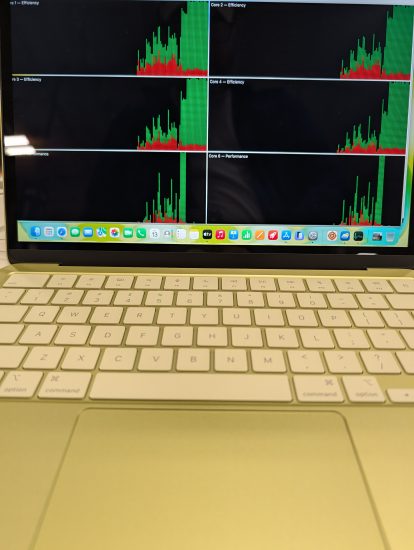
[the following commentary has been updated after using a Neo for a few weeks and finding out that it doesn’t struggle with multi core tasks as much as I expected, as evidenced here when stress testing. -May 2026, -JD]
Lets look into multi core, because compared to competitors the Apple multi-core situation is a different story than single store. With 6 cores (2 performance + 4 efficiency) versus 8-10 (or more) on competitors, the Neo’s 8,668 score is essentially M1-class. It actually trails Intel’s 8-core Ultra 5 226V (9,702) and the Snapdragon X Plus (11,345) in multi-threaded workloads. The M4 Air at 14,730 is 70% higher.
If you’re compiling a lot of code, running parallel builds, or doing sustained multi-threaded work a LOT, then this matters. For the Neo’s target audience, it likely won’t matter much b/c bursty workloads feel great and even with tons of multi-core and multitasking work it still manage to power through those moment.
(Extreme encoding or long tasks are not going to be as fast as more-core competitors… if you need more than 6 cores then definitely get something else! For me, remembering when the Intel Q6600 desktop CPU seemed SO fast and amazing with quad cores at ~2.66GHz overclocked, I am pretty impressed with the Neo being able to get 6 cores in a lightweight portable package at ~2.4-4GHz for ~$699.)
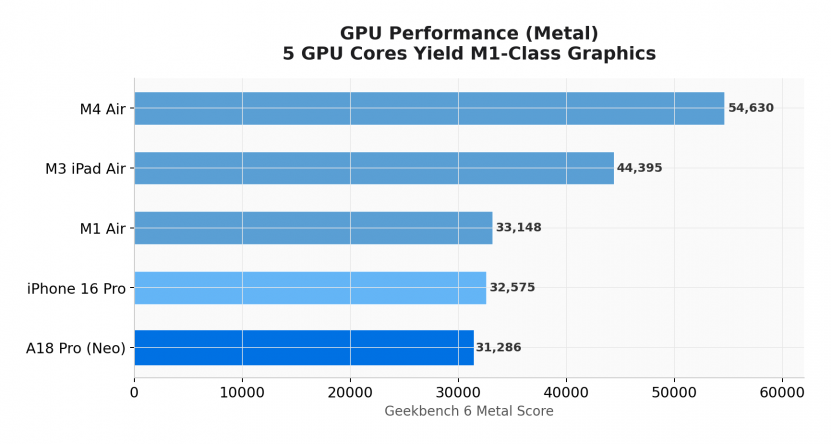
GPU performance at 31,286 (Metal) actually trails the M1 Air (33,148) slightly, despite the newer architecture. Five GPU cores versus the M1’s seven or eight means fewer parallel shader units. The M4 Air’s 54,630 is 75% higher. GPU-intensive work (video editing, 3D, gaming) is clearly not the Neo’s territory.
That 31,286 Metal number puts the Neo at M1-tier graphics. Cross-platform, two independent reviews (Notebookcheck’s MacBook Neo review and PCMag’s MacBook Neo review) put the Neo at 1,786 (PCMag 1,733) on 3DMark Steel Nomad Light and 3,999 (PCMag 3,947) on 3DMark Wild Life Extreme. That positions the A18 Pro 5-core GPU below the M4 Air (3,839 Steel Nomad Light / 8,735 Wild Life Extreme), well below the strongest ARM-Windows iGPU shipping today (Snapdragon X2 Elite Extreme in the Asus Zenbook A16 at $1,599 launch: 5,492 / 11,479), and below the AMD Radeon 860M tier (2,571 / 5,772). The Neo is closer to entry mobile iGPU territory than to Snapdragon X2. Intel’s newer Panther Lake Arc 140T/B390 leads the synthetic iGPU charts. Cyberpunk 2077 on the Neo (per PCMag’s MetalFX-enabled “For This Mac” auto preset) runs at 52 fps; at native 1080p Ultra it drops to 9 fps.
| Price (July 23, 2026) | Machine | Chip / GPU class | Thermal / memory context | Price basis |
|---|---|---|---|---|
| $699 | MacBook Neo | Apple A18 Pro / 5-core Apple GPU | Fanless, 8 GB unified memory | Apple direct base |
| $1,049.99 | Surface Laptop 13″ | Snapdragon X Plus / Adreno X1 | Fanless, 16 GB / 256 GB | Microsoft direct, 16GB/256GB (8GB base now $849.99) |
| $1,499.99 | HP Omen 16″ (entry RTX 5060 laptop) | Discrete NVIDIA RTX 5060 Laptop | Actively cooled gaming laptop, 16 GB+ DDR5 | Best Buy current retail; the sub-$1,000 promo is gone now |
| ~$1,249 | Samsung Galaxy Book4 Edge 16″ | Snapdragon X Elite first-gen / Adreno X1 | Thin Copilot+ PC, 16 GB / 512 GB | Amazon; first-gen X Elite closeout, retail stock thinning (was $999.99) |
| ~$1,346 | HP EliteBook 845 G11 | AMD Ryzen 7 8840U / Radeon 780M | Business-class 14″, 16 GB base config | Amazon base business listing; 32 GB / 512 GB business configs run $1,600-$1,700 |
| $1,349.99 | Asus Zenbook A14 | Snapdragon X2 Elite X2E-88 / Adreno X2 | Thin ARM ultraportable, base 16 GB / 512 GB | Best Buy 16GB/512GB listing; ASUS direct lists 16GB at $1,099.99 and 32GB/1TB at $1,999.99; launched ~$1,149.99 in April 2026 then adjusted upward |
| $1,699.99 | Asus Zenbook A16 | Snapdragon X2 Elite Extreme X2E-94 / Adreno X2 | Actively cooled ultraportable, 48 GB / 1 TB | Best Buy current retail; launched at $1,599 in April 2026 with the 48 GB / 1 TB Windows 11 Home config |
Representative US retail prices re-checked July 23, 2026. The whole field moved up on the 2026 memory shortage: Surface, Samsung, HP Omen, and the HP EliteBook all sit above where they were in May, while the Asus Zenbook X2 Elite parts held near their earlier levels. The Neo rose too, from $599 to $699 on June 25, 2026, but it is still alone at the bottom, and the cheapest comparison machine here is roughly 50% above it. This is price-tier context for a $699 fanless Mac, not a buying recommendation, and configurations and listings change quickly.
Olivier B. correctly pointed out in the comments below that the original GPU section here was much shorter than the CPU coverage.
So here is a new post: MacBook Neo GPU Compared: A18 Pro vs Snapdragon X2, Radeon, Arc, and RTX 5060 that has a full five-chart GPU comparison (Geekbench Metal in Apple context, 3DMark Steel Nomad Light, Cyberpunk 2077 as a two-panel chart with the Neo’s PCMag presets alongside the existing 1080p High cohort, 3DMark Wild Life Extreme, and the price ladder)
UPDATE: Beyond Geekbench, More Benchmarks
Geekbench 6 is one datapoint but this next section digs a little deeper with more sustained CPU performance under thermal load, compression and crypto throughput, integer and floating-point kernels, real-world video transcode.
Before the tables, two notes. First, where the Neo is benchmarked from my own homelab, the testbed is the same throughout: MacBook Neo Mac17,5, A18 Pro 6-core, 8 GB unified, 256 GB SSD, macOS Tahoe 26.3.2, AC power, Low Power Mode off. Second, where competitor numbers come from PCMag or Notebookcheck, the table caption says so explicitly. I do not combine measurements from different labs into a single blended row.
| Benchmark | Workload type | What it measures well | What it cannot tell you |
|---|---|---|---|
| Geekbench 6 | Short, mixed real-app kernels | Burst CPU on PDF, HTML5, image, ML, ray tracer subtests; cross-platform | Sustained performance, GPU, memory pressure, specific apps, browser feel |
| Cinebench 2024 | Cinema 4D float render, multi-minute run | Sustained multi-thread float throughput; cross-platform | Integer workloads, crypto, browser, anything outside Cinema 4D |
| HandBrake 1.8 | Real video transcode using a fixed source file and preset | Real-world video transcode throughput when encoder, preset, and source file are identical | Comparisons across software vs hardware encode paths (VideoToolbox, QuickSync, NVENC), single-thread, GPU |
| 7-Zip total MIPS | LZMA compression + decompression | Integer ALU and memory-subsystem throughput under multi-thread load | Float, GPU, real-app behavior |
openssl speed rsa2048 |
Asymmetric crypto big-integer math (the openssl binary ships LibreSSL on macOS and OpenSSL on most Linux / Windows builds; both expose the same speed command) |
Big-integer arithmetic throughput | Symmetric crypto (which uses hardware AES on Apple Silicon, Lunar Lake, etc.), memory bandwidth |
| C sieve 10M primes | Tight integer loop, single thread | Cache, branch predictor, integer ALU on a single thread | Anything threaded, I/O bound, or floating point |
| Matrix 512×512 GFLOPS (naive C) | Triple-nested float multiply-add, compiler auto-vectorization left on (Apple clang defaults) | Compiler vectorization quality and cache behavior on a naive kernel | Optimized BLAS / Accelerate / OpenBLAS results (an order of magnitude faster) |
| Speedometer 3, JetStream 2 | Browser framework workload, JavaScript | Web-app responsiveness on the browser and engine used | Anything outside the browser; cross-OS comparisons are sensitive to browser version, JS engine, OS scheduler |
| 5-minute all-core stress (this article) | Sustained all-core utilization | Thermal envelope, throttle onset, post-soak floor | Single-thread burst response, real-app interleaving |
The thing this table makes obvious: every benchmark answers a narrow question. The Neo wins some of them and loses others by huge margins, depending on the workload.
The Neo across thermal states, across multiple benchmarks
| Test | Cold pristine | With Claude Code active | Post 5-min thermal soak | Source / notes |
|---|---|---|---|---|
| Geekbench 6 single-core | 3,569 | 709 (-80%) | 476 (-87%) | jdhodges.com lab; GB Browser runs 17527677, 17527733, 17527818 (3-run average) |
| Geekbench 6 multi-core | 8,879 | 1,305 (-85%) | 1,340 (-85%) | jdhodges.com lab |
| Geekbench 6 Metal (GPU) | 31,275 | (not run) | (not run) | jdhodges.com lab; Metal API, Apple platforms only |
| C sieve 10M primes (lower better) | 18.8 ms | 39-41 ms | 124.2 ms (6.6x slower) | jdhodges.com lab; Apple clang -O2, single thread, auto-vectorize on |
| Matrix 512×512 GFLOPS (naive C) | 15.9 | 7-12 | 3.85 (-76%) | jdhodges.com lab; naive triple-loop, Apple clang -O2 with auto-vectorization left on; not BLAS |
OpenSSL speed rsa2048 sign/s |
504 | (warm state, separate run) | (not retested) | jdhodges.com lab; openssl speed rsa2048; the macOS openssl binary is LibreSSL 3.3.6 |
OpenSSL speed -evp sha256 @ 8K |
2.1 GB/s | (warm state, separate run) | (not retested) | jdhodges.com lab; LibreSSL 3.3.6; SHA throughput here is implementation-dependent and almost certainly uses Apple Silicon SHA hardware instructions |
| 7-Zip total MIPS | (pending fresh cold run) | (not run) | 2,458 (provisional, throttled) | jdhodges.com lab; 7z b 6-thread, run started warm and spanned the thermal cliff. Cold-pristine 7-Zip is queued for the next lab session |
The C sieve row is the one I want to call out. The same machine, the same binary, the same 10-million-element sieve, goes from 18.8 ms cold to 124.2 ms when launched immediately after the 5-minute stress test was stopped. That is a 6.6-times slowdown on a single-threaded integer workload that has nothing to do with Geekbench. The throttle is a property of the chassis and the fanless nature of the Neo, not the benchmark. If you only ever look at cold scores, you will never see this number.
The 7-Zip row is upfront about a limitation in my own data: the run I have was started warm and ran straight through the thermal cliff, so its 2,458 MIPS total is a provisional, throttled figure, not a cold-pristine number. A clean cold-state 7-Zip run is on the list for the next lab session.
Cinebench 2024 and HandBrake against the budget-laptop field
For a cross-laptop view that does not rely on Geekbench, PCMag’s MacBook Neo review (May 2026) ran the Neo against four PC competitors on Cinebench 2024 and HandBrake 1.8 on the same bench. I have been a PC Magazine fan for decades and they continue to produce great reviews!
| Machine (chip) | Cinebench 2024 SC | Cinebench 2024 MC | HandBrake 1.8 (lower better) |
|---|---|---|---|
| MacBook Neo (A18 Pro 6C, fanless) | 129 | 308 | 11:20 |
| MacBook Air 13″ 2025 (M4 10C, fanless) | 168 | 849 | 5:07 |
| Lenovo IdeaPad Slim 3x 15 (Snapdragon X) | 96 | 687 | 5:17 |
| Framework Laptop 12 (Intel Core) | 95 | 293 | 14:26 |
| Acer Aspire Go 15 (Intel N-series) | (not in PCMag CB chart) | (not in PCMag CB chart) | 15:06 |
Source: PCMag MacBook Neo review, May 2026. Cinebench 2024 at default preset, HandBrake 1.8 with Fast 1080p30 preset, same PCMag test bench across the rows shown. Not every benchmark was reported by PCMag for every machine. HandBrake numbers are elapsed wall-clock time; PCMag does not explicitly identify whether hardware-accelerated encode paths (Apple VideoToolbox, Intel QuickSync) were disabled, so treat HandBrake elapsed times as a single-vendor, same-preset comparison rather than a strict “CPU encode only” comparison.
On single-core, the Neo’s 129 is the strongest result in the comparison after the M4 Air, ahead of both the Snapdragon X Lenovo and the Framework Intel system. On multi-core and HandBrake, the Neo loses decisively. The Snapdragon X Lenovo finishes the same HandBrake transcode in less than half the elapsed time, and PCMag’s reviewer’s word for it was that the Snapdragon X chip “outpaced the A18 Pro by a country mile.” This may be driven by the Neo’s thermal envelope, by different encoder paths between machines (Apple VideoToolbox availability versus Intel QuickSync versus pure software on each system was not separately reported by PCMag), or by both. The practical takeaway either way is that the Neo’s burst lead on single-core does not survive a long real-app transcode. The pattern is not Geekbench-specific.
Broader competitor context: Snapdragon X2, Lunar Lake, Ryzen
PCMag’s lineup leaves out the higher-end ARM-Windows, Lunar Lake, and Ryzen AI configurations that someone budget-shopping the Neo might be cross-shopping with at the next price tier up. Notebookcheck publishes chip-level Cinebench 2024 averages aggregated from device-level reviews.
| Chip (representative laptop) | Cinebench 2024 SC | Cinebench 2024 MC | Source type and notes |
|---|---|---|---|
| MacBook Neo (A18 Pro 6C, fanless) | 129 | 308 | PCMag review result, $699 MSRP (launched $599) |
| Snapdragon X2 Elite Extreme X2E-94 (Asus Zenbook A16) | 151 | 1,761 | Notebookcheck Apr 2026 analysis review result, Performance mode, Zenbook A16 launched at ~$1,599 |
| Snapdragon X2 Elite X2E-88 (Asus Zenbook A14) | 149 | 1,471 | Notebookcheck review result, Performance mode, Zenbook A14 launched at ~$1,149 |
| Snapdragon X Elite X1E-84-100 | 127 | 866 | Notebookcheck chip-page aggregate, first-gen X Elite |
| Snapdragon X Plus X1P-64-100 | 109 | (not in our cited excerpt) | Notebookcheck chip-page aggregate, first-gen X Plus |
| Intel Core Ultra 5 226V (Lunar Lake, 8C) | 112 | 572 | Notebookcheck chip-page average. Tested laptops ran at 25 W, 30 W, or 35 W cTDP rather than Intel’s recommended 17 W, which favors the chip. SC range 111-114, MC range 530-609. |
| AMD Ryzen 7 8840U (Minisforum V3 convertible) | 98 | 748 | Notebookcheck single-sample, Minisforum V3 2-in-1 convertible (different thermal envelope than a typical 8840U ultrabook); read directionally only |
| AMD Ryzen AI 9 HX 370 (Strix Point, 12C) | 117 | 1,085 | Notebookcheck chip-page average across many laptop reviews, wide range of power limits and chassis; SC max ~121, MC max ~1,299; directional only |
Sources: PCMag for the Neo row; Notebookcheck Snapdragon X2 analysis (April 7, 2026) for the Snapdragon rows; Notebookcheck Core Ultra 5 226V page; Notebookcheck Ryzen 7 8840U page; Notebookcheck Ryzen AI 9 HX 370 chip page. Different labs and different test laptops sit behind each row. The price tier on each row matters as much as the score, and the chassis (fanless vs actively cooled, ultrabook vs convertible vs mini-PC) matters at least as much as the chip.
The single-core picture is the most useful reading, with the cross-source caveat above kept in mind: in this mixed-source Cinebench 2024 context, the A18 Pro Neo’s 129 sits in the same band as the Lunar Lake Core Ultra 5 226V (112), the Ryzen 7 8840U datapoint shown (98), the first-gen Snapdragon X Plus (109), the first-gen Snapdragon X Elite X1E-84 (127), and the Ryzen AI 9 HX 370 chip-page average (117). Only the M4 (168) and the new Snapdragon X2 Elite parts (149-151) clearly lead it. For a $699 fanless laptop, “competitive with the burst single-core of nearly every chip in the chart except the M4 and the X2 Elite tier” is a strong result. Multi-core is the inverse story: the Neo’s 6-core 308 is well behind every actively-cooled competitor here because the 6-core fanless A18 Pro simply cannot stay near peak through a multi-minute Cinema 4D render. The cross-platform pattern matches what the Neo’s own thermal-cliff data shows.
Compression, crypto, and integer kernels: the Neo vs a $399 actively cooled Windows machine
If you want the cold-vs-hot head-to-head on 7-Zip total MIPS, OpenSSL speed RSA-2048 and SHA-256, native C sieve, and naive matrix GFLOPS against a compact Windows competitor at $399, I already ran that benchmark suite against the Chuwi MiniBook X (Intel N100, 12 GB). Unlike the fanless Neo, the Chuwi uses active cooling and held 100% CPU for the full five-minute stress run without a visible thermal cliff, which makes the comparison interesting in both directions. The full data, methodology notes, and same-test caveats are in the dedicated post: Chuwi MiniBook X vs MacBook Neo: The $399 Laptop That Refuses to Throttle. Same source-level tests, platform-native compilers (Apple clang on the Neo, w64devkit GCC on the Chuwi).
Architecture: Is the A18 Pro Really “Just a Phone Chip”?
The internet discourse has centered on whether an “iPhone chip” belongs in a Mac.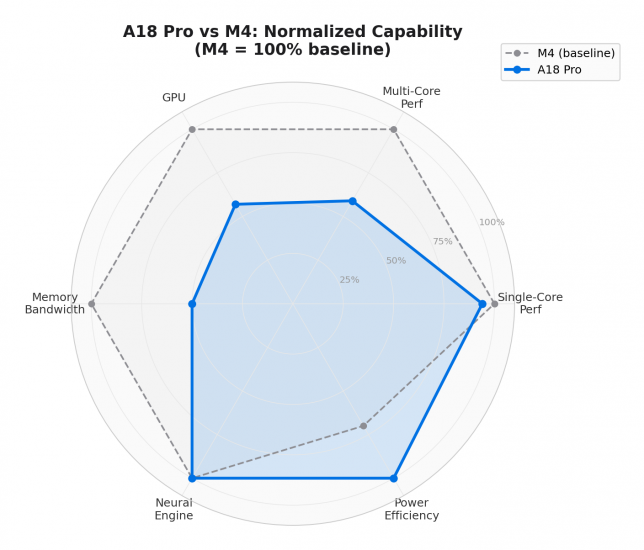
The A18 Pro and M4 share the same DNA at the core level. Both are built on the ARMv9.2-A instruction set, both use Apple’s custom Everest performance cores and Sawtooth efficiency cores, and both are fabricated on TSMC’s N3E 3nm process. When you normalize Geekbench single-core scores by clock speed, you get approximately 857 points per GHz for both chips. The IPC (instructions per clock) is essentially identical.
They also share the same GPU shader core architecture (with hardware ray tracing and mesh shading) and the same 16-core Neural Engine rated at 35 TOPS. If Apple had branded the A18 Pro as “M4 Lite,” nobody would have blinked.
Where they differ most is at the system level:
| Attribute | A18 Pro | M4 |
|---|---|---|
| CPU cores | 2P + 4E (6 total) | 4P + 6E (10 total) |
| GPU cores | 5 | 10 |
| P-core clock | 4.04 GHz | 4.40 GHz |
| Memory bandwidth | 60 GB/s | 120 GB/s |
| System Level Cache | 24 MB | 16 MB* |
| Thermal envelope | ~10W peak | ~20-25W sustained |
| I/O | USB 3 + USB 2 | Thunderbolt 4, PCIe 4.0 |
* Apple does not officially publish full cache hierarchies. SLC figures from cpu-monkey.com and nanoreview.net.
The memory bandwidth gap (60 vs 120 GB/s, a full 2x) is the most consequential difference. It limits any workload that’s memory-bound: large matrix operations, high-bitrate video encoding, GPU-intensive rendering. The A18 Pro partially compensates with a larger System Level Cache (24 MB vs the M4’s reported 16 MB), which reduces how often it needs to hit main memory.
The thermal difference also matters. The A18 Pro was designed for an iPhone, where sustained power is roughly 4W. The Neo’s larger fanless chassis allows somewhat more thermal headroom, but under prolonged multi-core loads it will throttle sooner than an M4 in a MacBook Air with its dedicated heatsink.
Bottom line: “Baby M4” is a useful shorthand. The shared core design means everyday responsiveness is M4-class. The system-level differences (bandwidth, thermals, I/O) mean sustained workloads are not.
Silicon Economics: How Apple Hits $499 (education) / $599 (retail launch; $699 retail since June 25, 2026)
The Neo’s price becomes less surprising when you understand the chip economics. The A18 Pro’s die measures approximately 105 mm² on TSMC N3E, confirmed by TechInsights die photography. That’s small. And small means cheap.
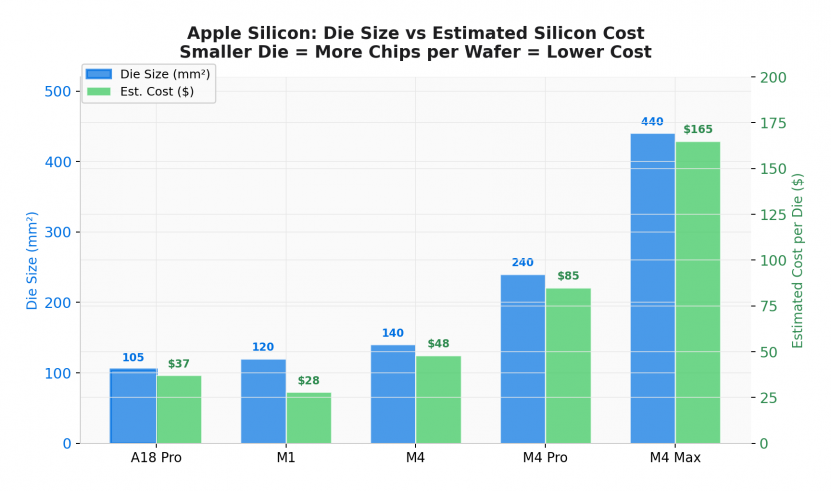
At 105 mm², the A18 Pro is 25% smaller than the M4 (~140 mm²) and 76% smaller than the M4 Max (~440 mm²). Smaller dies yield dramatically more chips per wafer and have higher yield rates because there’s less silicon for defects to land on.
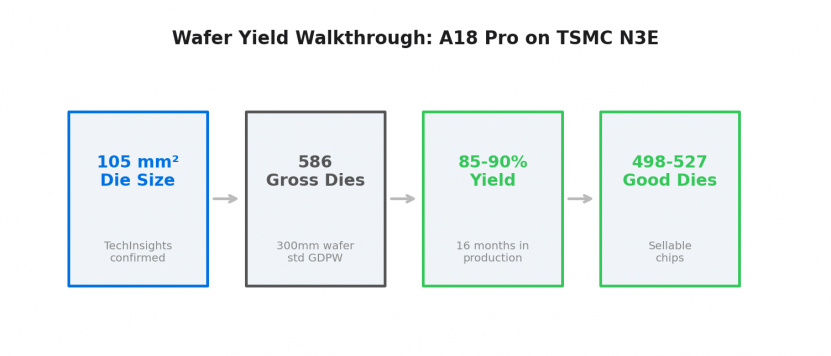
A standard 300mm TSMC wafer produces approximately 586 gross dies at 105 mm² (per Arete Research). After 16 months of production maturity on N3E, yields are estimated at 85-90%, giving 498-527 good dies per wafer. At Apple’s estimated wafer cost of $18,000-$20,000 (per Ben Bajarin/Creative Strategies and Morgan Stanley), that works out to $34-40 per die before packaging and test. Fully loaded: roughly $38-47 per SoC.
Compare that to an M4 at ~140 mm² yielding approximately 430 gross dies, or an M4 Max at ~440 mm² yielding maybe 130. The A18 Pro costs Apple roughly one-third what an M4 costs and one-quarter what an M4 Max costs in raw silicon.
What’s even crazier?! Apple ships approximately 230 million iPhones annually. 🤯 The A18 Pro has been in volume production since September 2024. All mask costs ($10-20M for a 3nm EUV tapeout) and design engineering were amortized across hundreds of millions of units before a single Neo shipped. The marginal cost to Apple of routing A18 Pro dies into the Neo is wafer cost plus packaging. Zero incremental R&D.
The Neo may also absorb binned A18 Pro dies that failed their sixth GPU core during iPhone production. The Neo ships with 5 GPU cores; binned dies are perfectly suitable. This is standard industry practice (AMD and Nvidia do the same) and further improves Apple’s effective yield.
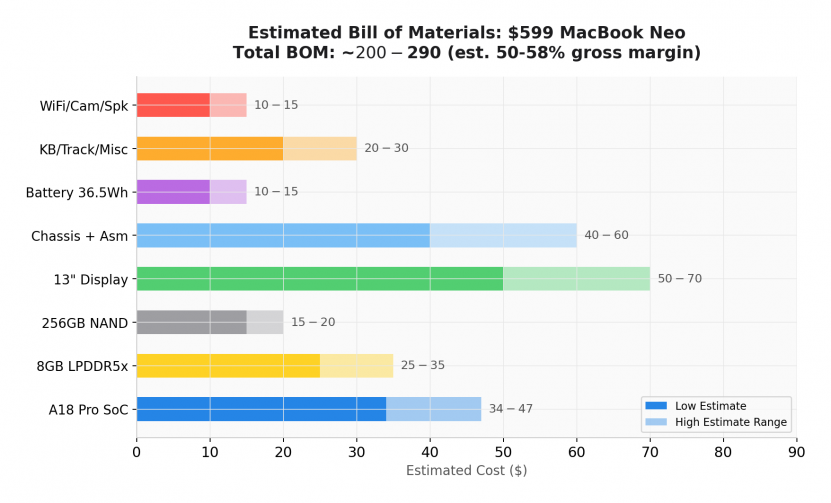
Adding up the full estimated BOM (SoC, memory, storage, display, chassis, battery, keyboard, wireless), the total lands at roughly $200-290. At $599 retail, that implies approximately 50-58% gross margin before R&D, marketing, and distribution. This is consistent with Apple’s company-wide gross margin of 47% on $436 billion in revenue. The Neo is not a loss leader. It’s a profitable product.
Update: since the June 25, 2026 increase, the Neo retails at $699. Nothing about the die or the bill of materials changed, so most of that extra $100 drops to margin. Against the same $200-290 BOM, $699 implies roughly a 59 to 71% gross margin on the base model, up from the roughly 50 to 58% at launch. Apple raised into a market shaped by the memory shortage, where rivals had to raise prices just to cover pricier DRAM and NAND, while Apple’s own cost basis barely moved because the A18 Pro and the 8GB package were already locked in at iPhone volume.
The 2026 RAM Shortage: Why 8GB Is Strategic, Not Just Cheap
The most common criticism of the MacBook Neo is the 8GB RAM ceiling with no upgrade path. Every Windows and Qualcomm competitor at this price ships with 16GB. Apple’s choice looks stingy until you understand the 2026 DRAM market.
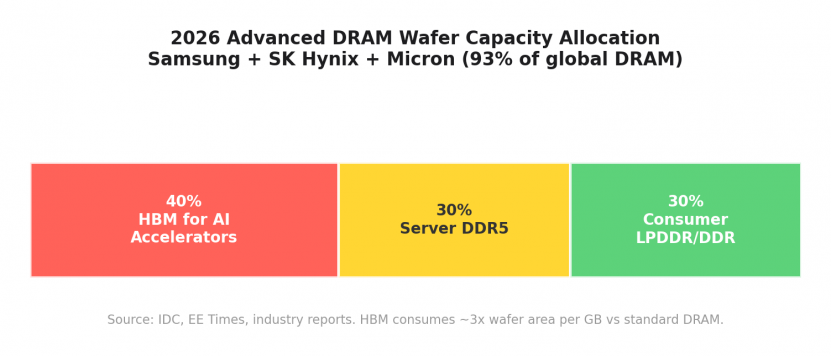
The 2026 DRAM shortage is not a typical supply/demand cycle. It is a structural reallocation of global memory fabrication capacity toward AI infrastructure. The mechanism works like this:
High Bandwidth Memory (HBM), the DRAM used in AI accelerators like Nvidia’s H100/B200 GPUs, consumes approximately 3x the wafer area per gigabyte compared to standard DDR5 or LPDDR5x. This has been confirmed by Micron executives and independently by EE Times. HBM stacks require larger dies optimized for Through-Silicon Via interconnects, and yields for 12-high stacking run only 50-60%.
Samsung, SK Hynix, and Micron control 93% of global DRAM production. All three have aggressively reallocated capacity: up to 40% of advanced wafer output now goes to HBM. Micron exited the consumer memory market entirely in December 2025. As IDC put it: “Every wafer allocated to an HBM stack for an Nvidia GPU is a wafer denied to the LPDDR5X module of a mid-range smartphone or the SSD of a consumer laptop.”
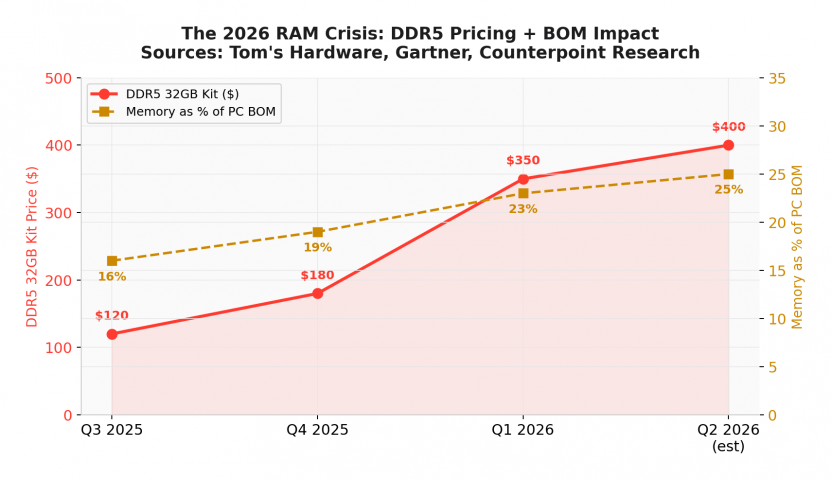
DDR5 32GB kits that cost $120 in Q3 2025 hit $350 by Q1 2026. Memory’s share of a PC’s bill of materials rose from 16% to 23% (Gartner). TrendForce projects a 90-95% quarter-over-quarter jump in PC DRAM contract prices for Q1 2026. Data centers will consume 70% of all memory chips manufactured in 2026.
The downstream effects are severe. Gartner projects global PC shipments will fall 10.4% in 2026, with average prices rising 17%. Lenovo, Dell, HP, Acer, and ASUS have confirmed 15-20% price hikes. Gartner’s projection: “The sub-$500 entry-level PC segment will disappear by 2028.”
This is the context that makes Apple’s 8GB choice strategically interesting, not just cheap:
Cost savings are real. At shortage pricing, 8GB of LPDDR5x costs Apple roughly $25-35. Doubling to 16GB would add $25-35 per unit. On a $599 product that’s significant, but Apple’s 47% gross margin on $436B revenue means an extra $30 is absorbable. This isn’t purely forced by economics.
The memory controller is a constraint. The A18 Pro was designed for the iPhone 16 Pro, which has always shipped with 8GB. The LPDDR5x controller is configured for that package. Upgrading to 16GB would require different memory packaging and PCB routing. Apple could have designed around this, but chose not to for a first-generation budget product.
The shortage creates a pricing umbrella. As competitor laptop prices rise 15-20%, Apple’s fixed $599 launch price becomes more competitive every month without Apple doing anything. A $600 Windows laptop that shipped with 16GB in mid-2025 now costs $700-750 for the same specs. Apple’s decision to halve the RAM halves its exposure to the shortage while competitors eat the full price increase.
The ecosystem income/revenue. A Neo buyer who subscribes to iCloud+ and Apple One generates significant $ in services revenue over a 2-year device lifecycle. At those numbers, the Neo’s hardware margin matters less than converting a Chromebook user into the Apple ecosystem.
Update, July 2026: the price increase happened
When I first wrote this, the argument was that Apple’s fixed price would look better every month as competitors raised theirs on the memory crunch. On June 25, 2026, the memory crunch finally caught up with Apple too. Apple raised prices across nearly the entire Mac line, and the Neo went from $599 to $699. The MacBook Air M5 went from $1,099 to $1,299, and the 14-inch MacBook Pro from $1,699 to $1,999. Apple was explicit that the cause was the memory and storage shortage and Dell, Lenovo, HP, and Microsoft raised prices the same week for the same reason. I wrote up the whole event separately: why Mac prices went up in June 2026.
So did I call it? Somewhat. The machines carrying the most memory got hit the hardest, which is what you would expect when memory is the thing in short supply. The AI Max mini-PCs I track with 128GB of unified memory roughly doubled between spring and July 2026, from around $1,500-1,999 to $3,300-4,400. The ThinkPad P14s I run with 96GB of RAM now configures near $4,000 direct from Lenovo, where the 16GB version of the same machine is closer to $1,500. The builds with the most RAM are the ones that moved. The Neo’s $100 bump is the smallest jump on this page, because 8GB is the least memory there is to reprice. That is the shortage doing exactly what we all thought it would.
Who Should (and Shouldn’t) Buy This
The MacBook Neo excels at: web browsing, email, document editing, streaming, messaging, light photo work, and running Apple Intelligence on-device. Single-core performance faster than any Mac until the M3 generation means everyday tasks will feel snappy.
It is not for: development work, gaming, content creation, video editing, virtual machines, heavy multitasking, or anything that regularly exceeds ~1.5-2GB of available application memory (after macOS overhead). The I/O is also a real limitation: one USB 2.0 port, one USB 3.0 port, and no Thunderbolt means a lot of constraints compared to systems with more and faster ports.
The gap to the MacBook Air is wider now than it was at launch. After June 25 the Neo is $699 and the M5 Air is $1,299 at Apple, though Amazon has been running the 16GB Air around $1,199 to $1,259. That extra $500 to $600 buys 2x the RAM, 2x the multi-core, Thunderbolt, MagSafe, a backlit keyboard, a P3 display, Wi-Fi 7, a 12MP camera, and more external monitor support. If you can swing the Air, I would save up for it instead. And do not overlook Windows here: a ThinkPad T14 with 32GB of RAM runs about $1,400 to $1,650 right now, and 32GB for that kind of money is exactly what the 8GB Neo can’t give you, as long as you are fine leaving macOS. (I run a 96GB ThinkPad P14s as my own daily machine, so I am speaking from use on that side, not guessing.) Buy the Neo when $699 is really the ceiling, or when you specifically want fanless silence and macOS. If you expect to take on more demanding work down the road, the extra memory in the Air or a 32GB ThinkPad is the thing you are really paying for.
If you found this while deciding whether the Neo is enough for real development or AI work, the benchmarks above mostly answer it: quick in short bursts, tight the moment you lean on memory or sustained cores. For what to run when 8GB and no fan are not enough, I keep a separate build guide going: the workstation and laptop setups I would actually buy for Claude Code and local AI, priced for the current market. And if your narrower question is whether the Neo can run Claude Code day to day, I put it through exactly that: can the MacBook Neo run Claude Code.
Conclusion
The MacBook Neo is an impressive piece of engineering at an unprecedented (for Apple) price point, strategically timed to exploit a market in crisis. The A18 Pro is not a compromise chip. It is the same core architecture as the M4, running at M3-to-M4 class performance for single-threaded work. Apple reused mature iPhone silicon at massive scale, eliminated incremental R&D cost, and shipped a product with healthy margins.
The defining constraint is the 8GB memory ceiling and thermal issues, both those ceilings are product of engineering constraint (the A18 Pro’s memory controller), market economics (DRAM shortage pricing), and strategic calculation (ecosystem conversion at maximum volume), etc. It will age poorly, it is not upgradeable, and Apple knows this. The second-generation Neo with 12GB or 16GB is already the obvious product.
But right now, in mid-2026, with sub-$500 PCs disappearing and average laptop prices climbing 17%, a $699 MacBook with M3-class single-core performance, an aluminum chassis, and 16 hours of battery life is the most interesting thing Apple has shipped in years. Not because it’s the best Mac. Because it’s the most strategically significant one.
Thanks for reading! Just a reminder, I am one lone computer enthusiast and this is just my attempt to review a cool new product. None of this is intended to present myself as an expert or a definitive source. Just somebody sharing their interest in computing. Happy computing! 👍
If you enjoyed this deep dive, you might also like a blast from the past: the BeBox, a 1996 dual-PowerPC tower from Be Inc. It has some interesting parallels to the Neo, from the company which Apple considered buying before choosing NeXT! (but it has WAY more ports lol)
Shopping for one of these? The Neo is pretty wild for a $699 Mac (Apple raised it from $599 on June 25, 2026). Supply has finally normalized; I ordered one for my daughter back when they were backordered and it took about 3 weeks, but Amazon has the Apple MacBook Neo in stock now around $699, with delivery in a couple days with Prime. The MacBook Air M5 16GB on Amazon is a pretty epic machine too, running about $1,199 to $1,259 versus $1,299 at Apple, which makes the step up worth a look IMHO. Lastly, if you want to see what Windows laptops offer, there are still budget options, though the memory shortage has thinned out the cheapest ones.
Sources: Apple Newsroom, MacRumors (March 5, 2026 benchmarks), Geekbench 6 Browser, TechInsights die analysis, Ben Bajarin/Creative Strategies (wafer cost analysis), Tom’s Hardware, IDC Global Memory Shortage Crisis Report (Feb 2026), Gartner PC Market Forecast, EE Times (“The Great Memory Stockpile,” Jan 2026), IEEE Spectrum, Network World, TrendForce, Counterpoint Research, AppleInsider, Six Colors. PCMag MacBook Neo review (May 2026), Notebookcheck Snapdragon X2 analysis, Notebookcheck chip pages (Core Ultra 5 226V, Ryzen 7 8840U, Ryzen AI 9 HX 370), Primate Labs Geekbench 6 workload documentation, and first-party jdhodges.com lab runs documented in data/benchmarks/macbook-neo-hands-on/. Estimated figures are noted as such and rely on public industry analysis and standard semiconductor cost modeling.
Please Note: If you purchase a product from Amazon via a link on my site I may benefit from the sale, though it does not cost you anything extra. Thanks again for visiting my site and have a GREAT day!
Appreciate the deep dive. It’s so easy to get blinded by the *number go up* hype every year, but real-world efficiency is what actually moves the needle for me and the avg consumer doesn’t really care as long it works.. My current machine sounds like a jet engine the second I throw anything even remotely intensive at it (even single-threaded stuff), so I’m really hoping the Neo lives up to these efficiency gains and I like the price point.
Thanks Simon! I am glad it was helpful 🙂
So far it seems like the Neo is a hit beyond anything people (other than probably Apple lol) could have expected.
Really cool to see this sort of stuff. I wish they would do a iMac Neo b/c that could be AMAZING for dorms and small offices etc.! But maybe I’m just jaded b/c back when I was in college a lot of people still had the tangerine iMacs etc and I get a little nostalgic.
Thanks again for commenting and have a great week!
-J.D.
Take care
Are you the same Jason Hodges that used to work at Goldy Holden?
Sorry, must be a different person. That’s not my first name and I never worked there.
-J.D.
That sounds like a Perth reference…
Nice catch! I had to look it up: Goldy Holden on Great Eastern Highway (Perth). Makes sense now. Definitely not me, but hope the original commenter finds the right Jason. Thanks for the context! -J.D.
Loved the benchmark numbers but I’m a bit perplexed at your conclusion. This machine is marketed at students, more specifically kids. To me, giving a knee capped laptop (like the Neo) to a kid is like saying “your curiosity doesn’t deserve to be cultivated.” Kids should have the tools available to lead their own path to finding out what they like doing. Hence why saying stuff like “The Neo is perfect for students” is very offensive. Kids will never be able to game on it, will never be able to get into networking (IT) on it, never get into server hosting, never be able to tey out 3d modeling or animation, etc. Your benchmarks show that anything that requires a sustained load of over 1 min will slow the device down to almost a halt, making any of those activities annoying to do, discouraging kids from pursuing them.
Magyx, thank you for the detailed comment. I think you are right that, yhe Neo is definitely not the perfect laptop for ALL students
There is a big difference between: #1 a student who needs just needs a reliable school laptop at a good price and #2 a student who wants to explore computing itself.
For the first group, I still think the Neo is a very strong option if the budget is truly tight. At $499, the display, battery life, build quality, responsiveness, and single core performance are hard to beat in a new laptop in the $500-$1000 range. For schoolwork, web apps, email, video calls, documents, media, light photo work, and even some light coding, I think it makes a lot of sense.
For the second group, I agree with you. If a kid is getting into IT, networking, VMs, Docker, server hosting, gaming, 3D modeling, animation, or heavier creative work, the Neo would not be my first recommendation. In that case I would rather see them get a used ThinkPad w/16GB or 32GB RAM, or a MacBook Airif the budget allows. The 8GB RAM limit, port situation, and sustained-load throttling are all real tradeoffs.
NOTE: an interesting side solution could be a Neo in conjunction with a small mini computer (be it a mac mini or a x86 box) wherein the Neo handles the front end and the student remotes into the mini computer. The total could still slide in under $1000 and yet they would game some good experience with SSH, VNC, RDP or whatever they chose to utilize.
My kids are middle school and high school age, and they do some 3D printing, Photoshop type work, and general school projects. My son has done some coding as well. For a lot of that, I think the Neo would still serve them well at those bursty (non continuous) type tasks. But I do not want the article to suggest that it is the perfect laptop for every curious kid. That was not my intent, and your comment makes me realize I should be more precise there.
One thing that surprised me after using the Neo more is that even when it is throttled, it still feels responsive in normal interactive use. That is why I came away impressed by it. But yes, if the student wants to push hard into computing, hardware, gaming, IT, or creative production, they should probably buy something with more RAM, more ports, and better sustained performance.
So I think the better conclusion is this: the Neo is a great budget laptop for general student use. It is not the right choice for every student, especially not one who wants the computer itself to become the playground for creation and exploration of tech.
Thanks again for commenting!
Take care,
-J.D.
Thanks for the understanding response! However I feel like my message didn’t come quite through. My point is that you can’t know which kid belongs in which group. So recommending the Neo for students at all is the problem.
I agree that the Neo is a great thin client, as you allude to with the suggestion of a secondary mini computer. But that breaks the whole point of the Neo does it not? The whole reason everyone is raving about the Neo is because of its price. But if you have to buy a second machine to get the functionality out of it then shouldn’t you just buy a different laptop?
I’ll use myself as an example. When I got my first laptop it was meant for studying, sure, but in the end I found my passion for IT because it had the capability of allowing me to find it. Of indulging me in my curiosity. If my parents had gotten me a Neo (and thus been born 13yrs later) I would have never have found my passion.
Magyx, fair point on not knowing ahead of time what a student may grow into, and also on the awkwardness of needing two machines.
Where I still think the Neo is strong is as a general-purpose student laptop: good display, good keyboard/trackpad, good battery life, solid build, decent repairability for a modern laptop, and very good everyday responsiveness at the $499 student price. Those things matter, especially because many cheap student laptops compromise badly on the screen, keyboard, chassis, or battery.
I am genuinely curious though: at roughly the same price, what specific laptop(s) would you recommend instead? New or used/refurbished is fine. I’d be interested in the exact models/configs you think provide a better overall experience for the price. That is not meant as a challenge, just as a friendly hardware discussion.
Is the Neo ideal for a hardware enthusiast? No. But as a starter computer for many students, I think it makes a lot of sense. Its limitations are real, but they do not stop it from being a very capable day-to-day laptop, especially with this screen, keyboard/trackpad, battery life, build quality, and responsiveness at the price.
Have you had a chance to try one in person yet? I’d be curious whether using one changes your impression.
Take care,
-J.D.
For $599, I would rather buy one Windows laptop with an Intel Core Ultra 7 155H, 32GB of RAM, and a 1TB SSD(Actually $587)
Thanks for sharing your thoughts on the MacBook Neo’s pricing!
I can definitely see why you’d consider a Windows laptop with an Intel Core Ultra 7 155H, 32GB of RAM, and a 1TB SSD for around the same price point (those are good spec upgrades, especially the RAM and SSD). But I tried searching those specs and most of what I found was in the ~$800 range, if you get the chance could you post a link to that price/product? I’ll check it out an potentially add it to the comparison(s).
I found this which was pretty nice for $699:
Lenovo Slim 3 with 13th Gen Intel i7, 16GB DDR5 RAM, 512GB SSD, 15″ WUXGA IPS.
A lot of the options I saw in the ~$500-$600 range really sacrifice on display quality and battery life.
Thanks for bringing up other options and have a great day!
-J.D.
To those wondering why Snapdragon comparison disappeared when it came to graphics… https://nanoreview.net/en/cpu-compare/qualcomm-snapdragon-x2-elite-extreme-x2e-88-100-vs-apple-a18-pro-macbook , https://nanoreview.net/en/cpu-compare/qualcomm-snapdragon-x2-elite-extreme-x2e-88-100-vs-apple-a18-pro-macbook
Thanks Olivier! I appreciate you sharing those links to nanoreview.net, they’re really helpful for comparing the Qualcomm Snapdragon X2 to the Apple A18 Pro when it comes to GPU/graphics.
I wrote up a full GPU comparison as its own follow-up post and added a short summary plus the price-class tableto the original article that you read. The deep dive GPU lives here: https://www.jdhodges.com/blog/macbook-neo-gpu-comparison/
Five new charts covering Snapdragon X1 / X2 (Elite and Elite Extreme), AMD Radeon 700/800-series iGPUs, Intel Arc 130V/140V/140T, and an RTX 5060 Laptop reference point.
Have a great night!
-J.D.
thanks for this, really awesome write up. One thing that a lot of hardware analyses assume though is every product is compared to existing new products. What’s not clear to me is how the NEO stacks up to used Mac, perhaps newer used Airs or older Apple Silicon M1s etc with a bit more RAM. I think that’s where the real comparisons are.. or not, maybe I’m wrong?
thanks again!
Thanks Andy! I’m glad you enjoyed the write up. You bring up a really good point about comparing the Neo to used Macs. I tried to include some comparative M1 benchmarks etc. but it would be really cool to look at what you can buy used for the same price as a Neo and how it performs (which is what I think you were alluding to).
When I have time I would love to delve into how the Neo stacks up to the used market, as it it could be a great option for people looking for a budget friendly Mac 💡. PC users have it a bit easier as there is SO MUCH corporate hardware that gets sold after a few years… I’ve always loved getting good deals on used high-end ThinkPads, Dell Precision laptops etc. However, Mac stuff holds its value for so long it is a bit tougher to snag a great deal IMHO (compared to purchasing new).
Sorry for the long reply, you comment just really got me thinking!
Thanks again for commenting and have a great week,
-J.D.
Telling that the only benchmark used is the widely discredit Geekbench. This is the one often flaunted by Apple zealots because it’s heavily biased towards Apple devices. Maybe update to include more legitimate benchmarks?
Hey Scott,
You can find benchmarks for 7-Zip (MIPS total), OpenSSL RSA-2048 sign/s, C sieve 10M primes and Matrix 512×512 GFLOPS over at the Neo vs. MiniBook post. I also added Cinebench results and others to this page. Did you have a particular benchmark you would like to see run on the Neo??
Have a great weekend!
-J.D.
That CPU in the Neo is better than I expected. I am a student and so I got the educational price when I bought one after reading your review and it has been really good for what I use it for in college. Plus my friends think it is cool. Thanks.
I’m glad to hear the Neo is working out for you, Julie. It’s great that you were able to get the educational price, that’s a fantastic deal.
I think it’s awesome that you’re enjoying it for college, and that is a nice perk that your friends think it’s cool too 😊. In the end, if the computer does what you want and you are satisfied, I call that a win.
Thanks for sharing your experience and have a great week!
-J.D.